
Wi-Fi extenders are an efficient way to make Wi-Fi available across larger spaces and connect more devices at the same time. Given the sheer diversity of devices we own, you would surely need one of these devices. However, what if you have a gaming or streaming device that works better with Ethernet? You can count on Wi-Fi extenders with an Ethernet port.
In this guide, we will cover the top Wi-Fi extenders with Ethernet ports.
Use Cases for WiFi Extenders with Ethernet Port
Let’s first look at the everyday use cases for Wi-Fi extenders with an Ethernet port. Keep in mind that a Wi-Fi extender may allow you to use the Ethernet port in different ways.

One, you can use the Ethernet port to share the connection with Ethernet-compatible devices. Let’s say you have a PlayStation or Xbox that offers better performance while using Ethernet instead of Wi-Fi. You can use a Wi-Fi extender to bring a wired connection to these devices even when they are kept far away from your primary Wi-Fi router. The extender will communicate with the main router via Wi-Fi, but your device (gaming PCs or consoles) will have a wired connection to the extender.
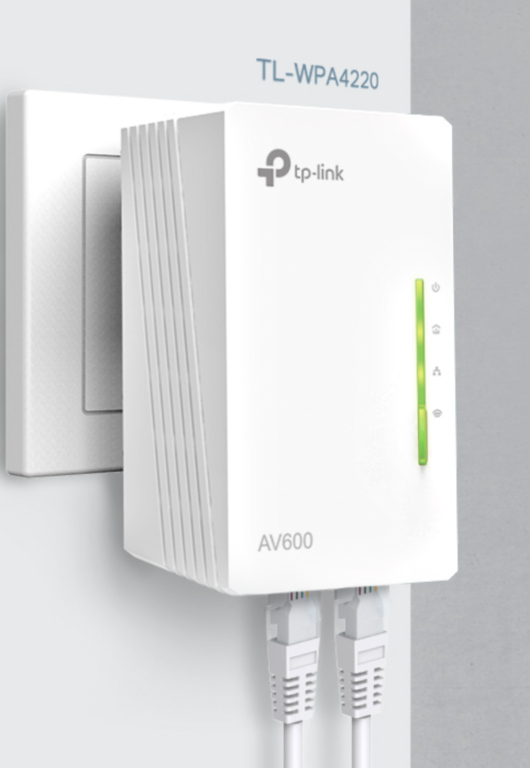
Two, you can use the Ethernet port for a feature called Ethernet Backhaul. Typically, a Wi-Fi extender keeps its connection with the router via Wi-Fi, but it may take a toll on the overall speed. So, at times, you can set up a backhaul connection that lets the extender communicate with the router directly over Ethernet. This setup is called a Wireless Access Point. You can find this option most often on mesh Wi-Fi systems or mesh Wi-Fi-enabled extenders, such as EasyMesh-based ones from TP-Link.
Even though a Wi-Fi extender may have an Ethernet port, it may not support both options. In some cases, you can find devices with additional features as well. Now, depending on the feature availability, any of the following use-case scenarios may be available for Wi-Fi extenders with an Ethernet port.
- You can use these Wi-Fi extenders to bring Internet/network access to devices that are kept far away from the main router but do not have Wi-Fi support. The Ethernet port on the extender makes it easy to extend the network via multiple modes, viz., Wi-Fi and Ethernet.
- You can use a Wi-Fi extender with an Ethernet port as a wireless network access point. When you set up a direct connection between the extender and router using Ethernet, you need not worry about signal loss, either.
When used properly, a Wi-Fi extender with an Ethernet port can make things easier. With the right options, you can easily create a mesh network without investing quite a lot in a mesh Wi-Fi system. You must choose the right Wi-Fi extender, though.
Top 3 WiFi Extenders with Ethernet Port
We shall now check out the top three Wi-Fi extenders with an Ethernet port. Some of these models let you use the Access Point mode while others offer mesh Wi-Fi functionality as well. I have included options from different pricing brackets as well.
#1 TP-Link AX3000 WiFi 6 Range Extender
We believe the TP-Link AX3000 WiFi 6 Range Extender is a fantastic option for most people. Despite having a sub-$100 price tag, this Wi-Fi 6 range extender brings a great bunch of features along with a 1-Gig Ethernet port. Though it works with almost every Wi-Fi router, you should prioritize this option if you already have a TP-Link Wi-Fi router with support for OneMesh.
Because it is a Wi-Fi 6 range extender, you can expect improved performance and speeds up to 3000 Mbps. These speeds are good enough for most of your browsing and downloading needs. And, even when you use the Ethernet cable for your Xbox or PlayStation, you can enjoy incredible download speeds and latency for most games.
In addition to two external antennas, the TP-Link AX3000 WiFi 6 Range Extender packs four amplifiers, which increase the overall range of the extender. It is thus a great option for multi-room spaces. You can also count on features like OFDMA and Beamforming. TP-Link has also added options to customize the performance or coverage of the extender as you wish.
We also loved the sleek design of the Wi-Fi extender. The placement of the Ethernet port makes it easy to convert the extender into a separate wireless AP as well. In the end, you can manage all these options using the TP-Link Tether app, which I believe gets better with every iteration. However, I think you can expect the best results from this extender if you have a OneMesh-supported router.
In conclusion, the TP-Link AX3000 WiFi 6 Range Extender is a great pick when you need raw performance as well as ease of use. Thanks to features like the Tether app and multiple functioning modes, this device does deliver on all these fronts.
#2 TP-Link AC1200 WiFi Extender
If you want to spend as little as possible, you might want to consider the TP-Link AC1200 WiFi Extender. It is one of the few good Wi-Fi extenders within the price range that delivers better speeds and supports an Ethernet port. Like the previous one, the Wi-Fi extender offers native support for OneMesh, making it a great companion for OneMesh-compatible routers.
Like the previous pick, the TP-Link AC1200 WiFi Extender is a Wi-Fi 6 extender with dual-band support. You can get the best of both worlds: performance and compatibility. According to specifications, this Wi-Fi range extender can offer a total coverage of up to 1,600 sq. ft. and can easily handle up to 32 devices. The numbers are pretty good from a productivity standpoint.
As you can expect, this handy Wi-Fi extender allows multiple running modes. You can set it up as a typical Wi-Fi extender or a wireless Access Point. The Access Point mode is easy to enable, and it works great when you want to share an Ethernet-based connection. However, it might disappoint you that the Ethernet port on the device does not have a Gigabit capacity.
We also loved how easy it is to set up and use the TP-Link AC1200 WiFi Extender. For one, you can use the TP-Link Tether app to manage anything and everything about the extender, including OneMesh setup. Even when paired with non-OneMesh devices, the extender does an impressive job. The High Performance mode built into the device is also pretty great.
Overall, considering that it costs just as much as a cup of coffee, the TP-Link AC1200 WiFi Extender is an excellent choice for most users. The only drawback is the lack of a Gigabit port, and it could be a problem if you were planning a lot of heavy downloads on your console.
#3 NETGEAR WiFi Mesh Range Extender (EX6250)
Another product from the sub-$100 bracket, the NETGEAR WiFi Mesh Range Extender (EX6250) is a superb pick for many who need reliable Wi-Fi expansion. It is designed to offer coverage of up to 1,500 sq. ft., and the Wi-Fi 6 device can easily handle up to 25 devices. As you can guess from the name, the top throughput will be 1750 Mbps.
In light of its specifications, the NETGEAR WiFi Mesh Range Extender (EX6250) is a great choice whether you have plans to utilize the mesh system. For what it’s worth, this NETGEAR Wi-Fi router offers a 1 Gigabit port for Ethernet connectivity. Given that it can offer a maximum throughput of 1.7Gbps, it is nice to connect a gaming console or PC for a more reliable connection.
As far as connectivity options go, you can easily switch between the Extender and AP modes, thanks to those tactile switches on the side. The device performs well when connected to an Ethernet port on the primary router as well. For wireless connection, you can expect speeds upwards of 1000 Mbps while using the 5GHz band.
The NETGEAR WiFi Mesh Range Extender (EX6250) packs other essential features like MU-MIMO to ensure the best multi-device Wi-Fi experience. You should keep in mind that this is a Wi-Fi 5 extender, not Wi-Fi 6 or 6E. If you can live with that limitation, you won’t have any trouble with the system. Last but not least, the device can be managed using the NETGEAR Nighthawk app.
Overall, the NETGEAR WiFi Mesh Range Extender (EX6250) offers ample value for most customers.
When to Connect a WiFi Extender to a Router With An Ethernet Cable
There are times when you can connect a Wi-Fi extender to a router using an Ethernet cable. Here are a few things you should know about it:
Purpose
Connecting a Wi-Fi extender to a router using Ethernet allows you to set up two things. One, you can enable an Ethernet Backhaul, which can improve the strength of the extended Wi-Fi network. Two, you can use the setup to create a different Access Point with separate credentials, like an SSID and a password.
The second method is excellent when you don’t want to face signal loss when the extender communicates with the router over Wi-Fi. By making the communication work over Ethernet, you can ensure the top speed, coverage, and performance.
The Setup
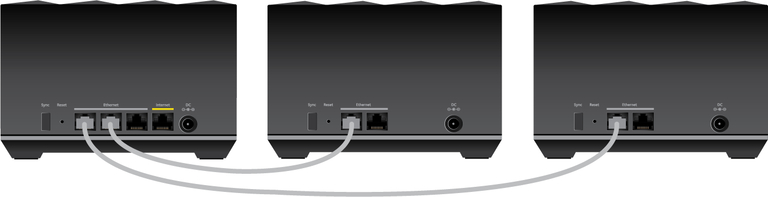
Setting up Ethernet backhaul on compatible devices is pretty straightforward. After the initial setup, you can use an Ethernet cable to connect. Connect one end to the Wi-Fi extender and the other end to one of the Ethernet ports on your Wi-Fi router. The extender firmware will do the rest to combine the connections and offer you a unified Wi-Fi network with better speeds. Keep in mind that you may have to install a firmware version with native support for Ethernet Backhaul.
Setting up the extender in the Access Point mode is easier. Some Wi-Fi extenders have a slider that lets you choose the appropriate mode (between options like Extender, AP, Repeater, etc.) On some devices, you can modify these settings using the web-based dashboard as well. Either way, you can choose the AP mode and connect the Ethernet cable to the appropriate port. You can also change the Wi-Fi credentials to set up a Wi-Fi network.
Compared to wireless alternatives, these two Ethernet-based methods offer better speed and reliability. You don’t have to worry about frequent signal drops, either.
Wrapping Up
I hope this guide helped you understand the point of Wi-Fi extenders with an Ethernet port and find a pick that works for you. Since more devices are integrated into mesh systems, Wi-Fi extenders can help you with seamless roaming (single network) across your home, too.
