
Even though Wi-Fi has become the norm for most purposes, Ethernet powers many aspects of our day-to-day internet needs. However, you might not understand what Ethernet is and how it works, especially if you were born after the revolutionary times of Wi-Fi. In this guide, I have simply explained the basics of Ethernet and how this technology powers our everyday connections. We shall start with a fundamental introduction and move to more complex topics.
What Is Ethernet?
Ethernet is essentially a wired networking technology that allows connected devices to communicate with each other and with other networks like the Internet. Ethernet works across two layers of the OSI model: the physical layer and the data link layer. The second layer makes use of the MAC and LLC sublayers.

Depending on the network environment/requirements, Ethernet may use additional technologies, such as switching and error detection. More importantly, Ethernet connections are operable with TCP/IP, a protocol that enables internet connectivity.
A Brief History of Ethernet
Even though the idea of Ethernet was conceived in 1973, Ethernet standardization began only in the 1980s. This process included some decisions on the specifications. At this time, Ethernet had a maximum speed of 10 Mbps.
In the following decades, the world witnessed improvements in Ethernet speeds, which have now reached an upper limit of 400Gbps and 1Tbps.
More importantly, the world has found new avenues where Ethernet can be used. Until the 2020s, consumer and enterprise-grade networking was the go-to use case for Ethernet technologies. However, starting from the 2020s, Power-over-Ethernet and Internet-of-Things applications are also on the rise.
How Does Ethernet Work?
But how does it work? I will try to explain the basics of how Ethernet works. As I said earlier, this simplified explanation applies only to consumer-grade networking environments. Datacenters or enterprise networks may have additional components.
As I said earlier, there are two layers to the Ethernet infrastructure.
- First, we have the physical connection, where devices are connected and to routers, printers, and other equipment using either twisted pair copper cables or fiber optic cables. The twisted pair copper cables are commonly known as Ethernet cables.
- In the second layer, we have the MAC sublayer and the frame check system. What this layer does is convert data into something called frames, which are used for transmission across the network. Each frame contains the necessary information to travel through the network and reach the intended device.
Here’s an oversimplified chronology of how Ethernet works:
- Devices within the network are connected using Ethernet cables or fiber-optic cables.
- When a device sends/receives data, it is converted into frames. These frames contain information such as the source MAC address, destination MAC address, transmitted data, and FCS.
- A router/switch will navigate the data and send them to devices with respective MAC addresses.
- A technology called CSMA/CD or full duplex will ensure that data transmission is smooth while also avoiding collisions.
- The FCS, which stands for Frame Check Sequence, can detect and correct errors in the transmission.
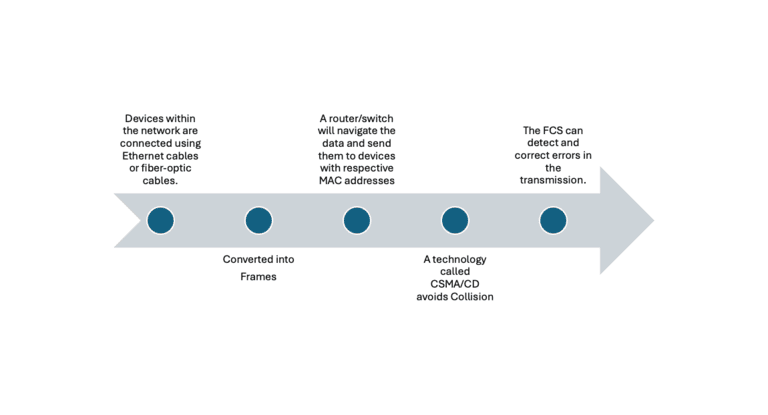
These actions happen multiple times a second. It is one of the reasons we need more powerful routers and network hardware for residential spaces. The number of these cycles is directly proportional to the number of connected devices and their activity.
Ethernet Standards and Protocols
Like other technologies, Ethernet also has standards and protocols. They are designed so that devices from different manufacturers can work with each other. As you can guess, these standards have undergone significant changes over time.
Here’s a table comparing the common Ethernet standards.
Standard |
Speed |
Media |
Max Distance |
Use Case |
|---|---|---|---|---|
802.3 |
10 Mbps |
Coaxial, Twisted-pair |
500 meters (coaxial) |
Early LANs, obsolete |
802.3u |
100 Mbps |
Twisted-pair, Fiber |
100 meters |
Fast Ethernet, basic networks |
802.3z |
1 Gbps |
Fiber |
550m (SX), 5 km (LX) |
Gigabit LANs |
802.3ab |
1 Gbps |
Twisted-pair |
100 meters |
Gigabit over copper |
802.3ae |
10 Gbps |
Fiber |
400m to 40 km |
Data centers, high-performance LANs |
802.3an |
10 Gbps |
Twisted-pair |
100 meters |
High-speed copper Ethernet |
802.3ba |
40/100 Gbps |
Fiber |
100m to 10 km |
Data centers, backbone networks |
802.3by |
25 Gbps |
Fiber, Twin axial |
100 meters |
Data center links |
802.3bs |
200/400 Gbps |
Fiber |
500m to 10 km |
Ultra-high-speed networks |
802.3bt |
10Mbps to 1Gbps |
Twisted-pair (PoE) |
100 meters |
Power + data for IoT, APs, IP cams |
These standards are approved and maintained by IEEE 802.3 family specifications. You must be aware of the common standards while purchasing network equipment such as Ethernet cables.
In addition to these, Ethernet uses multiple protocols to make the browsing experience smoother and avoid potential confusion/errors. Here’s a quick table comparing some typical protocols.
Protocol |
Purpose |
Description |
|---|---|---|
CSMA/CD |
Collision Management |
Manages network access and handles collisions. |
MAC |
Addressing & Frame Control |
Provides unique MAC addresses and manages data frames. |
VLAN (802.1Q) |
Network Segmentation |
Divides networks into logical VLANs for traffic isolation. |
STP |
Loop Prevention |
Prevents network loops in Ethernet topologies. |
LACP |
Link Aggregation |
Combines multiple links for more bandwidth and redundancy. |
Flow Control |
Traffic Management |
Pauses transmission to prevent data loss during overloads. |
PoE (802.3af/at/bt) |
Power + Data Transfer |
Provides power and data over the same Ethernet cable. |
EEE (802.3az) |
Power Saving |
Reduces power usage when the network is idle. |
FCoE |
Storage Networking |
Transports Fiber Channel over Ethernet. |
Jumbo Frames |
Large Data Transfer |
Supports larger frames for efficient large data transfers. |
As you can imagine, multiple devices use these Ethernet protocols to ensure seamless communication within a network. It thus becomes unsurprising that various components are required in this endeavor.
Ethernet Components
I will now provide a quick overview of the core Ethernet components in a network. Keep in mind that some networks/network environments may need additional components.
- Network Interface Cards, also known as network adapters, enable devices like smartphones or laptops to connect and interact with Ethernet-enabled devices. These cards are essential for devices to connect to an Ethernet network and access the Internet. Most computers come equipped with an Ethernet card, but users can upgrade to more advanced cards if needed.
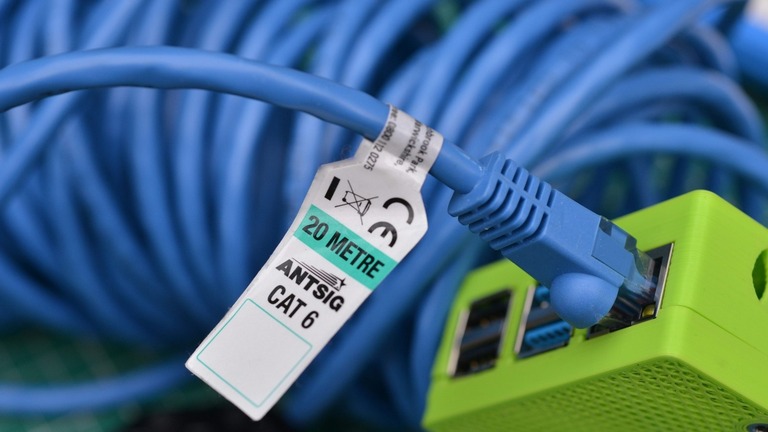
- Ethernet cables are twisted-pair copper cables used to transfer information between two Ethernet-enabled devices. Depending on the speed and level of protection, different types of Ethernet cables exist, such as Cat5e, Cat6, and Cat8. The newer categories offer better resistance to signal interference and support higher data transfer speeds.
- Switches are crucial for managing multiple devices within a network. They handle data traffic management, ensuring that data sent or received from a device reaches the intended destination within the network.
- Hubs are a legacy component that may not be used in modern systems but were once essential for connecting printers and scanners to multiple devices within a network.
- Routers are necessary for managing multiple networks. For example, when a device needs to provide both a Local Area Network (LAN) and Internet access, understanding the difference between Ethernet and the internet helps clarify how data reaches the correct destinations
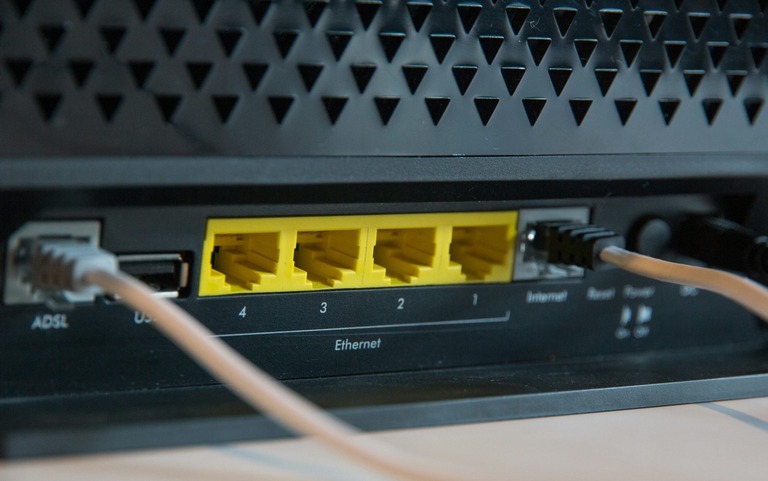
You can also count Ethernet ports as additional components, but they are mostly a part of NICs these days. However, for modern devices, these components are a part of the original package.
Unlike older days, you don’t have to worry about Ethernet adaptors or drivers. Instead, Ethernet is plug-and-play, thus becoming a stable connectivity option for most people and occasions.
Difference Between WiFi & Ethernet Connection
I understand that most of you are more familiar with Wi-Fi than Ethernet. Wondering what makes them so different, apart from the presence or lack of wires? Well, here’s a quick comparison.
Aspect |
Wi-Fi |
Ethernet |
|---|---|---|
Medium |
Wireless (Radio waves) |
Wired (Cables) |
Speed |
100 Mbps – 1.3 Gbps+ |
1 Gbps – 10 Gbps+ |
Latency |
Higher |
Lower |
Reliability |
Prone to interference |
Very stable |
Range |
~30-100 meters |
~100 meters |
Mobility |
High (no cables) |
Limited (wired) |
Security |
Needs encryption (WPA2/3) |
More secure, less tampering risk |
Setup |
Easy (no cables) |
More complex (cabling) |
Cost |
Lower (no cables) |
Higher (cabling, switches) |
Interference |
Susceptible (devices, walls) |
No wireless interference |
Use Case |
Homes, offices, mobile devices |
Gaming, data centers, stable links |
Wi-Fi and Ethernet differ from each other in aspects other than convenience. For instance, while Wi-Fi could be a better option for a small office or home, heavy-duty networking demands warrant Ethernet. It is mainly the case when you have to count on better latency and security.
Benefits of Using Ethernet Connectivity
Compared to Wi-Fi connections, Ethernet offers some definite advantages. Here are those valuable benefits:
- Compared to wireless forms of networking, Ethernet is very much reliable. It makes Ethernet a go-to option when you do not want to compromise the speed or performance due to physical barriers and other issues.
- Because Ethernet uses physical cables, you don’t have to worry about signal interference. To avoid potential interference, Ethernet cables are equipped with an additional security layer. These cables can offer better latency as well.
- Ethernet connections can offer multi-gigabit speed, making it easier for local area networks as well. Even though Wi-Fi speeds have been increasing, they are not yet suitable for real-world needs where one cannot compromise performance.
- Since physical cables are used for connections, users don’t need to worry about security. Unlike a Wi-Fi system, threat actors cannot understand what happens over the network. Ethernet also makes it easy to segment and control your network.
- As opposed to Wi-Fi, Ethernet can offer advanced options such as Power over Ethernet. It means you can use Ethernet to power additional equipment, such as security cameras and fixed wireless access points. In these instances, Ethernet cables can carry power in addition to data.
- If you use suitable routers and network equipment, Ethernet connections can handle more devices without congestion. This can be the case even when Ethernet uses fiber-optic cables for long-distance networks.
- As opposed to Wi-Fi networks, Ethernet does not cause battery drain. This is so because most of the work is done by the network hardware, not your device. With Ethernet, you get better speed without compromising battery backup.
Conclusion
As you have seen, Ethernet offers a lot of potential for everyday networking. Sure, Wi-Fi may be the future, but we are not yet ready to leave Ethernet behind. I recommend Ethernet to most people, especially when they are worried about signal interference and performance.
