
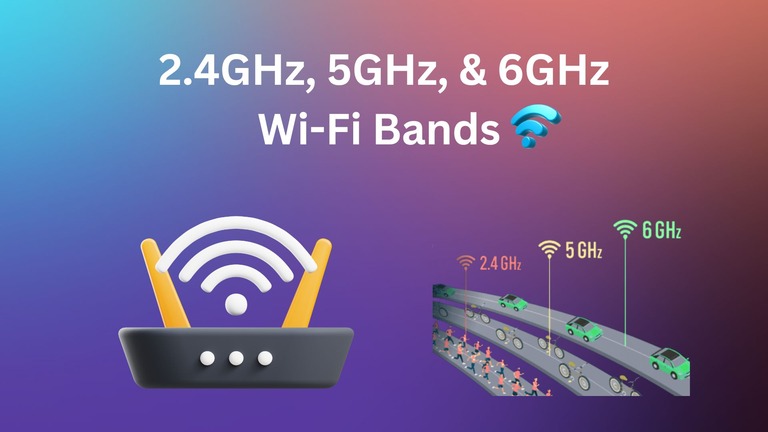
Wi-Fi band is a common term that you come across while dealing with Wi-Fi networks and routers. If you are new to the whole ordeal, you may be a little confused, though. Setting up a network or choosing a router is also about choosing between 2.4GHz, 5GHz, and 6GHz bands these days. Here, you can find a complete guide to Wi-Fi bands, especially the three major bands like 2.4GHz, 5GHz, and 6GHz.
What Is Wi-Fi Frequency Band?
As you may know, Wi-Fi works by transferring signals between devices using radio signals. A Wi-Fi frequency band is a specific range of radio frequencies over which this happens. 2.4GHz, 5GHz, and 6GHz are the most popular Wi-Fi frequency bands available for residential and commercial use.

For instance, the 2.4GHz Wi-Fi frequency band means signals will be traveling at frequencies between 2.4 GHz and 2.5 GHz. Similarly, the 5GHz band spans from 5.15 GHz to 5.85 GHz. This range will determine many aspects of the connection, including speed, coverage, penetration, and congestion.
Evolution of WiFi Frequency Bands
Like Wi-Fi itself, Wi-Fi frequency bands also had a gradual rollout. Here is a quick evolution of Wi-Fi frequency bands.
Wi-Fi Generation | IEEE Standard | Year Introduced | Frequency Bands Used | Maximum Speed |
|---|---|---|---|---|
Wi-Fi (Original) | 802.11 | 1997 | 2.4 GHz | 2 Mbps |
Wi-Fi 1 | 802.11b | 1999 | 2.4 GHz | 11 Mbps |
Wi-Fi 2 | 802.11a | 1999 | 5 GHz | 54 Mbps |
Wi-Fi 3 | 802.11g | 2003 | 2.4 GHz | 54 Mbps |
Wi-Fi 4 | 802.11n | 2009 | 2.4 GHz, 5 GHz | 600 Mbps |
Wi-Fi 5 | 802.11ac | 2013 | 5 GHz | 6.9 Gbps |
Wi-Fi 6 | 802.11ax | 2021 | 2.4 GHz, 5 GHz | 9.6 Gbps |
Wi-Fi 6E | 802.11ax | 2021 | 6 GHz | 9.6 Gbps |
Wi-Fi 7 | 802.11be | 2026 | 2.4, 5, 6 GHz | 23 Gbps |
As you can see, the 2.4GHz band was the first to be launched in 1997. Even today, it is the most widely used Wi-Fi frequency band. In addition to Wi-Fi devices, other devices like microwave ovens and baby monitor systems also use the band. As a result, there is an increasing amount of congestion within the Wi-Fi band. It, however, offers the highest range among all available Wi-Fi frequency bands.
The 5GHz frequency band made its debut to fix the congestion-related issues that 2.4GHz faced. It did so by introducing more channels and increasing speed. However, compared to the 2.4GHz band, the 5GHz band has a shorter range and suboptimal penetration capacity. As a result, the 5GHz is less commonly used and is mostly favored by devices that need high-bandwidth connections.
The 6GHz frequency band is the latest entry to the world of Wi-Fi. It was introduced in 2021 along with Wi-Fi 6E and has the maximum bandwidth capacity. Despite offering the least congestion (since fewer devices use the band) and maximum speed, the 6GHz band has the weakest penetration capacity. As a result, the 6GHz band has limited use cases.
Differences Between Wi-Fi Frequency Bands
We shall now look at the major differences between the three popular Wi-Fi frequency bands.
Feature | 2.4 GHz | 5 GHz | 6 GHz |
|---|---|---|---|
Range | Longest range; covers larger areas | Shorter range than 2.4 GHz | Shortest range of all three bands |
Speed | Slowest speeds; suitable for basic tasks | Faster than 2.4 GHz; supports high-bandwidth | Fastest speeds; supports ultra-high bandwidth and low latency |
Congestion | Most congested; many devices use this band | Less congested; more channels, less interference | Least congested; newest band, minimal interference |
Penetration | Best penetration through walls/obstacles | Weaker penetration than 2.4 GHz | Weakest penetration; struggles with obstacles |
You can already see the significant differences between these frequency bands in the table. However, a more detailed analysis of these three bands is given below.
Range/Coverage Area
You would think that, because they were launched later, the 5GHz and 6GHz frequency bands would offer better range. As it happens, however, they offer a limited range compared to 2.4GHz. As it stands today, the 2.4GHz band offers the longest range and is suitable when you want to cover a larger area, such as a larger house. On the contrary, the 5GHz and 6GHz frequency bands are best suited for connectivity within line of sight, let’s say within a bedroom or living area.
Speed
Speed, on the other hand, has improved with every new frequency band. You can expect a typical speed of 600 Mbps from the 2.4GHz frequency band, but the 5GHz band improves it to over 1300 Mbps. So, in itself, we are talking about a 2x jump. The 6GHz band, however, takes it up another notch, offering speeds as high as 9.6 Gbps (or 9600 Mbps). However, keep in mind that these numbers are theoretical maximums, and the actual speed depends on many factors, including your ISP, equipment, and environment.
Congestion
Congestion in the world of Wi-Fi refers to how smoothly signals can pass through the band. It most crucially depends on the number of channels present in the frequency band and the number of devices using the said band. Because the 2.4GHz band is the legacy one, it has fewer channels, even though many devices use it. As a result, the congestion is high. On the other hand, both 5GHz and 6GHz bands have introduced a higher number of channels, improving the speed. These bands aren’t used much by devices, either.
Penetration
Penetration refers to how the frequency bands deal with obstacles such as walls and other hindrances. You may think 5GHz and 6GHz bands are better at this, but you’d be wrong. Because of the lower frequency, the 2.4GHz band offers the best penetration capability, thus delivering impressive range. On the contrary, both 5GHz and 6GHz bands struggle with obstacles; they often need a line of sight for maximum performance. As a result, you may not get the promised speeds on 5GHz and 6GHz bands when you are away from the router.
How to Choose Between 2.4 GHz, 5 GHz, and 6 GHz?
These days, you can choose the best frequency bands for your Wi-Fi network. However, keep in mind that you cannot choose between these options. It is more about allocating the right devices to the right band for the right speed, coverage, penetration, etc. Here is how you can go about it.
Use 2.4GHz For
You should use the 2.4GHz band for devices that you keep far away from the Wi-Fi router. You will need this band if you have smart-home devices like smart switches and lights across the home. Keep in mind that the speeds on the 2.4GHz band will be quite lower, making them an ideal choice for only basic tasks. For instance, the 2.4GHz band is a great choice for a Wi-Fi security camera that you have installed outside the house. Since this frequency band has high congestion, I wouldn’t recommend using it for time-sensitive devices, though.
Use 5GHz For
You should use the 5GHz band for devices that require network stability and high speeds. This band is great when you are setting up a workspace with a lot of devices. Because the 5GHz band has more channels, it can easily tackle the high number of devices. For instance, the 5GHz band is great for your 4K smart TV or gaming PC, in addition to the low-latency connection. However, compatibility is an issue here, as the 5GHz band isn’t popular with legacy Wi-Fi devices.
Use 6GHz For
You should use the 6GHz band when speed and latency are the primary priority. It is a recommended option for gaming, Augmented Reality, and Virtual Reality as these instances require millisecond transactions with web servers. However, if you want the benefits that the 6GHz band offers, you should keep the devices in line of sight with the router. You should keep in mind that there are only a few devices that utilize the newest Wi-Fi frequency band. So, setting up the 6GHz band is mostly future-proofing.
Band Steering
Band steering is a feature that many (low-end and high-end) Wi-Fi routers offer these days. Instead of having multiple networks for each frequency band, Band Steering will create a single network. Then, depending on the device’s location and nature, the Wi-Fi router will allocate it to the right frequency band.
How to Change WiFi Bands?
Now that you know the differences between the Wi-Fi frequency bands, you also know that you might have to change Wi-Fi bands. You can do this by following the steps given below.
- Open the Wi-Fi menu on your computer or smartphone
- If your Wi-Fi router has a dual or tri-band system, you should be able to see two or three SSIDs.
- If the SSID is Home Wi-Fi, there will be options like Home Wi-Fi_2G, Home Wi-Fi_5G, and Home Wi-Fi_6G.
- Depending on the band you want to connect to, you can choose the appropriate Wi-Fi SSID.
You may want to do it if you normally use the 5GHz band but cannot find it when you move far away from the router. In my case, I need to connect the device to the 2.4GHz band when I move to the basement. Sure, you can solve the problem by saving the password for both SSIDs and setting up auto-connect.
What Are The Best Wi-Fi Channels?
I already mentioned that different Wi-Fi frequency bands have a varying number of channels. Ensuring the best performance means choosing the best Wi-Fi channels for each band. Here is a list of the best channels for each of these three bands.
2.4 GHz Wi-Fi
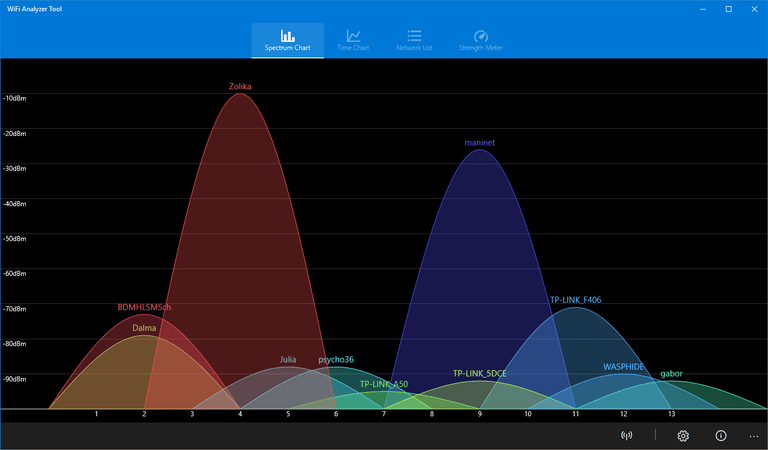
Even though the 2.4GHz frequency band consists of 14 channels, there are only 3 non-overlapping channels. These three channels are most likely to give you the best network environment. So, if you can choose specific channels for the 2.4GHz connection, you should select channels 1, 6, or 11.
5 GHz Wi-Fi
Because a 5 GHz Wi-Fi frequency band consists of more channels, there is a lower chance of overlapping. There are 30 channels, and you can choose between the lower channels and the upper channels. You should stick to lower channels like 36, 40, 44, or 48, or upper channels like 149, 153, 157, 161, 165, 169, or 176.
6 GHz Wi-Fi
It is difficult to recommend a specific channel when using the 6GHz Wi-Fi band. As I said, only a few devices actually rely on the 6GHz band, so there are no worries about overlapping and channel hogging. For the time being, you are better off letting the automatic channel selection decide.
Wrapping Up
I believe this guide helped you understand the core differences between the 2.4GHz, 5GHz, and 6GHz Wi-Fi frequency bands. I also noticed that newer Wi-Fi models are packing better-aware band steering options. If you want a smooth connection experience across your home, you might as well enable band steering. But if you are looking for maximum performance, it makes sense to set up Wi-Fi frequency bands and allocate the right devices to them. I mean, the last thing you want is the gaming PC struggling with speed or latency, isn’t it?
