
Though Spectrum offers high-quality Internet service throughout the United States, many feel that its prices are on the higher side. You might have an option to shift the ISP to something else, but it is not viable all the time. Instead, you can try lowering your Spectrum bill through some strategic decisions. Here are some steps that have helped me lower the Spectrum bill by a long shot.
#1 Review the Bill for Hidden Fees
The first step is understanding what your Spectrum bill is made up of. Sure, you will be paying the monthly fee for the Internet plan, but you should see if anything else is contributing to the final amount.
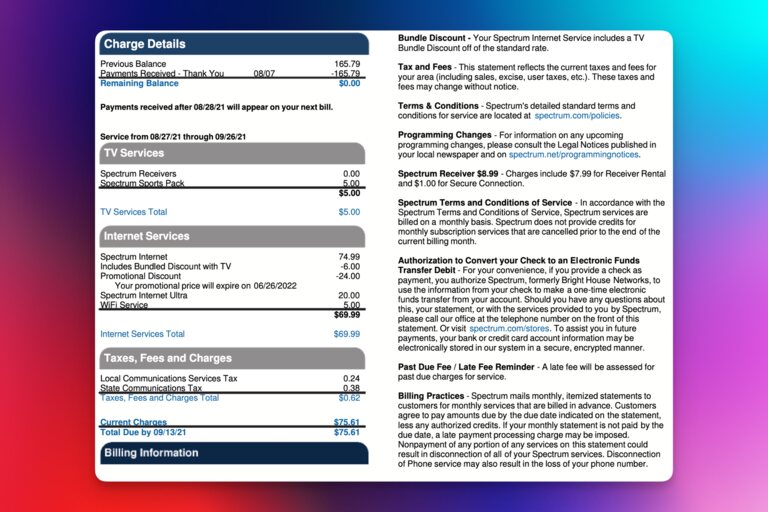
I have come across scenarios where promotional offers and other terms add to the final bill after a year or two. You can also check whether you are paying any additional rent for equipment such as the router or Wi-Fi extender.
Depending on what you can find on the bill, there will be options to cut down the cost. It could be done with the help of bundling services. You may also be able to dispute some charges.
#2 Contact Spectrum
If you find a charge that you cannot identify on the bill, you should immediately contact Spectrum. The bill template from Spectrum has a section that specifies what each charge is. For instance, if you have the TV service from Spectrum, there may be a Receiver charge.
If the description on the bill answers your query, all good and well. But if you end up finding any promotional offers that you do not recognize, you had better talk to Spectrum.
#3 Get Your Own Equipment
One charge that almost everyone can reduce from the Spectrum bill is called Wi-Fi Service, which normally costs $5 per month. This is essentially the price you pay for renting the Spectrum Wi-Fi Gateway that you’d keep at home. Remember that the cost of the modem is included in the core Internet charge, but the Wi-Fi device will cost extra.

The solution? Get your own Wi-Fi router.
This single step can save you close to $60 every year. We are talking about a total discount of $120 over two years.
While going through your Spectrum bill, you should check if you are being charged a rental fee for any other equipment. If there is an option to use your equipment in its place, that task will reduce the bill for sure.
#4 Return Unused Spectrum Equipment
Equally important is the rent you are being charged for the equipment you have leased. I have come across scenarios where people have forgotten about devices that they no longer use. However, many of them will continue paying the rent for this equipment.
The solution here is to return all the Spectrum-owned equipment that you don’t use. It could be a digital TV box or a secondary telephone. You may also see Wi-Fi range expansion gadgets that you stopped using after that mesh Wi-Fi router upgrade.
Returning all these pieces of equipment can reduce the total amount you pay Spectrum every single month. The return process is smooth and free of cost. You can return unwanted equipment through a prepaid box, UPS Store, or a nearby Spectrum store.
#5 Offer for Existing Customers
You should also check whether Spectrum is offering any offers for existing customers in the area. It might help your case if you tell Spectrum that you are considering shifting to another ISP. I have been able to get a few discounts for 6-month and 12-month periods after letting Spectrum know that I am thinking of moving to another ISP. There are some additional options as well.
Many recommend checking out the Peacock Premium Subscription plan that Spectrum customers can get. Depending on whether you have bundled Internet and TV services from Spectrum, you can get Peacock for up to a full year, which is impressive value for most people.
#6 Spectrum Discount Options
Spectrum offers a special service called Internet Assist for low-income families. This special service provides qualifying families with a 50Mbps Internet connection at only $25 per month. Considering that 50 Mbps is a decent speed for many families, you can consider this option if your family is going through tough times.
You should also check whether the Spectrum service provider in your area works with Lifeline or ACP, which stands for Affordable Connectivity Program. If you are from an eligible household, you might get the Internet service from Spectrum at a lower cost.
As far as I know, Spectrum does not offer discounts for students, teachers, or older citizens. They can check out the Internet Assist option, though. However, you should see if the local service provider is working with NGOs or other entities to offer low-cost Internet access to deserving communities.
#7 Bundle Your Services for Additional Savings
Bundles with Spectrum can really help you cut down the final bill amount. These bundles are great if you’re using multiple services from the service provider. For instance, if you are getting both the Internet and voice service from Spectrum, a bundle is going to help you save as much as $50 every month.
The first step to saving money via bundles is visiting the official Spectrum website and choosing the location. You can soon learn about the bundles available in the region. Then, you can contact Spectrum to learn more about upgrading to the bundle and saving money.
You should remember that bundles can sometimes be expensive as well. It happens when you don’t really use one or more of the bundled services. In those cases, separating the services and cancelling the ones you don’t want will help you bring the final bill amount down.
#8 Try a Bill Negotiation Service
If you don’t want to talk to Spectrum, you may consider getting a bill negotiation service as well. These are companies that will talk to Spectrum on your behalf and ask for potential negotiations within the plan.
Unlike us, professionals at bill negotiation services know what to say to elicit savings. The best part is that you don’t have to pay these companies until you get a discount. Even then, the final charges will be based on how much you have managed to save.
But if you don’t want to pay anyone extra, you can spend some extra time on research. You should check all competitor plans and offerings before talking to the customer service at Spectrum.
#9 Monitor Usage and Change Plans
If you are anything like me, you may be paying more than you should for the Spectrum plan. It all comes down to the plan I have chosen. So, checking the current plan and usage has been a good way to decide if I should downgrade.
I really recommend you do the math. Of course, the deciding factor would be the Internet speed, right? You can solve this dilemma by surveying the maximum speed you need. Sometimes, you can save tens of dollars a month by shifting to a 500Mbps connection from a 1Gbps one. It might mean you need to wait for a few more minutes to download a game, though.
It is up to you to weigh in the options and make an informed choice. Once you know that a cheaper plan has what it takes to power your workflow, you can call up Spectrum and request a downgrade. There will be a lot of convincing from the other end, but remember to stand your ground.
#10 Use Seasonal Hold Options
If you are going for a vacation or something, you don’t have to pay the full Spectrum bill amount. If it’s for over a month, you should consider availing of the Seasonal Hold options. You can either check out Spectrum’s website or contact Spectrum Support to learn more about Seasonal Hold options.
You can save a considerable amount every month by choosing to suspend one or more Spectrum services. It does not involve hidden fees like cancellation or reconnection, either.
Wrapping Up
I hope this article gave you a few ideas on how to lower your Spectrum bill. Sure, these steps might not bring you a 50% discount or anything, but even something like 20% makes up a considerable amount over 12 months. So, make sure you try the options you can for the Spectrum services you are currently using.
