
A sluggish, unreliable Wi-Fi network can take all the fun out of your apartment living experience. I mean, it is not fun to have Wi-Fi dead zones or terrible streaming speeds in the bedroom, right? Fortunately, you can solve this issue by choosing a Wi-Fi router optimized for apartments. Worried about research? I’ve got you covered; here, I’ll talk about the five best routers for apartments in 2026.
How We Picked the Best Routers for Apartments
As you know, there are thousands of Wi-Fi router models on the market. Choosing the five best options for an apartment meant that we had to narrow down the options. I used the following criteria to pull it off.
- Apartment Size: You need a router that can offer seamless connectivity across your apartment, right? It means choosing a Wi-Fi router with a suitable coverage performance. I have set 2000 sq. ft. as the minimum range for this collection.
- Internet Speed Compatibility: If you have a multi-gigabit Internet connection, you must have a Wi-Fi router that is properly compatible. I have ensured that all routers on this list are multi-gigabit, and they offer speeds as high as 6 Gbps.
- Connect Multiple Devices: Given that you have a large apartment, you may have a high number of devices as well. So, I have picked devices that can easily handle 100 connected devices or more.
- Ease of Setup: Surely, you don’t want a Wi-Fi router with a complex setup process. Keeping this point in mind, I have picked routers that you can set up in half an hour or less. In fact, most routers offer a wizard-like interface for setup.
- WiFi Connectivity: There is no point in going for a Wi-Fi 5 or Wi-Fi 4 router these days. So, I had to limit the options to Wi-Fi 6, Wi-Fi 6E, and Wi-Fi 7. This way, you get to future-proof your apartment network by a long shot.
- Security: I have made it a point to choose Wi-Fi router models from well-reputed companies alone. There may be cheaper options in the market, but you don’t want to compromise security when you get a Wi-Fi router.
5 Best WiFi Routers for Your Apartment
Based on the criteria, hands-on experience, and user recommendations, I have picked the following five Wi-Fi routers. You can count on these routers when you need fast and reliable Wi-Fi in your apartment.
#1 Best Value-for-Money Router for Apartments: TP-Link Archer AX3000 Pro
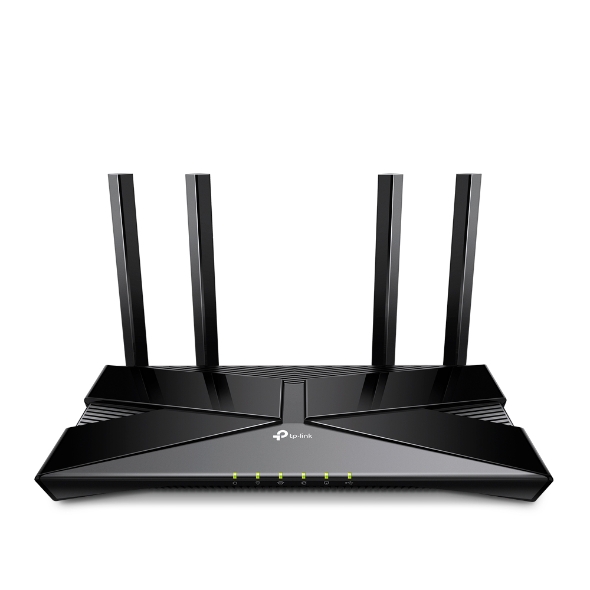
TP-Link Archer AX3000 Pro is one of those routers that offer incredible specifications without leaving a hole in your wallet. This Wi-Fi 6, dual-band router offers a total speed of 3 Gbps and coverage as high as 2,500 sq. ft. It is thus a great option for most 3-bedroom apartments with a multi-gigabit Internet plan. Thanks to features like OFDMA and MU-MIMO, the router can handle a high number of devices at a time as well.
| Criteria | Specification |
|---|---|
| WiFi Standard | WiFi 6 (802.11ax) |
| Bands | Dual-band (2.4 GHz + 5 GHz) |
| Max WiFi Speed | 3 Gbps (2402 Mbps on 5 GHz, 574 Mbps on 2.4 GHz) |
| Coverage | Up to 2,500 sq.ft. (suitable for 3-bedroom apartments) |
| Device Support | OFDMA, MU-MIMO, supports multiple devices |
| Security | WPA3, TP-Link HomeShield, Parental Controls, Guest Network |
| Wired Ports | 1× 2.5 Gbps WAN/LAN, 1× 1 Gbps WAN/LAN, 3× 1 Gbps LAN, 1× USB 3.0 |
| Antennas | 4 high-gain external |
| Key Features | Beamforming, 160 MHz channels, Easy setup (TP-Link Tether app), VPN support |
| Smart Home | Works with Alexa, Google Assistant |
| Mesh Support | OneMesh compatible |
| Price Range | Budget-friendly |
Another factor making the TP-Link Archer AX3000 Pro a great option is its four high-gain external antennas. Thanks to beamforming, these antennas can deliver amazing performance on most devices. If you need the power of a wired connection, you can count on its 1 Gbps and 2.5 Gbps Ethernet ports and the USB 3.0 port. I appreciate the USB 3.0 port when I want to set up a media server.
I believe apartment users would also appreciate the additional security features, starting with WPA3 Wi-Fi encryption. You can also benefit from advanced parental controls, TP-Link HomeShield, and Guest Network. These are, in many ways, optimized for people living in apartments. I also loved the easy setup option, thanks to the TP-Link Tether app.
The four high-gain external antennas that you can find with the router do a great job of making sure that each corner of your apartment gets a high-quality Wi-Fi signal. The 160 MHz channels are also helpful when you deal with quite a few devices. I should appreciate the option of VPN support and the native support for smart home devices, including Alexa and Google Assistant.
Although the TP-Link Archer AX3000 Pro is not a mesh Wi-Fi network, it comes with support for TP-Link’s OneMesh technology. It means you can create a mesh Wi-Fi network by combining this router with another OneMesh-compatible router or Wi-Fi Extender from TP-Link. This option is great if you end up adding more devices to the Wi-Fi network or want to boost the speed by a long shot.
I also love that the TP-Link Archer AX3000 Pro is not that bulky. So, finding a suitable place for this router is not going to take a lot of time. It performs well even with a lot of obstructions around, too. After trying the Wi-Fi router for tasks like gaming and streaming, I was thoroughly impressed. So, unless you keep your PC or smartphone far away, you can expect a similar experience from this TP-Link router in an apartment.
Pros
- Fast Wi-Fi 6 speeds up to 3 Gbps.
- 2.5 Gbps multi-gig WAN/LAN port for high-speed wired connections.
- Four external antennas provide strong, reliable coverage.
- OFDMA and MU-MIMO support efficient multi-device performance.
- Easy setup and management with the TP-Link Tether app.
Cons
- Advanced security features require a paid subscription.
- Performance may drop with many devices under heavy load.
#2 Best Wi-Fi 7 Router for Apartments: TP-Link Archer BE550
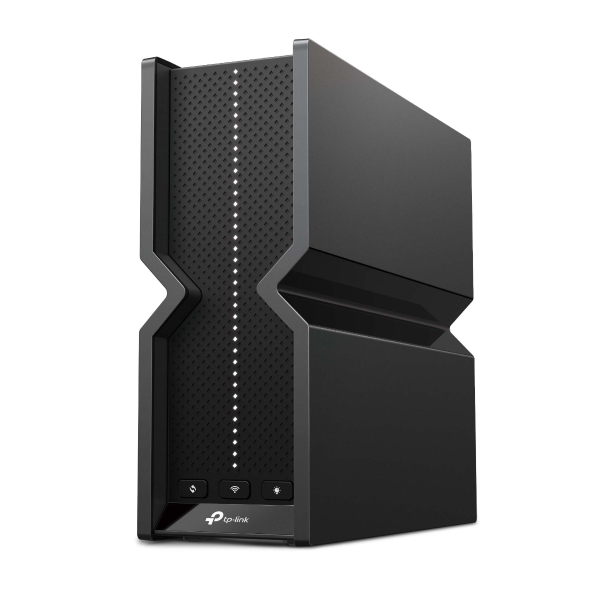
If you want to future-proof the Wi-Fi network in your apartment, it makes sense to go for a Wi-Fi 7 router in the first place. TP-Link Archer BE550 can help you achieve this objective without spending a lot. This tri-band Wi-Fi 7 router packs enough power to handle a variety of your networking needs while offering coverage as high as 2,000 sq. ft.
| Criteria | Specification |
|---|---|
| WiFi Standard | WiFi 7 (802.11be) |
| Bands | Tri-band (2.4 GHz + 5 GHz + 6 GHz) |
| Max WiFi Speed | 9.3 Gbps (5760 Mbps 6 GHz, 2880 Mbps 5 GHz, 688 Mbps 2.4 GHz) |
| Coverage | Up to 2,000 sq.ft. |
| Device Support | 6 streams, Multi-Link Operation, high capacity |
| Security | WPA3, HomeShield, SPI Firewall, VPN support, Guest Network |
| Wired Ports | 1× 2.5 Gbps WAN, 4× 2.5 Gbps LAN, 1× USB 3.0 |
| Antennas | 6 internal high-performance |
| Key Features | 320 MHz channels, 4K-QAM, Beamforming, EasyMesh support |
| Smart Home | Yes |
| Mesh Support | EasyMesh compatible |
| Price Range | Premium |
I should also highlight that the TP-Link Archer BE550 packs all necessary features, including Beamforming, to make sure that all your devices stay connected. The six streams from the router and multi-link operation can ensure that multiple devices are handled with grace. However, the best part is that TP-Link Archer BE550 can deliver a total Wi-Fi speed of 9.3 Gbps across the three bands.
The tri-band system is probably most useful when you’re into gaming. Because it has two high-speed bands, 5GHz and 6GHz, you can expect the best latency and speed when you’re involved in gaming. Once again, you can set everything up using the Tether app, and the internal antennas of the router are designed in such a way that you get incredible coverage across your apartment.
It uses EasyMesh to help you create whole-home networks without upgrading the entire setup. This feature lets you connect EasyMesh-compatible routers and Wi-Fi extenders to enable smart roaming and a single Wi-Fi name across the apartment. Apartment owners will appreciate this option when they want to expand coverage or speed.
You won’t be disappointed in the case of wired connectivity, either. You get a 2.5 Gbps WAN port along with four 2.5 Gbps WAN ports. So, when you want uninterrupted Internet speeds for something like your PS5 or Xbox, you can count on these connections. It is also nice to see the USB 3.0 port, which works great when it comes to setting up a media server.
TP-Link has added some convenience-focused features to the package as well. For instance, the HomeShield package can scan your network for potential threats, whereas Parental Controls offers easy control over what your kids do on the Internet. You also get some powerful QoS options if you want to prioritize network performance.
Pros
- Blazing-fast Wi-Fi 7 speeds up to 9.2 Gbps, ideal for 4K/8K streaming and gaming.
- Five Ethernet ports support 2.5 Gbps, enabling multi-gig wired connections throughout your network.
- Tri-band (2.4 GHz, 5 GHz, 6 GHz) and Multi-Link Operation (MLO) deliver high capacity and reduced latency for many devices.
- EasyMesh compatibility allows seamless expansion of Wi-Fi coverage with other TP-Link devices.
Cons
- Wi-Fi range and speed may drop off at longer distances, especially in larger or multi-level homes.
#3 Best Gaming Wi-Fi Router for Apartments: ASUS RT-AX86U Pro
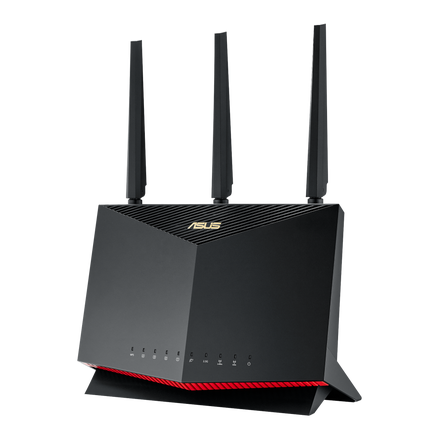
All routers mentioned on this list can offer a decent gaming experience throughout your apartment. Things are different if you need dedicated gaming performance. In those cases, you can go for the ASUS RT-AX86U Pro. This upper mid-range Wi-Fi 6 router is powerful enough to cover your medium/large apartment with a maximum area of 2,000 to 2,200 sq. ft.
| Criteria | Specification |
|---|---|
| WiFi Standard | WiFi 6 (802.11ax) |
| Bands | Dual-band (2.4 GHz + 5 GHz) |
| Max WiFi Speed | 5.7 Gbps (up to 4804 Mbps 5 GHz, 861 Mbps 2.4 GHz) |
| Coverage | Approx. 2,000–2,200 sq. ft. (suitable for medium/large apartments), RangeBoost Plus |
| Device Support | MU-MIMO, OFDMA, Gaming device prioritization |
| Security | WPA3, AiProtection Pro, Parental Controls, VPN, Firewall |
| Wired Ports | 1× 2.5 Gbps WAN/LAN, 1× 1 Gbps WAN, 4× 1 Gbps LAN, USB 3.2 |
| Antennas | 3 external, 1 internal |
| Key Features | Quad-core 2.0 GHz CPU, Gaming port, Adaptive QoS, Mobile Game Mode |
| Smart Home | Yes |
| Mesh Support | AiMesh compatible |
| Price Range | Upper mid-range |
This Wi-Fi router from ASUS is an excellent choice for multi-device environments as well, thanks to the maximum total speed of 5.7 Gbps. However, one thing I would have loved to see is a third band. Right now, the system offers only two bands. However, I must mention that the router does deliver decent speeds even at larger distances, primarily thanks to its RangeBoost Plus tech.
Its features, like MU-MIMO and OFDMA, make sure that all your devices receive sufficient signals, whether you are close to the router or away. You can also use its gaming device prioritization to ensure that your PC or smartphone has privileged access to network resources. The quad-core 2.0GHz CPU on this router does a great job on most days.
I also tried the additional features like Mobile Game Mode and adaptive QoS. Both features helped me get a smoother gaming experience, especially with titles like COD: Mobile and PUBG. The additional option for a dedicated gaming port is also great for many users. Overall, gaming-centric features from ASUS RT-AX86U Pro add a lot of value.
As far as connectivity is concerned, the ASUS RT-AX86U Pro does not disappoint. In addition to a total of six Gigabit ports, you get a USB 3.2 port, which offers ultra-high speeds for media server needs. Security options integrated with the router also add a lot of value. In particular, AiProtection Pro from ASUS does a great job of keeping your web browsing experience/network secure.
Finally, in addition to being gaming-optimized, the ASUS RT-AX86U Pro is an AiMesh-compatible device. This feature allows you to connect other compatible devices and set up a mesh Wi-Fi network. The router does work with most smart home devices, too.
Pros
- It delivers fast and reliable Wi-Fi 6 performance, which is ideal for gaming and streaming.
- Features a 2.5 Gbps WAN/LAN port for high-speed wired connections.
- Includes lifetime free AiProtection Pro security updates.
- Supports AiMesh for easy expansion of Wi-Fi coverage with other ASUS routers.
- User-friendly setup and management via the ASUS app and web interface.
Cons
- Does not support Wi-Fi 6E or Wi-Fi 7, limiting future-proofing.
- Bulky, gamer-focused design may not suit all home aesthetics.
#4 Best Mesh Wi-Fi Router for Apartments: TP-Link Deco XE75
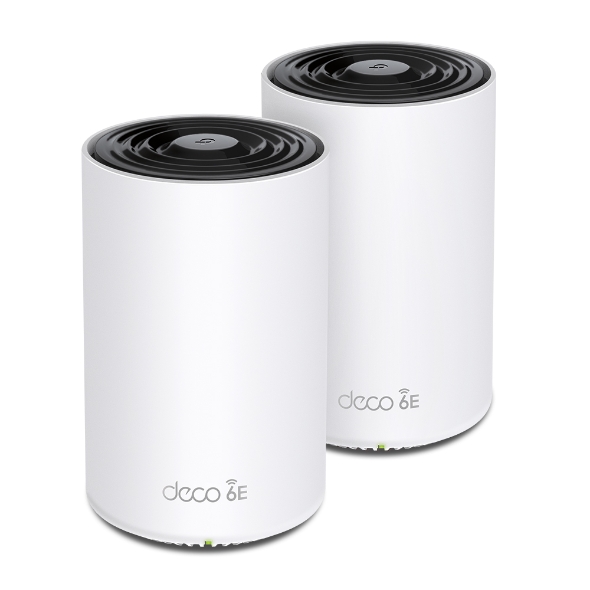
If you are particular about whole-home connectivity across your apartment, you should go for a mesh Wi-Fi router in the first place. The TP-Link Deco XE75 is a value-for-money option that delivers on multiple fronts. For starters, this Wi-Fi 6E router comes with three bands, one of which you can use for dedicated needs like gaming or streaming.
| Criteria | Specification |
|---|---|
| WiFi Standard | WiFi 6E (802.11ax, 6 GHz support) |
| Bands | Tri-band (2.4 GHz + 5 GHz + 6 GHz) |
| Max WiFi Speed | 5.4 Gbps (2402 Mbps 6 GHz, 2402 Mbps 5 GHz, 574 Mbps 2.4 GHz) |
| Coverage | Up to 5,500 ft² (2-pack), 7,200 ft² (3-pack) |
| Device Support | Up to 200 devices, AI-driven mesh |
| Security | WPA3, TP-Link HomeShield, Parental Controls, Guest Network |
| Wired Ports | 3× 1 Gbps Ethernet per unit |
| Antennas | Internal |
| Key Features | AI-driven mesh, seamless roaming, easy setup (Deco app), parental controls |
| Smart Home | Yes |
| Mesh Support | Native (Deco mesh) |
| Price Range | Mid to upper |
The most significant advantage here is the coverage itself. The two-module pack from TP-Link can offer a maximum coverage of up to 5,500 sq ft, whereas the three-module pack expands it to 7,200 sq ft. This power is enough for most apartments out there. The mesh system can easily handle up to 200 devices as well. The AI engine does a great job of prioritizing and managing the devices without any hassle.
As far as speed is concerned, the TP-Link Deco XE75 does not disappoint for a mesh system. You get a total Wi-Fi speed of 5.4 Gbps across the three bands. You can also benefit from the 1 Gbps Ethernet port on each module if you want to set up an Ethernet backhaul. Despite having an internal antenna, the Wi-Fi router can eliminate Wi-Fi dead zones in your apartment.
I must also appreciate how easy it felt to connect and configure the TP-Link Deco XE75. I used the Deco app for the entire process, and it helped me choose a suitable location for all modules. The seamless roaming is so convenient that I can enjoy a balance of coverage and speed no matter where I go. The Deco app makes it easy to manage parental control options as well.
TP-Link does not hold back when it comes to security, either. In addition to standard WPA3 security, you get HomeShield and Guest Network options. Unified network management means you don’t need to make these changes for every module. Instead, you shall have a self-healing and self-managing network after the initial setup process.
One thing I would have loved to see in the package is a USB port. However, from a connectivity and reliability point of view, the lack of a USB port does not really matter. On the bright side, because you are going for a Wi-Fi 6E router, you will ultimately future-proof your network for almost half a decade. It should work fine even if you upgrade to a faster Internet connection.
Pros
- Delivers excellent Wi-Fi 6E speeds with strong throughput and wide coverage.
- Inexpensive compared to other Wi-Fi 6E mesh systems in its class.
- Easy setup and management via the Deco app; seamless roaming and AI-driven mesh technology.
- Includes extra security software and parental controls (with optional subscription for advanced features).
- Supports up to 200 devices, making it suitable for busy smart homes.
Cons
- Lacks USB ports and does not support link aggregation or multi-gig wired connections.
- Some security and advanced features require a paid subscription.
#5 Secure Wi-Fi Router for Apartments: Synology RT6600ax
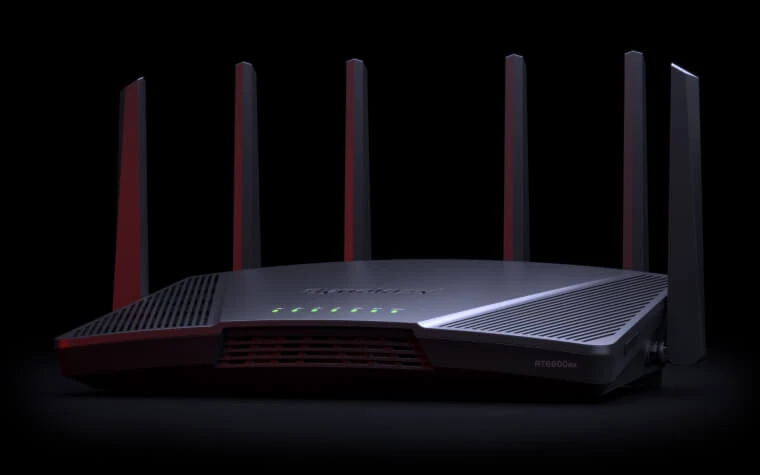
If you prioritize security as much as you want speed and reliable connections, you can check out the Synology RT6600ax. Synology is known for making some security-focused Wi-Fi routers, and this model belongs to the same category. This model from Synology is most suited for large apartments with an area of around 3,000 sq. ft.
| Criteria | Specification |
|---|---|
| WiFi Standard | WiFi 6 (802.11ax) |
| Bands | Tri-band (2.4 GHz + 5 GHz + 5 GHz) |
| Max WiFi Speed | 6.6 Gbps (4800 Mbps 5 GHz, 1200 Mbps 5 GHz, 600 Mbps 2.4 GHz) |
| Coverage | Up to 3000 sq.ft., Large apartments, advanced management |
| Device Support | MU-MIMO, OFDMA, Smart Connect, up to 5 networks |
| Security | WPA3, advanced parental controls, web filtering, threat prevention, VPN |
| Wired Ports | 1× 2.5 Gbps WAN/LAN, 1× 1 Gbps WAN, 3× 1 Gbps LAN, 1× USB 3.2 |
| Antennas | 6 high-gain external |
| Key Features | Quad-core 1.8 GHz CPU, SRM OS, VLAN, mesh support, granular management |
| Smart Home | Yes |
| Mesh Support | Yes (with other Synology routers) |
| Price Range | Premium |
The Synology RT6600ax checks all the boxes when it comes to signal management, thanks to OFDMA and MI-MIMO. It also packs the Smart Connect feature from Synology, allowing seamless management. Having said that, the best part about the Synology router is the advanced management options you get. For starters, you can use the router to create up to five networks.
You should keep in mind that the Synology RT6600ax is a tri-band Wi-Fi 6 router with a band that you can set up for gaming or other resource-intensive tasks. It comes in handy that you can set up as many as 5 Wi-Fi networks and 15 SSIDs using the Synology RT6600ax router. However, network segmentation is one of the many great things about the Synology Router Manager (SRM).
By all means, the 1.8GHz CPU does an incredible job of smoothing the router management process. Whether you want to set up a virtual LAN or track statistics, SRM is effortless to use. For one, you also get advanced control over user profiles, quotas, and search options. The UI is indeed one of the best I have ever seen on Wi-Fi routers.
If you have a large apartment in a busy area, it makes sense to have multiple LANs in the first place. You can have one for IoT devices and another one for surveillance. Synology SSL, VPN and Remote Desktop features are also great from a convenience point of view. The Synology app that you can use to manage the Wi-Fi router is also well built.
Lastly, Synology has added a variety of hardware connection options to the Synology RT6600ax. For starters, you get three 1 Gbps LAN ports and a 1 Gbps WAN port. However, you can get the best value from the 2.5 Gbps WAN/LAN port that you can use for heavy-duty equipment such as NAS. I also loved the presence of the USB 3.2 port, which is handy for content management.
Pros
- Delivers excellent Wi-Fi 6 performance and coverage, especially on 5GHz bands.
- Highly configurable with robust parental controls and advanced security features.
- Easy to set up and manage, with user-friendly SRM (Synology Router Manager) firmware.
- Includes a 2.5 Gbps WAN/LAN port for high-speed wired connections.
- Supports mesh networking and can function as a basic NAS using its fast USB 3.2 port.
Cons
- Only one 2.5Gbps port; all other Ethernet ports are limited to 1Gbps.
- Pricier than many other AX6000 routers, and has limited 2.4GHz coverage
Wrapping Up
I genuinely hope this guide helped you choose a great Wi-Fi router for your apartment in 2026. I have added options from different budget ranges so that you can find a suitable option. You might see that I have skipped a few cheaper alternatives for the sake of sticking to the criteria, though.
