
You would have definitely noticed a unique-looking port on your router called the WAN port. However, not many may understand why the port exists and what it is used for. In their defense, WAN ports are as popular as Ethernet ports. Don’t worry; I will clear this confusion right away. In this detailed guide, I will discuss the importance and uses of the WAN port on a router, starting with what a WAN port is.
What is A WAN Port?
WAN port stands for Wide Area Network port. It is a single/dual-jack Ethernet port used to connect your router’s Local Area Network (LAN) to a Wide Area Network (WAN).
A Wide Area Network (WAN) is a network that connects more than two Local Area Networks (LANs). A WAN could be any connection matching these characteristics. It could be as large as the Internet or a set of clients and data centers that a business has deployed across a country or continent. For home users, however, the most common wide-area network is the Internet.
Therefore, for most people worldwide, the WAN port on a router is used to connect to the Internet. But this port has additional uses.
Uses of WAN Port
Here are the different ways in which you can use the WAN port on a router:
Connecting to the Internet
For most people, the go-to use of the WAN port will be to connect to the Internet. I should remind you at this point that the Internet is a Wide Area Network. On the majority of modems, an Ethernet cable will be used to connect the WAN port to the ISP-provided modem. In the case of fiber-optic connections, the cable may be connected to another ONT or another device. Some ISPs using PPPoE may also offer a direct connection to your router’s WAN port.
Connecting to Routers via Bridge Mode
Sometimes, you may want to extend an existing Internet connection to your router from another router. In these cases, you may have to connect an Ethernet cable between your WAN port and the LAN port on your existing router. However, you may have to enable additional settings on both routers to avoid issues such as double NAT.
In addition to these, WAN ports may also be responsible for several other tasks. For instance, NAT is active when traffic from the LAN passes through the WAN port. This system is responsible for ensuring that data reaches the intended destination on the Internet.
Router Dual WAN Port
Typical routers ship with a single WAN port, which you can connect to the Internet. The maximum speed of the WAN connection would vary based on the device and the environment. However, on some devices, you can find dual WAN ports. Here’s how they work:
Routers with dual WAN ports are designed to benefit from two simultaneous connections. It means there could be two Internet connections attached to a single router. Depending on the scenario, this dual setup is used for purposes such as failover, load balancing, and achieving aggregated speed.
Failover
By connecting two WAN sources to a router, you can set up a backup system. Even when one source goes offline, your network will have Internet access. If you are running a server or VPN from your office, you may need such a setup, as downtimes could be deadly.
Load Balancing
You can use software-centric approaches to control how the two WAN ports are used. By determining where traffic is directed, load balancing lets you prevent network congestion. It would also mean a better browsing experience even during downtime. You can take this further by getting two types of Internet connections.
Aggregate Speeds
Some software options let you combine the bandwidth from both WAN connections. As a result, you can achieve better speeds when using resource-intensive tasks like downloads or video conferencing. However, the setup and the WAN sources are essential here.

I rely the most on dual-WAN port routers to ensure a sense of backup across my network. I make this work by choosing two kinds of Internet connections: fiber-optic and Fixed Wireless Access. This way, even when the fiber lines are damaged/congested, I have a relatively high-speed connection at my disposal.
For typical users, however, dual-WAN routers may be overkill.
When NOT to Use the WAN-Port
Here are a few instances where you SHOULD NOT use the WAN port on the router:
- You do not want the router to access an external network, but rather like a local setup. This setup is great when you need to test something without an internet connection.
- You may skip using the WAN port if you use the router to extend an existing connection. In this case, you may want to use the LAN ports and avoid NAT issues.
- You won’t need the WAN port when you want a local connection for specific purposes. For instance, if you plan to use a printer via the network, you can do so without the WAN port.
Therefore, ensure that you don’t use the WAN port when you find yourself in these situations, however rare they may be.
DSL Port
You may also come across a DSL port on some modems and routers. In a way, the DSL port is similar to the WAN port in that it connects you to a wider area network. But both of them work differently.
For instance, a DSL port is designed to work with telephone lines that are capable of DSL technology. In this case, if you have a compatible modem, you can plug in a telephone line port using an RJ11 connector and access the internet, provided you have an active plan.
On the other hand, the WAN port is a general port that allows you to connect to any internet source using an Ethernet cable. And because the entire internet processing is done through a modem or ONT, or something similar, the WAN port doesn’t do much in configuring the internet.
Wrapping Up
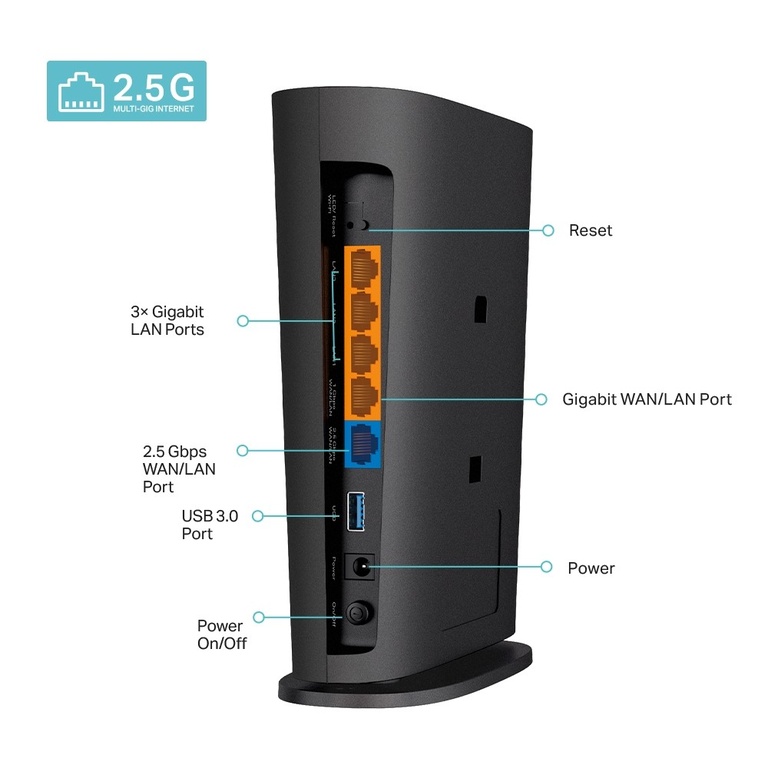
In most setups, it is easy to distinguish WAN ports from other ports on your router. Most routers also use a unique color for the WAN port. However, if you are ever confused, this guide will help you.
