
Compared to other satellite internet services I have tried, Starlink is miles ahead in troubleshooting and self-healing maintenance. Most people don’t have to spend time worrying about Starlink errors, either. However, you may come across some issues, such as the blinking white light. As the router doesn’t have any markings, a flashing white light can be confusing.
In this guide, I will explain how to fix the Starlink router blinking white light issue.
Starlink Router Lights Meaning
Let’s first look at the standard Starlink router lights and their meanings:
On the Starlink Gen 3 Router, you can find the status LED on the front panel of the router.
| Light Status | Meaning |
|---|---|
| Solid White | Connected to internet |
| Blinking White | Trying to connect |
| Violet | Router is in bypass mode |
| Red | Not connected to the internet |
| No Light | No power to router |
Therefore, if your Gen 3 Starlink Router shows a blinking white light, it means the device is trying to connect to the Internet using the satellite dish. Now, here is something you must know about the blinking white light.
You WILL DEFINITELY see a blinking white light when you turn on your Starlink router. Starlink is not designed to connect to the network instantly. Therefore, the Starlink router needs up to a few minutes to connect the device to the Internet. During this period, it is common to see a blinking white light on the router. You don’t have to worry about this.
When the router finally connects to the Starlink network and the Internet, the white light turns solid. At this point, you will have Internet access on all the devices connected to the Wi-Fi network. So far, so good, right?
There is a problem if the blinking white light does not stop. Ideally, the blinking white light should stop within 2-3 minutes. If your router cannot connect to the network even after 5 minutes, multiple reasons could be contributing to the issue.
Possible Reasons for Starlink Router Blinking White
Here are some potential reasons your Starlink router keeps blinking white for over 5 minutes.
- Trouble Connecting to Satellites: As I said, you see the white blinking light when the router attempts to connect to the satellite network. So, if the Starlink system cannot locate or connect to satellites, you will see a blinking light on the router.
- Service Disruption: Starlink takes multiple measures to ensure seamless connectivity. Even so, there could be some issues once in a while. If your area faces such problems, the router may have trouble connecting to the Starlink network.
- Hardware Issues: At times, hardware bugs or configuration issues may also cause the blinking white light issue. We have also seen cases where firmware issues were responsible for malfunctioning light LEDs.
- Location Issues: Did you start seeing the blinking light issue after moving to another location? In that case, the area or the new configuration could be causing the problem. Though Starlink is designed to work everywhere, multiple instances require reconfigurations for the best results.
We have curated some solutions based on these potential reasons.
How to Fix Starlink Router Blinking White Light
Here are some solutions that can help you fix the Starlink router blinking white light issue.
#1 Restart and Wait
The first step, as always, is restarting the Starlink system and waiting for up to 20 minutes. If a temporary bug was responsible for the problem, you should have a stable Internet connection in a few minutes. If there are problems with connecting, the Starlink router will show a Red light after 20 minutes.
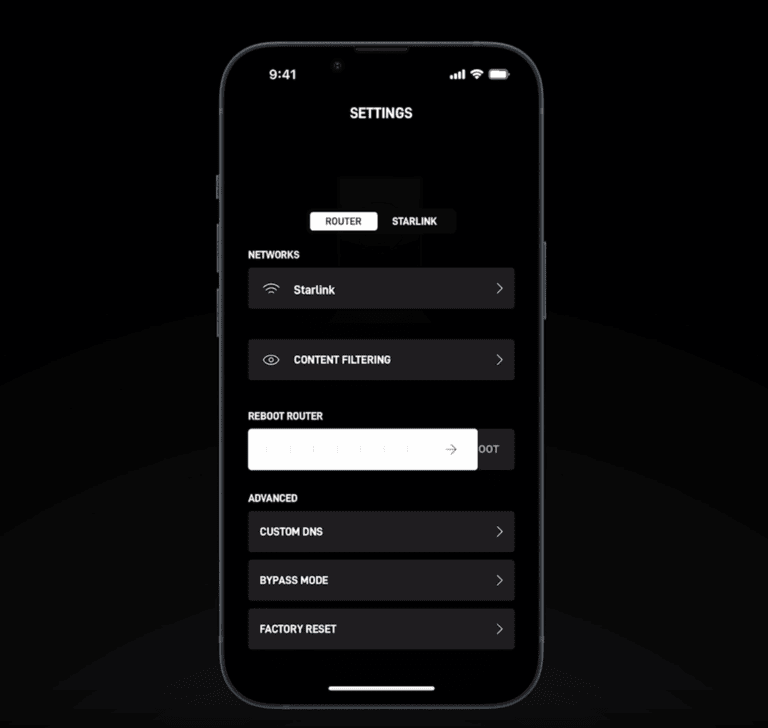
I know 20 minutes is a long time to wait, but the satellite-based connection may be time-consuming at times.
#2 Check The Starlink App
If your Starlink router cannot connect to the Starlink network even after waiting for 20 minutes, you should check the Starlink app to know the current status of the device.
If there are service-related issues that are preventing the connection, you should be able to see something on the screen. You might also see a setup screen if there were issues with the configurations.
If you can find some actionable information on the Starlink app, you should follow those instructions before moving further.
#3 Check for Obstructions
As we said earlier, obstructions around your area can prevent the Starlink dish from working correctly. So, even when you think you have placed the dish at a viable location, it doesn’t hurt to double-check. You can double-check in two ways.
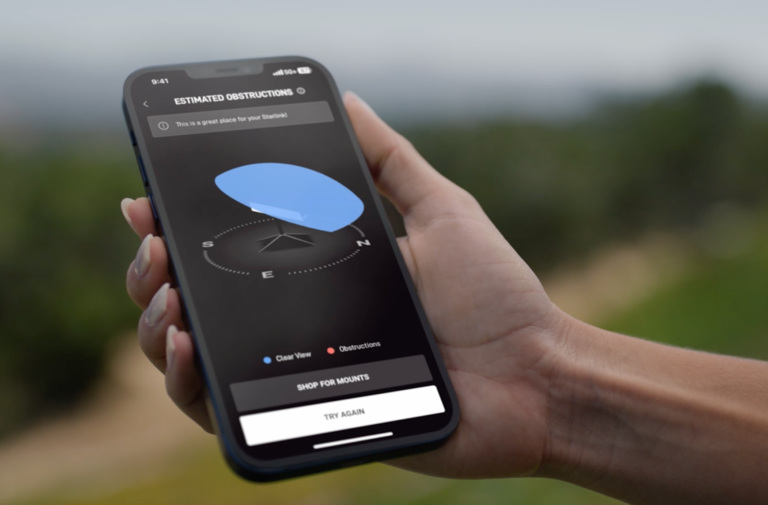
One, you can go around and check whether there is anything that is blocking the view of the Starlink dish. Alternatively, you can open the Starlink app and navigate to the obstructions panel, where you can see a virtual map of obstructions and visibility.
If there are even the slightest red portions on the screen, you might want to re-optimize the location of the dish.
#4 Registered Location
If you have opted for the Starlink Residential, you cannot use the service elsewhere.
So, if you recently moved to another location and are trying to connect to the Starlink network, you will see a blinking white light on the router.
The solution here is to contact Starlink and change the account details. If you are looking for something that you can use on the go, you might want to upgrade to something like Starlink Roam.
#5 Factory Reset and Set Up
If the solutions so far haven’t helped you, you might want to factory reset your Starlink and set it up from scratch. This process takes some time, but it is going to solve most of the hardware and software-related issues with the Starlink router as well as the dish.
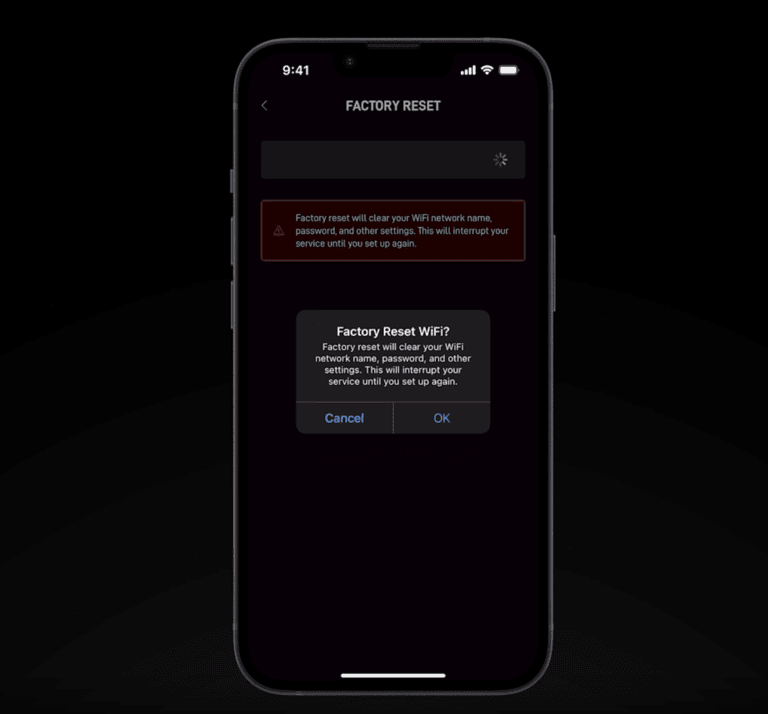
Once you have done this, you can try realigning the DISH and connecting to the satellite network, and you should have a stable internet connection. To factory reset a Gen 3 router without using the app,
- Locate the Reset button on the back panel of the router.
- Use a SIM ejector tool to press the Reset button.
- Hold the button when the status LED light starts blinking white.
You can set up your Starlink system now.
Conclusion
I hope this guide helped you understand the reasons behind a persistent blinking white light on your Starlink router. I have also provided most solutions that will help you sort out the issues and regain Internet access.
