
Spectrum routers are known for working great most of the time. One reason is that Spectrum optimizes the device for its network and services. These devices are also easy to operate. Yet, at times, the status lights on the Spectrum router can be confusing. The Spectrum router blinking blue could be one such instance. I will explain the reasons behind this issue and guide you through the steps to resolve it.
Spectrum Router Status Light Colors
Before I explain everything, let’s take a look at a quick table on the Spectrum router status light colors and their meanings. Some of these apply to modems from brands that Spectrum has used. However, our focus today is on the Spectrum-branded Wi-Fi 6 and 7 popular routers.

| Light Color/Pattern | Meaning |
|---|---|
| Off | Router is powered off or not receiving power. |
| Solid Red | Hardware or critical system error; router may need a restart or replacement. |
| Blinking Red | Router failed to initialize or firmware update issue; try rebooting. |
| Solid Blue | Connected to the internet and working normally. |
| Blinking Blue | Establishing a connection (booting up, syncing, or updating firmware). |
| Solid White | Router is on but not yet connected to the internet. |
| Blinking White | Attempting to connect to Spectrum network (startup sequence). |
| Amber / Yellow (Solid) | Limited connectivity or maintenance mode. |
| Amber / Yellow (Blinking) | Software update in progress or partial connectivity. |
| Green (Solid) | Stable internet connection (on some models, replaces blue). |
| Green (Blinking) | Data is actively being transmitted/received. |
As you can see, on many Spectrum router models, two variants of the blue color exist. Solid blue is the status light color you should always expect. It means your router/modem is connected to the Spectrum network and, thus, the Internet. On the other hand, a blinking/flashing blue light indicates that the router/modem is attempting to connect.
Here’s something important, though.
It’s completely normal for your Spectrum router to show a blinking blue status light when you boot it up. You see, connections to the Internet are not instant. It takes a few seconds to a minute for the router to set up a connection. Therefore, you should wait for a short period after turning on the router. In a few minutes, you can see a solid blue light on the Spectrum router, indicating that your router is successfully connected.
However, if the router’s status light shows a blinking/flashing blue for over a few minutes, you probably have an issue that needs fixing. This means the router hasn’t been able to connect to the Internet. Depending on the router, network, and other circumstances, there could be different reasons.
Reasons Why the Spectrum Router Blinks Blue
The common reasons your Spectrum router blinks blue, even after a few minutes of booting up, are listed below.
- There could be a delay in the booting and connection process. During this entire process, the router will show a blinking blue light. Such delays are common on old Wi-Fi routers from Spectrum.
- The physical connection between your Spectrum router and the network also matters. The router-modem connection should also be stable. If it isn’t, you’ll see the blue light.
- The Spectrum network could be facing an outage. In this case, your router cannot connect to the said network even when everything else is correct.
- Bandwidth overload and overheating can also prevent Spectrum routers from connecting within the stipulated time. It could be a hardware-related issue, after all.
- If you have a setup with a separate modem, issues affecting the modem can also prevent the router from connecting to the network. This is uncommon, considering that Spectrum uses a hybrid device.
- A hardware issue with the Spectrum router may be the cause of the blinking blue light. You can resolve this issue by resetting the router or having it replaced.
- A misconfigured router can also lead to the persistent blinking blue light situation. If you have made recent changes to the Spectrum configuration, you may have caused the issue.
How to Fix a Spectrum Router Blinking Blue
You have already gone through the common reasons your Spectrum router has a blue blinking status light. In many cases, a combination of these reasons could also cause the Spectrum router to continue blinking blue. As a result, our attempts to fix a Spectrum router blinking blue should also be strategic.
#1 Check for Faulty/Disconnected Cables
I have lost count of how many times people have cried No Internet while the WAN/coaxial cable was kept disconnected. It may sound silly, but faulty/improperly connected cables are a common reason for a flashing blue light on your Spectrum router. Fortunately, the solution is easy.
Check the rear side of the Spectrum router and check if you are using working cables for WAN and power.
Both these cables should be connected properly as well. In the case of the Ethernet cable, you can hear a clicking sound when it is properly plugged in. The power jack should also be plugged in completely.
#2 Restart the Router
Like other electronic devices, your Wi-Fi router can benefit from a power cycle, also known as a soft reset or a clean restart. Many temporary issues may prevent the router from establishing a connection, and a restart typically solves these problems. Depending on the situation, you can do a hard restart or a soft restart.

You can trigger a soft restart using the Spectrum Wi-Fi app on your smartphone. However, if you cannot access the app in the first place, you can try disconnecting the power plug or using the Power button on the router (if available). The restart will, in turn, trigger a fresh reconnection to the Spectrum network.
#3 Power Cycle the Spectrum Router
Sometimes, temporary errors require more than a simple restart. In these cases, you can try power cycling your Spectrum router. It is similar to restarting your router, but the process is a little more elaborate. Given below are the steps:
- Disconnect all network and power cables from the Spectrum router.
- Wait for 5-10 minutes, as the router remains in disconnected mode.
- Now, reconnect the wires, starting with the network-based ones.
- Once everything else is connected, connect the Spectrum router to a power source.
This process forces the router to restart all its modules. Compared to a typical restart, a power cycle is more comprehensive and can help you solve initial connection errors that cause the blinking blue light.
#4 Check for Spectrum Outage
So far, we have followed the basic steps to solve the blinking blue light on the Spectrum router. Before we proceed, we must verify whether the Spectrum network is experiencing an outage. If such an outage exists, your router cannot possibly connect to the network.
Spectrum is quite punctual when it comes to informing customers about outages. You would have received an email or SMS in the event of a scheduled outage. Yet, these can be unpredictable in the case of natural disasters. Nevertheless, the official Spectrum website will display notifications regarding the blackout.
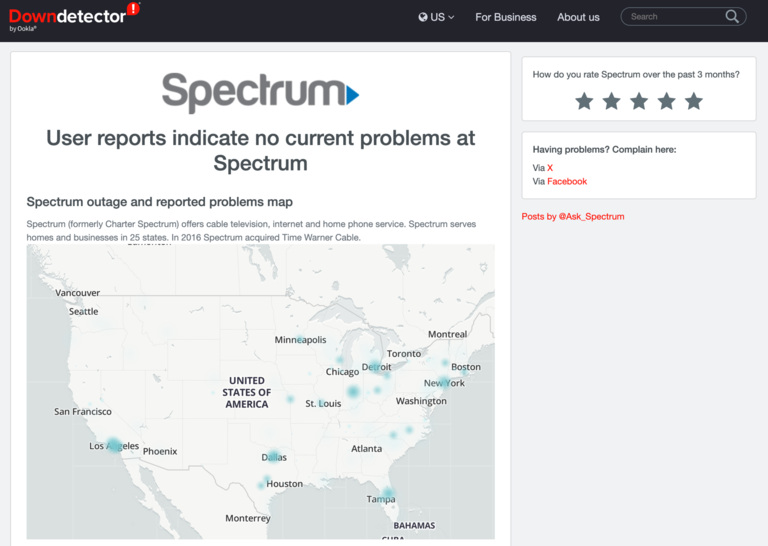
If you want to double-check, you can also try websites like downdetector.com. Such sites keep a regular track of network outages.
#5 Verify the Modem’s Function
This step applies to you only if the Spectrum Internet connection came with a separate modem. Sometimes, the router cannot connect to the Internet because the modem isn’t functioning properly. In these cases, you have to check for potential issues and fix the Spectrum modem.
- First, check if all the status lights on the Spectrum modem are in the correct position.
- Ensure that the modem is receiving sufficient power from an uninterrupted power source.
- To be sure, you can try connecting your computer directly to the modem using an Ethernet cable.
If you encounter an issue with the modem, it must be repaired or replaced. If you have a Spectrum-provided one, you should contact Spectrum at this point.
#6 Avoid Overheating/Overloading
If you have been using the Spectrum router for a while, you may be experiencing issues with overheating or overloading. Overheating occurs when hot air from the router cannot escape, forcing it to limit or shut down its functions. Overloading happens when too many devices are connected to the router.
You can prevent overheating with the help of occasional cleaning and optimizing the router’s placement. Ensure the router is kept in a well-ventilated area and that the air vents remain clean and unobstructed. On the other hand, you can mitigate overloading by being mindful of how many devices use the network simultaneously.
This step not only prevents the blinking blue light issue but also improves the overall performance of the Spectrum router.
#7 Reset the Spectrum Router
If you haven’t had luck with these steps so far, you may need to consider factory resetting your Spectrum router. It is an easy process, but you will lose all preconfigured settings. This means you will have to set up the router from scratch once it reboots. If this sounds okay to you, we can proceed.
- Ensure that you have disconnected all cables from the Spectrum router, except for the power cable.
- Now, access the router’s rear panel and press and hold the Reset button for at least 15 seconds.
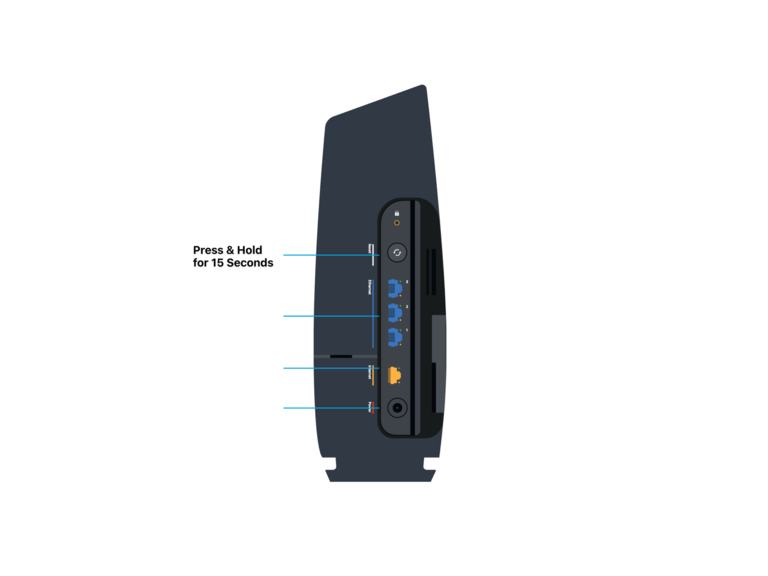
- The router’s status lights will start flashing as the reset process starts. They should become stable when the reset process is complete.
- The Spectrum router has now been factory reset. Connect your computer to the router using an Ethernet cable for initial configuration.
After the initial setup, the router should stop showing the flashing blue light. This factory reset process can also resolve a wider variety of other issues.
#8 Get A Replacement Router
If the problem persists even after a factory reset, you should consider getting a replacement router from Spectrum. Given that Spectrum leases these products, they are bound to replace a defective product. However, depending on your location, it may take a few days to receive this router.
#9 Get Spectrum Support
In a rare event, a replacement router doesn’t solve the problem, you should contact Spectrum support. You may be facing the blinking blue light issue due to infrastructural problems. In these cases, it is better to seek official support.
Wrapping Up
I believe this guide helped you resolve the flashing blue light issue on your Spectrum router. While the light itself is common, multiple factors may cause it to appear. I had this idea in my mind while preparing a guide to resolve it.
