
Port Forwarding is a handy feature to have on your network router, especially if you need remote devices to reach your network. However, port triggering is a rather new entry to the scene, and you may not have heard it as often as you have come across port forwarding. More so, picking one from the two could be confusing.
In this guide, I shall explain the key differences between port triggering and port forwarding.
What is Port Forwarding?
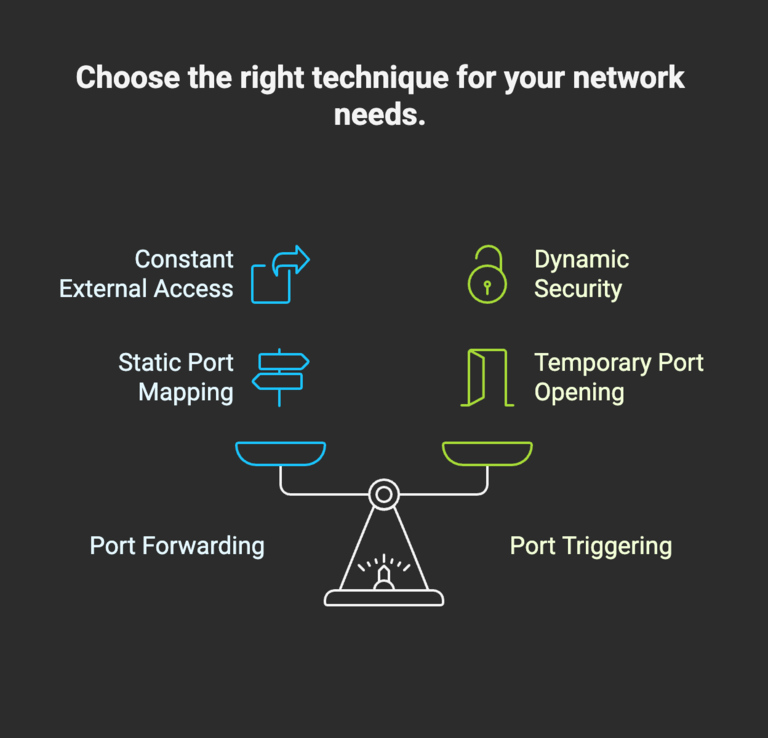
Port forwarding is a networking technique that is widely used for setting up things like web servers, gaming servers, FTP servers, and remote access. You can think of port forwarding as a static rule that connects an external port of the network router to one of the connected devices. This way, the data that reaches the particular port will be forwarded to the specific device. I think you will get this better through an example.
Let’s say that you want to host a Minecraft server that your friends can join. Now, the server will have an IP address (internal), but a device using the Internet cannot directly connect to this IP address. There is also a public IP address, but this needs manual configuration. This is where port forwarding comes in. It makes sure that devices entering through the specific port can reach a device on your network.
In essence, port forwarding tells your router that it should forward traffic to a specific device on the network if traffic reaches the public IP address with a specific port. Without port forwarding, the network router and NAT will block all incoming traffic from the Internet. Your firewall also makes sure that unauthorized devices cannot get to the network.
Port forwarding is widely used for hosting online services like web servers, FTP servers, and game servers. It also comes in handy for purposes like remote access to devices, surveillance, and Internet of Things devices. You can count on port forwarding for media servers and file sharing, especially for services like Plex, Jellyfin, and Nextcloud.
What is Port Triggering?
Port triggering is another networking technique that is used when devices within a local network need to be reached by devices on the Internet. However, compared to port forwarding, port triggering is more flexible and automated. Port triggering needs two ports to work: a trigger port and an opening port. These two are connected through a dynamic rule. I will explain this using an example.
Let’s say that you are using an application that requires inbound traffic (from the Internet to the device). It could be online gaming, video conferencing, IRC, etc. Instead of keeping ports always open, you can use port triggering to open an inbound port only when you send something through an outbound port. In the context of gaming, when you send a connection request through a port, that action will trigger two inbound ports.
Unlike port forwarding, port triggering is better used by applications/instances that require only temporary access to the Internet. Because port triggering uses an if condition, you don’t keep any ports open all the time. From a security standpoint, this decision makes more sense as you don’t expose your LAN to an outer network like the Internet.
You should use port triggering for applications/instances that may use unpredictable ports. That is, you might send information through one port, but it comes back to the router through another port. In these cases, it makes more sense to have an automated system. This system protects the network from unwanted exposure to the Internet as well.
How Does Port Triggering Work
I shall now try to explain how port triggering works:

As you can see in the image above, the port triggering process is multi-step. All these components must work together for the task to be completed. Given below is a detailed explanation of what takes place.
For everything to take place, you must set up port triggering on your network router. Most modern routers, including Wi-Fi routers, offer support for port triggering, and you can set it up using the admin dashboard. I will show you the steps later, but you essentially need to set up trigger-action combinations. That is, you can choose the trigger port and the target port. The router lets you select the appropriate protocol as well.
Once you have set up port triggering, the following things will happen:
- After you have enabled a port triggering rule, your network router will continuously monitor all types of traffic, both incoming and outgoing.
- When your router detects outgoing traffic through one of the trigger ports you have selected, it will open the target ports that you have defined earlier. These target ports will now be able to receive all kinds of incoming traffic from the Internet.
- Now that outgoing and incoming ports are active, data transfer takes place between a device on your network and another network on the Internet.
- When the data transfer is complete, the port becomes inactive. Once it hits the threshold, your Wi-Fi router will close the target port.
This process will repeat whenever necessary. Keep in mind that you will mostly define a set of ports as the main target instead of a single port. This way, even if the device on the Internet uses a different port, the connection will go smoothly. Thanks to modern Wi-Fi routers with simple UI designs, setting up rules for port triggering is pretty effortless.
How to Set Up Port Triggering
As I said, it is easy to set up port triggering on most modern routers. Here are the steps you need to set up the feature on a TP-Link Wi-Fi router.
- Ensure that there is an active Internet connection through the TP-Link Wi-Fi router. Also, make sure that you have connected your computer to the router using an Ethernet cable, not Wi-Fi.
- Now, open tplinkwifi.net on a web browser and wait until the login screen appears. Alternatively, the default router IP address works, and it could be something like 192.168.1.1.
- Enter the username and password credentials for your router and sign in to the dashboard. This is where you modify all sorts of settings for your router.

- Click the NAT Forwarding option from the sidebar menu and choose Port Triggering from the drop-down menu that appears.
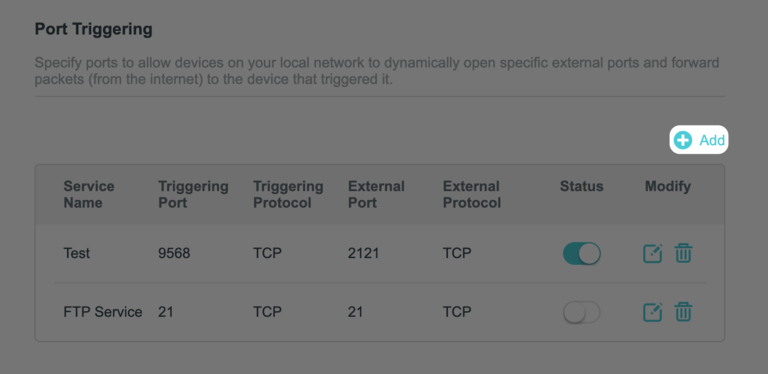
- If you have already set up some port triggering rules, they would appear on this page. You can turn on or turn off these rules as you wish. However, to set one up afresh, you need to click the Add button on the right side.
- In the interface that shows up, you need to enter the details of the port triggering configuration.

First, you need to give the service a name so that you can recognize it later. TP-Link router’s interface lets you choose one option from many popular services. Now, you have to enter the triggering port. Your router will keep an eye on this port after the triggering service is active. You should also select the protocol for both triggering and external. Lastly, you should specify the range of ports for the service. These ports will stay open for a while when your router detects traffic through the triggering port.
- You can save a lot of time by choosing a popular service. The router will fill in the information without your input.
- Once you have filled in the data, you can hit the Save button. After it is saved, you need to toggle it.
That’s it! You have successfully configured port triggering on your router.
Uses Of Port Triggering
I did mention the core uses of port triggering, but we can dive a little deeper.
As I said, you need port triggering in the first place because some applications/servers don’t always use the same port to connect to the network. That is, you might send the information using Port 3074 (UDP/TCP), but the inbound port could be anything within the 27015–27030 range.
If you want to set things up using port forwarding, you will have to keep 15 ports open at all times. Not only is it a waste of resources, but it also exposes your local network to multiple threats. In this context, you get a better set of results using port triggering.
Now, we can look at the common uses of port triggering.
Triggering For Gaming
Games with an online multiplayer feature require an active connection to the Internet. In particular, popular games like Call of Duty and Battlefield may use unpredictable ports. Because of this, port forwarding doesn’t solve the problem. Instead, we can go for port triggering.
Other Uses of Port Triggering
Other applications, such as video conferencing, may also need multiple dynamic ports to work well. In these cases, you can count on port triggering. For instance, early versions of apps like Zoom and Cisco Webex were known for using multiple ports. Similarly, IRC file transfer and P2P applications may also require more than one particular port to function well.
However, keeping too many ports open at the same time does not make sense. Port triggering solves this problem by opening the range of ports when they are required and closing the ports after a specified period of inactivity.
In addition to these common platforms/software, some custom-made business software may also require a multi-port inbound setup. So, port triggering comes in handy in those instances as well. I also love that you can easily set up port triggering on most routers, and they even let you choose the devices using a simple UI.
Port Forwarding Vs Port Triggering
Here is a quick comparison between port forwarding and port triggering.
Feature | Port Forwarding | Port Triggering |
|---|---|---|
Port State | Always open | Opens only when triggered |
Type | Static (permanent rule) | Dynamic (temporary rule) |
Use Case | Hosting servers (web, FTP, game, CCTV) | Apps with dynamic ports (gaming, VoIP, video calls) |
Direction | Internet → LAN (inbound) | LAN → Internet (outbound trigger) then Internet → LAN (inbound) |
Security | Less secure (permanent exposure) | More secure (closes when idle) |
Device Support | Fixed to one internal device | Can be shared, but usually one device at a time |
Configuration | Simple: map external → internal IP & port | Complex: define trigger port + incoming range |
Persistence | Active until disabled | Expires after timeout/inactivity |
Here’s the gist:
Port forwarding is a static rule that keeps ports always open and forwards the inbound traffic to a predefined device. While it is easy to set up, it is not completely secure due to permanent exposure. It is widely used for tasks like hosting servers and CCTV surveillance.
Port triggering is a dynamic rule that functions only upon a specific trigger. It enables the connection from a range of ports to a specific device on the local network when a device sends traffic to the Internet through a predefined port. This method offers better security and mapping options.
Wrapping Up
I hope you now understand the differences between port triggering and port forwarding. Given that online multiplayer games are the trend more than ever, it is convenient to have a Wi-Fi router with this option. It is nice to see router makers offering easier ways to set up the feature.
