

These days, the second thing guests ask once they are home is, “What’s the Wi-Fi password”? Although it is difficult to say no, it is not really a wise decision to share your main Wi-Fi network’s password with everyone. For starters, you run the risk of privacy issues. Fortunately, you can rely on guest Wi-Fi networks for visitors. In this guide, you can find a simple guide to creating a safe and secure guest WiFi network.
What is a Guest WiFi Network?
A guest Wi-Fi network is a Wi-Fi network dedicated to guests/visitors at your home/office. This network will offer Internet access but will be different from the primary Wi-Fi network. This way, you can let your friends and family connect to the Internet without giving them full access to your Wi-Fi network.
A guest Wi-Fi network uses network segmentation technology or VLAN (Virtual Local Area Network). That is, it creates another network using the same router. It means you do not need another router or access point to enjoy the benefits of a guest Wi-Fi. Sure, you must have a Wi-Fi router with the Guest Network feature.
Because a guest Wi-Fi is virtually created, you get some additional customization features as well. Some such points are:
- Devices connected to the guest Wi-Fi network cannot interact with the main network or the devices connected to the main network. For instance, a guest cannot stream content to your smart TV if you have connected the smart TV to the primary network.
- The guest Wi-Fi network will have a unique name (SSID) and password. It can also have a variety of configurations, starting with the frequency band.
- The administrator can control aspects like bandwidth limits, content, and guest network traffic. For instance, you may not want the guests to hog all the Wi-Fi speed. You can control this by limiting the bandwidth.
Because of these characteristics, a guest Wi-Fi network can offer many benefits.
Benefits of Guest WiFi
Here are the core benefits of having a guest Wi-Fi network at your home or office.
Security
Enhanced security is the most significant benefit of using a guest Wi-Fi network. Because the guest network is isolated, visitors cannot access the primary network. More importantly, even if one of the guest devices is infected, your primary network will stay safe.
There is no need to worry about the guest unknowingly sharing the main network’s password, either. These security benefits are appealing when you have sensitive things like a NAS or shared folders in the main network.
Convenience
A guest Wi-Fi network is a convenient option for you and the visitor. For starters, you can set up an easy-to-remember password for the guest network while keeping the primary network as secure as possible. Since you can control what happens within the guest network, you don’t have to worry, either.
Easy Control
You can easily impose restrictions on and manage the guest Wi-Fi network from the router dashboard. For instance, you may want to limit the speed or bandwidth consumption. You may also want to prevent visitors from accessing specific types of content.
You can make these changes and secure the guest Wi-Fi network behavior without affecting the primary Wi-Fi network. Some routers with advanced guest network options may also let you set up multiple secondary networks for different needs.
Protection from IoT Vulnerabilities
Although the Internet of Things is growing like ever before, devices are vulnerable to many threats. Keeping all these devices in your primary network would be a bad decision, but a guest Wi-Fi network specifically made for IOT devices will help you sort this out. This way, even if an IoT device is compromised, it would not have access to your primary network.
In addition to these, a guest Wi-Fi network for visitors will give you additional benefits such as the ability to set up VPN access or the option to hide your primary Wi-Fi network details from hackers, so that you can limit the availability.
Primary Network vs. Guest WiFi Network
Now, here is a quick comparison between a primary network and a guest Wi-Fi network.
Feature | Primary Wi-Fi Network | Guest Wi-Fi Network |
|---|---|---|
Purpose | Connects trusted users and all personal/business devices | Provides internet access to visitors or guests |
Network Access | Full access to internal devices and shared resources | Internet access only; isolated from internal devices |
Security | Higher risk if shared; exposure to sensitive data if compromised | Enhanced security by isolating guest devices from main network |
Resource Sharing | Allows sharing of files, printers, and other devices | Resource sharing disabled; guests cannot access internal resources |
Authentication | Typically uses a strong, private password | May use a simple password or captive portal for easy access |
Bandwidth Management | All devices share bandwidth; no isolation | Often supports bandwidth limits to prevent guest overuse |
Network Segmentation | No segmentation; all devices on the same network | Uses VLANs or similar to segment and isolate guest traffic |
Monitoring/Logging | Standard network monitoring | Enhanced monitoring and logging for guest activity |
Access Controls | Restricted to trusted users; full access | Open or limited access; no access to network settings |
Device Isolation | Devices can see and communicate with each other | Devices are isolated from each other and the main network |
Typical Users | Homeowners, employees, core users | Visitors, customers, temporary users |
Setup | Default network on router | Additional SSID; easy to set up via router settings |
As you can see, a guest Wi-Fi network is an improved option in terms of security and control. The best part? You can confidently share the Wi-Fi network credentials without second-guessing the choice. At the end of the day, your guests will have Internet access while you have your peace of mind.
Set Up A Secure Guest WiFi Network
Now that you know how beneficial a guest Wi-Fi network is, I will show you how to set up a secure guest Wi-Fi network. Note that I cannot provide you with the exact steps for all router models. Instead, I shall offer a step-by-step guide that works on popular Wi-Fi routers.
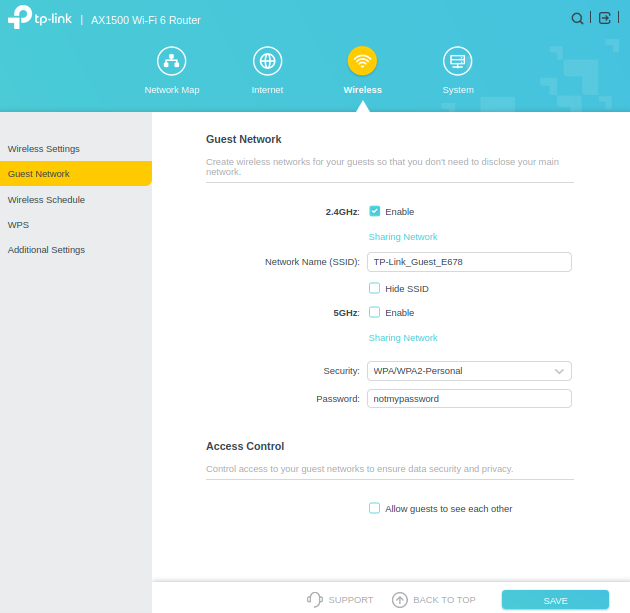
Method #1: If Your Router Has the Guest Network Feature
This method is the most convenient if your Wi-Fi router has a built-in option for a Guest Wi-Fi Network. The steps are:
- Make sure your computer is connected to the router using Ethernet or Wi-Fi.
- Open a web browser and enter the default router IP address. It could be something like 192.168.1.1.
- Once you see the login page, enter the login credentials for the router.
- Now, navigate to Guest Network from the Wi-Fi or Wireless menu.
- On this page, you can choose the password and bands (2.4GHz, 5GHz, and 6GHz) for the guest Wi-Fi network.
- When you enable a band, you will find an option to change the Network Name (SSID) as well. If you want something unique, it is time to add it.
- You should also choose the best available security protocol. I recommend going for WPA3.
- You can save the settings, and the guest Wi-Fi network will be available in a few minutes.
At this point, you can share the network details with guests or visitors at your place.
Method #2: If Your Router Lacks the Guest Network Feature
If your Wi-Fi router does not natively support a guest Wi-Fi network, you can still create one by investing in additional hardware. It is a suboptimal option because the access point will have the same configuration as the primary network. You can choose between a fully-fledged router or a Wi-Fi extender for this purpose.
On the bright side, you can set up the network name, password, and security options as you wish. As long as you avoid double-NAT conflicts, you can control what users can access through the access point. But if you ask me, you might as well upgrade your primary router to one with the guest Wi-Fi network feature if you are spending money on another router.
As you can see, it does not take a rocket scientist to create a safe and secure guest Wi-Fi network for visitors and guests. You can use the same method for enterprise needs, but there must be additional security measures.
Why Should IoT Devices Be On A Guest Network?
Keeping IoT devices on a guest network is a security measure.
As you may know, many IoT devices are still vulnerable to hacking attempts. Because there are so many devices from diverse brands, fixing all such issues is a difficult affair. Keeping this point in mind, it does not make sense to keep all the IoT devices on the main Wi-Fi network.
If you do that, a threat actor can exploit the vulnerability of the IoT device to access your network. You can probably guess the repercussions of such unauthorized access. By keeping all your IoT devices on a guest Wi-Fi network, you can solve this problem.
Even if someone manages to exploit the issue, they won’t have access to the main network.
Wrapping Up
While easy to set up, a guest Wi-Fi network goes a long way in terms of network security. It is a convenient solution for staying polite and secure at the same time. Because you know the guest Wi-Fi network is secure, you can even set up a QR code for easy login.
