

These days, Wi-Fi routers have become powerful enough to cater to our connectivity needs. However, many router vendors still use suboptimal firmware to power these devices, and it can limit your possibilities for control and performance.
Fortunately, the DD-WRT router firmware is a solution. You may have heard of DD-WRT if you have searched for third-party firmware for your routers. In this guide, I will explain what a DD-WRT router is.
What is DD-WRT Firmware?
DD-WRT is an open-source firmware that is designed for wireless routers and access points. It is a Linux-based open-source system that you can install and manage without paying anything. When you install DD-WRT on a Wi-Fi router, it will replace the firmware that the router came with.
For instance, a TP-Link router will be running the TP-Link firmware by default. You can, however, install a third-party firmware like DD-WRT for additional control and benefits. DD-WRT is a popular choice because of its reliability, feature set, and compatibility with a wider set of routers and access points.
DD-WRT had its initial release in 2005, and the project has been actively running for the past 20 years. It was first released for a Linksys router, but the list of supported routers has grown dramatically since then. At the time of writing, the DD-WRT firmware is available for thousands of Wi-Fi router models.
The name DD-WRT is an interesting combination. The first part, DD, refers to the German license plate letters for Dresden, the area where the development team used to reside. The second part, WRT, was taken from the model number of the Linksys router, WRT54G, which is believed to be a short form of wireless router.
Core Features of DD-WRT Firmware
I shall now take you through the significant features of DD-WRT firmware.
#1 Multiple Network Modes
Support for multiple network modes is probably the best feature of the DD-WRT Firmware. This feature lets you use your Wi-Fi router in three modes, which are Access Point, Client Bridge, and Repeater. So, you can convert your Wi-Fi router into a Wi-Fi repeater, or a device that connects one network to another one.
#2 QoS Settings
Quality of Service settings are great when you want optimized performance from your network. DD-WRT will help you access these settings by limiting and prioritizing the bandwidth consumption of different apps and devices. DD-WRT also lets you set up these rules based on IP address and MAC address.
#3 VPN Support
We still see many routers without support for network-wide VPN. By installing DD-WRT on your router, you can bring in native support for VPN. At the time of writing, DD-WRT works with VPN protocols like OpenVPN, PPTP, and L2TP.
#4 DNS Caching
DNS caching and forwarding are also great features in the DD-WRT firmware. DNS caching can speed up the website loading process, whereas DNS forwarding will always help you choose the correct DNS server for resolving queries.
#5 Firewall Options
You get an advanced network firewall from DDWRT as well. This firewall is known for being better than the default one that you get on most routers. The Stateful Packet Inspection (SPI) firewall is great for analyzing the traffic and blocking the bad ones based on packets.
By the way, the actual list of DD-WRT features is quite lengthy. It includes options like Dynamic DNS, Wake-on-LAN, overclocking, transmission power control, SSH, Tor support, Universal Plug and Play (UPnP), RADIUS, multiple SSIDs, etc.
Benefits of Flashing a Router with DD-WRT
Here are the core benefits of flashing your Wi-Fi router with the DD-WRT firmware:
Additional Features
As I said earlier, you get an impressive set of features when you flash a router with DD-WRT. So, it becomes a better way to get these features than purchasing a brand-new Wi-Fi router with the said features. Provided that DD-WRT is compatible with older and newer Wi-Fi models, you can bring these additional features to a not-so-modern router as well. You would also appreciate the active development community behind the DD-WRT firmware. If you have an old router that supports Wi-Fi Extender mode, you can flash the DD-WRT firmware to bring that option to the router.
Better Performance
Because you get more control over different modules, DD-WRT firmware can help you improve the network performance to an extent. Something that I really love is power transmission control, which lets me adjust the processing/transmission power of the router, thus affecting the range. You will also benefit from the QoS features on the firmware. I also like DD-WRT for allowing the overclocking option, which can enhance the way you use the router’s processing power.
Advanced Security
Your Wi-Fi router comes with a stock firmware that offers basic security features for a firewall and intrusion detection. But these can be insufficient for many purposes. But with DDWRT firmware, you get an additional set of features such as enhanced firewall, VPN support, and network segmentation. Because it is an open-source project, you are likely to get faster updates without waiting for a long time. It is also future-proof in that there is native support for IPv6 and performance tracking.
Customization & Control
While the additional features are appealing, most users rely on the DD-WRT for the customization/control it offers compared to other router firmware. It also helps that threat actors do not target this router firmware as much as they target others, such as TP-Link or NETGEAR firmware. So, you get to enjoy the type of control that router vendors will never give you, without serious concerns over security and vulnerabilities.
It also helps you find a super-active user community for the DD-WRT firmware. So, when you want to flash the firmware or fix some potential issues, you can find sufficient resources on the web. I believe this alone adds to the confidence you have to try things out.
How to Install DD-WRT on Your Router
You can install DD-WRT on your router using three different methods. However, I want to recommend the easiest one.
Step #1
Before you begin the first step, you should check whether your router is supported by DD-WRT. The task is simple. You can visit the Supported Device page on the DD-WRT website and the Downloads page.
I recommend matching the exact model number of the router on the safe side. If the model number seems the same, you might want to check other details like voltage. You can probably find the Wiki page with the directions for installation and the link to the DD-WRT firmware for the model.
Make sure you keep the file in an accessible space.
Step #2
It is important that settings from the previous configuration do not interfere with the DD-WRT configuration. So, to make sure that doesn’t happen, you need to reset the Wi-Fi router that you are trying to flash. I recommend using the reset button, which you can find on the back of the router. Keep in mind that a factory reset will remove all your settings and data from the device and restore default credentials.
Step #3
In this step, you need to log in to the Wi-Fi router dashboard and upload the DD-WRT firmware. You would get there by:
- Make sure that your device is connected to the Wi-Fi router
- Open a web browser and open the Web GUI by entering the default router IP address. For most Wi-Fi routers, the address is 192.168.1.1. You should, however, double-check the router label or the packaging.
- Now, navigate to Administration > Firmware Upgrade.

- You should now see an interface that lets you browse and choose the firmware file. Select the DD-WRT firmware you downloaded earlier and upload it.
- Now, click the Upgrade button and stay patient until you see a Confirmation page.
- You MUST wait for 5 minutes before clicking the Continue/Yes button. The system will adjust to the new firmware during this period.
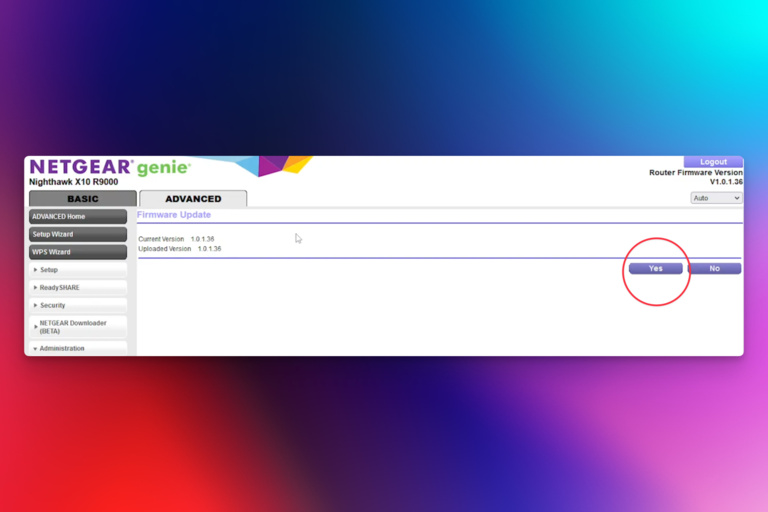
If everything went well, you should see the login page for the DD-WRT web interface. But you are not done yet.
Step #4
Before you follow this step, you must check if the DD-WRT firmware is working. You should explore different sections of the web GUI and see whether you can interact with everything. Once you are sure, you need to reset the router again.

To do this, log in to the router web GUI (which should now be DD-WRT) and navigate to Administration > Reset. Follow the on-screen instructions to complete the Reset process.
At this point, your router should be working without a glitch, and you can enjoy all the goodness of the DD-WRT firmware. You should first change the router login credentials to prevent unauthorized access.
Top 3 DD-WRT Routers
I shall now tell you about the top three routers where you can set up DD-WRT. Don’t worry; we have picks from different budget categories.
#1 ASUS RT-AX57 Wi-Fi Router
If you have a budget of around $100, the ASUS RT-AX57 Wi-Fi Router is one of the best DD-WRT-compatible options on the market. This heavy-duty Wi-Fi 6 router from ASUS packs a punch in terms of features like MU-MIMO, OFDMA, and AiMesh compatibility. However, with the DD-WRT firmware, you can explore additional features with no performance limits.
#2 Linksys E2500 Wi-Fi Router
If you are looking for a well-performing Wi-Fi router that does not break the bank, you should consider the Linksys E2500 Wi-Fi Router. This router is popular for its seamless compatibility with DD-WRT, and the setup process is easier as well. However, you must keep in mind that the Linksys E2500 has a maximum speed of only 600 Mbps.
#3 TP-Link AC1750 Wi-Fi Router
If you need something in the middle, you might want to consider the TP-Link AC1750 Wi-Fi Router for your DD-WRT needs. This router from the Archer series is popular for its maximum speed of 1.75 Gbps and the relatively easier setup for DD-WRT. Considering the features you get from the package, the pricing is quite value-focused.
Wrapping Up
I am sure you have a better idea about and a better appreciation for the DD-WRT firmware now. I know that the setup requires time and effort, but the benefits of DD-WRT are worth the effort. However, backups are your friend when tinkering with anything related to firmware.
