AI browsers have become so hyped that you would have come across a few already. In their defense, these browsers offer an innovative way to browse the Internet. But if you feel that all AI browsers are essentially the same, you should meet Strawberry Browser. We have been testing this AI-powered browser for about two weeks now, and here is a comprehensive review covering the experience, pros, cons, and ideal use cases.
What Is Strawberry Browser?
Strawberry Browser is an AI-powered browser with built-in agentic capabilities. It differs from a typical AI browser that integrates ChatGPT into its features. Instead, Strawberry Browser calls itself the self-driving web browser that can bring AI-powered automation into your existing workflows.
Designed by Dendrite Systems, Strawberry Browser is currently available for macOS. You can choose from one of the free or paid plans, but please note that you may have to wait on a waitlist.
As far as promises go, this sounds amazing. So, when we came across Strawberry, we wanted to test it out. For the past two weeks, we have been using Strawberry Browser as the default browser on our M2 MacBook Air. We wanted to see how effective this browser is in integrating AI for better productivity.
Key Features of Strawberry Browser
We shall now see the key features of Strawberry Browser and how they perform:
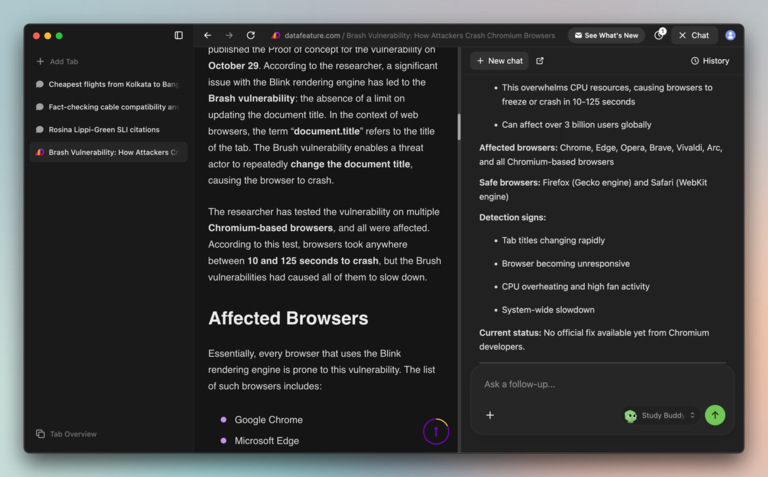
To begin with, you have a web browser that resembles many other Chromium-based ones. You can view all your tabs on the vertical bar and the URL at the top. Strawberry lets you launch the chat interface using the Chat button as well. This means you can access all the standard AI-based functions from the get-go. You can, for instance, ask Strawberry Browser to summarize a tab or ask for other suggestions.
However, the real USP of Strawberry Browser is called Companions.
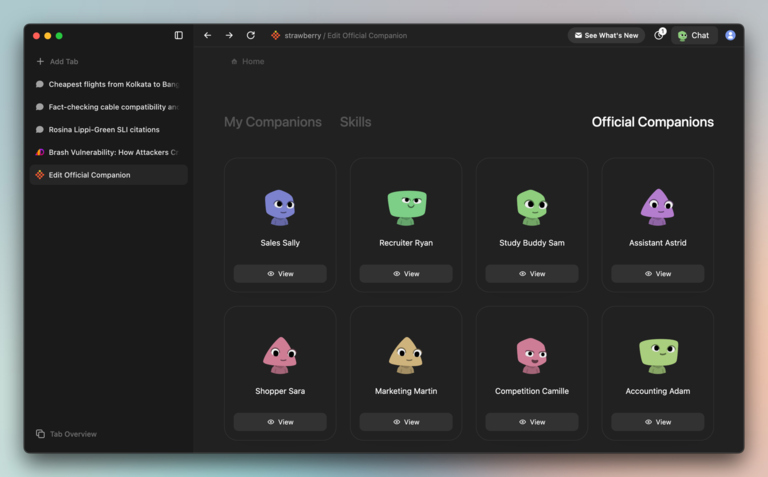
Strawberry Browser takes a bold step towards agentic browsing, and Companions are what make it work. You can think of companions as specialized assistants who can understand the browsing context and work with you. If you feel the following companions are not enough, you can create your own as well:
- Sales Sally: This companion helps with cold outreach, lead generation, and prospect follow-up. This assistant is designed for marketers who work closely with Sales Teams.
- Recruiter Ryan: Strawberry Browser has made this companion to help you with the hiring process. This assistant can help you find talent, job descriptions, and even assist with candidate screening.
- Extractor Ella: Ella is designed to help you with structured data extraction. You can give this assistant a document containing data, and the rest is taken care of.
- Competition Camille: Designed to assist you with market research, Camille helps with market data tracking, competitor analysis, and more.
- Assistant Astrid: Strawberry Browser also features a general-purpose assistant that can handle tasks such as email, calendar, and appointments.
In addition to these, Strawberry has made other companions like Study Buddy Sam, Developer Daphne, VC Veloria, Shopper Sara, Marketing Martin, and E-com Eric. You can also customize each of these companions to suit your specific needs.
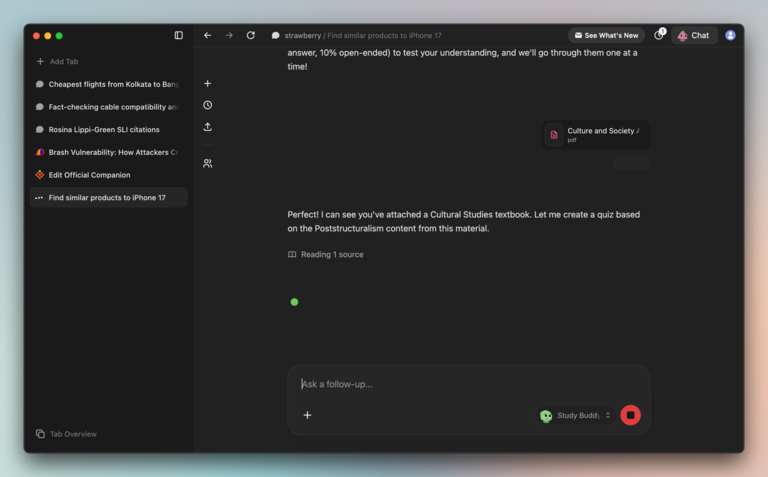
Something unique here is that these Companions are not overpowered chatbots. Instead, they are designed to help you with real tasks on the web. I think you will understand this better through an example.
Let’s say that you want to book a flight ticket. Instead of doing the manual search by yourself, you can ask a Companion to do it for you. In this case, we would go to Assistant Astrid, who can handle many tasks. Once you have given the basic requirements, the assistant will start its work.
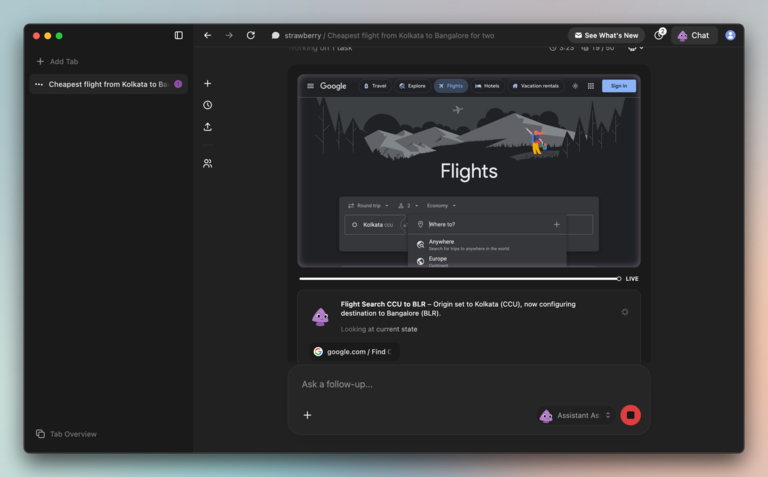
The companion first creates a plan for carrying out the task. Once the plan is ready, you can click the Start Browsing button to let Strawberry do the job. Once the task has been started, Strawberry will show a preview of what it is doing. You can visit the tab at any time to make your input. Strawberry often asks for help with CAPTCHA or sign-ups.
The option to Take Over or Stop is also pretty great from a control standpoint.
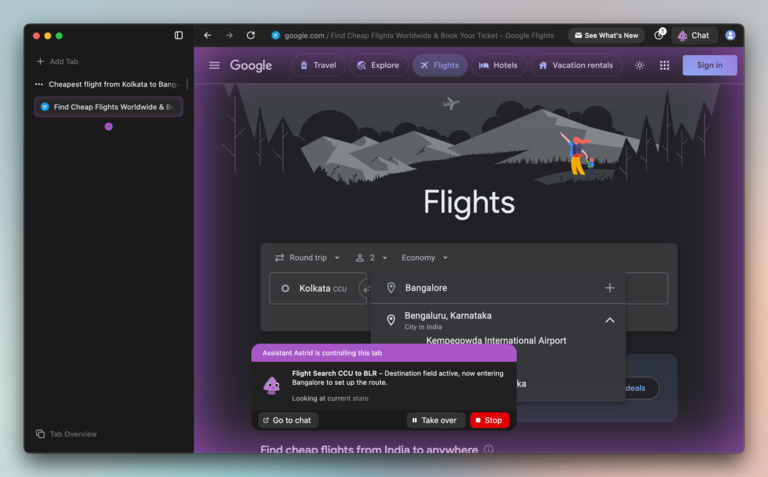
By the time you have completed something else, Strawberry will have picked a flight deal according to the request. You can then proceed with the booking or try something else. This is one of the many ways you can utilize Strawberry to save time while staying productive.
We should also appreciate how Strawberry Browser handles privacy. It does not take over your entire digital world. Instead, the browser and its Companions take caution while dealing with sensitive stuff. You will be receiving notifications and approval requests.
Strawberry Browser is also one of the most intuitive AI-agentic browsers we’ve come across.
Ideal Use Cases
Here are some ideal use cases for Strawberry Browser:
- If you are in Sales, you can ask Sales Sally to manage your corporate contacts or CRM information. It can also help you with lead generation or appointment management. Sally can automate tasks that may otherwise take minutes or hours of your time.
- Recruiter Ryan is a great option for those who work in the Hiring sector. This assistant can help you with preliminary screening and search options, starting with job descriptions. Ryan can also assist with the interview process.
- Professionals in the market research industry can also benefit from Strawberry. You can use multiple companions for market research, planning, and competitor analysis.
We must also underscore the power of new Companions and custom ones. For instance, Astrid may not have unique skills like Sally or Ryan, but the general assistant Astrid can do amazing things. So, you should consider customizing this general assistant.
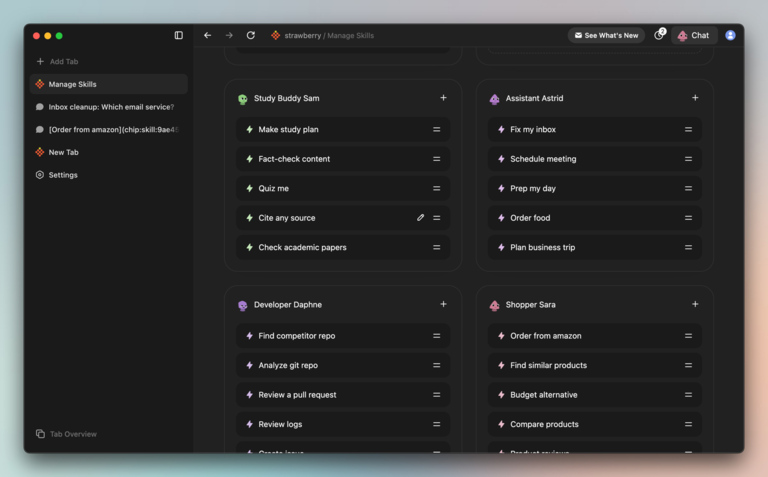
Strawberry also makes it easy to customize the skills of each Companion. This way, you can mix and match various skills to create a system that suits your needs.
Pricing & Availability
Strawberry Browser is currently available for macOS. There is no confirmation if the developers plan to release a version for Windows and other platforms.
The free plan provides 2000 credits, but you must join the waitlist. Pro and Ultra plans from Strawberry are priced at $20 and $250 per month, respectively. The premium plans provide instant access to the browser.
We liked how Strawberry Browser offers an estimate of credits/time before any task. This way, you can avoid surprises.
Pros and Cons of Strawberry Browser
Here are some pros and cons of Strawberry Browser:
Pros
- Automates repetitive web tasks such as form-filling and data extraction.
- Uses natural-language instructions to guide AI agents in workflows.
- Supports multi-step automation across tabs and web apps.
- Prioritises privacy with local data handling and explicit action approvals.
- Improves productivity for research, content, and lead-generation workflows.
Cons
- Performance may feel slower than mainstream browsers.
- Free-tier limits can restrict heavy usage.
- Complex workflows involve a learning curve.
- Some integrations and extensions are still limited or under development.
Wrapping Up
After using Strawberry Browser for over two weeks, we are thoroughly impressed. It was one of the reasons to include this browser in our coverage of the Best AI browsers for smarter working. Given that you can use the free trial, I recommend you check out Strawberry Browser and see how it can help.