Given how AI is becoming an integral part of almost all aspects of our lives, AI browsers are part of a natural progression. Every other web browser out there is integrating AI features into existing ones or developing new projects. However, finding the AI browser that you actually need for faster and smarter use can actually help you. I have compiled a top 5 list of the best AI browsers.
What Are AI Browsers?
AI Browsers are essentially web browser applications that integrate Artificial Intelligence at numerous levels. Traditional web browsers were designed to display web pages using a rendering engine, and the user had to take care of navigation and input.
AI browsers, on the other hand, are designed to understand the context of a webpage, interpret the data, and generate content using an AI/LLM engine. As a result, AI browsers can provide you with more than pre-designed content. It can offer summaries and explanations along with automation. Since the browser engine itself is powerful, AI browsers require minimal extensions. Most actions require a faster Internet connection because the browser needs cloud-based AI resources to provide the results.
Let’s imagine a scenario where you are browsing the Amazon page for a product and want to know how it is priced elsewhere. On a conventional browser, you need to open multiple tabs and navigate between them. On an AI browser, you can ask the Chat function to find the price range, and it will do the rest. If you think about it, context awareness is what makes AI browsers distinct from what we are familiar with.
AI agents also make AI browsers unique! These are integrated AI tools that can complete full tasks across a web browser. For instance, you can ask an AI agent to prepare a literature review of a given topic or to find places that are hiring for a specific position. AI agents work as well as they do because the AI browser retains an active memory of what a user does.
Overall, AI browsers appear to be the next step towards a faster, smarter Internet.
Traditional Browser vs AI Browser
Here is how AI browsers differ from traditional browsers in some key functions.
Feature | Traditional Browsers | AI Browsers |
|---|---|---|
Core Function | Displays web pages as-is | Interprets and generates content using AI |
Interaction | Manual navigation | Conversational, task-driven |
Content Handling | Standard rendering of content | Summaries, explanations, transformations |
Personalization | Basic, history-based | Adaptive, intent-based |
Automation | Limited; extension-dependent | Built-in task automation |
Search | Keyword search | AI-interpreted results |
Extensions | Heavy reliance on add-ons | Fewer needed due to integrated AI |
Privacy | Mostly local data | Often cloud-processed |
Performance | Generally faster and lighter | Heavier due to AI tasks |
Use Cases | Everyday browsing and media | Research, writing, workflow help |
Learning Curve | Minimal and predictable | Intuitive and requires trust in AI |
As a result of these differences, AI browsers can offer numerous benefits, including enhanced contextual browsing and improved automation. However, they may also pose privacy-based concerns, as your data will be sent to LLMs and other AI engines.
AI Browser vs AI Extension
You should also understand the difference between an AI browser and a browser with an AI extension.
Feature | AI Browsers | Browsers with AI Extensions |
|---|---|---|
Integration Level | AI is built into the core browser | AI added as an optional plugin |
Performance | Optimized for AI tasks; smoother AI workflows | Depends on extension quality; can feel bolted-on |
Features | Native summarization, automation, smart search | Limited to what the extension provides |
Consistency | Unified design and behavior across tools | Varies by extension; uneven experience |
Privacy | AI processing often part of browser’s system | Data handled separately by each extension |
Updates | AI features updated with browser updates | Extension updates may lag or break |
Resource Usage | Heavier due to integrated AI layer | Lighter; AI runs only when extension is triggered |
User Experience | Seamless, conversational, task-based | Traditional browsing with optional AI boosts |
Reliability | Usually more stable AI functions | Can crash or conflict with other extensions |
Ideal User | People wanting an AI-first workflow | People who prefer classic browsing with occasional AI help |
You should consider these points when deciding between these two options. I will be skipping browsers with AI extensions for this list. Instead, we shall look at fully-fledged AI browsers.
How to Choose the Right AI Browser
When selecting an AI browser for your needs, consider the following aspects.
Native/Extension
I have already explained the differences between a native AI browser and a browser with an AI extension. It is thus essential to choose one of these options based on your specific needs. For instance, if you want full automation and agentic operation, you probably need a dedicated AI browser. Otherwise, a conventional browser with an AI extension would suffice.
AI Model & Features
You must pay attention to the AI model and features in use. First, the AI browser must have access to a well-reputed and efficient AI model. Moreover, these AI-powered features must be accessible across all browsers. For instance, context-awareness and automation tools will determine how productive an AI browser can make your life.
Performance Impact
You may want to run other applications and tasks even when your AI browser is active. Therefore, you should check the performance impact of these browser apps. Keep in mind that browsers with native AI models will consume more CPU/RAM resources than cloud-based ones. Stability during long browsing/automation tasks is also essential.
Use-Case
Not all AI browsers are made for the same demographic. Therefore, you should check whether the browser is suitable for your use case. For instance, you may need more automation tools to optimize your workflow. However, a researcher may prefer having advanced tools for data interpretation and summarization. Making this pick can make or break your case.
Privacy and Control
You don’t have to give up entirely on privacy just because of AI features. You should at least be able to find a viable balance between data privacy and productivity. Fortunately, you have options from companies that don’t sell your data or use it for training AI models.
In addition to these, factors like pricing, availability, and generative features must also be considered.
Top 5 AI Browsers
Based on the factors above, we have selected the top 5 AI browsers.
#1 Perplexity Comet: Best for Research & Automation
- From: Perplexity
- Availability: macOS, Windows
- Pricing: Freemium
Comet from Perplexity was one of the first AI browsers to leverage the AI browser hype. Perplexity says this new browser is like a digital assistant that can do tasks for you. It heavily integrates the popular AI platform, Perplexity, into every nook and corner of the web browser. This also means you need a Perplexity account to get the best out of Comet.
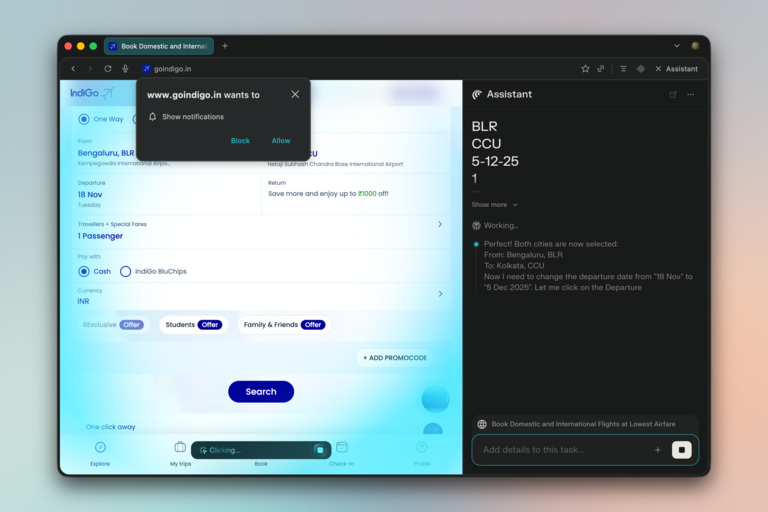
Comet is an excellent option for researchers who require advanced features such as citation management, source management, and summaries. It does an impressive job of handling multiple sources across tabs. Like other AI browsers, Comet also allows you to access the AI assistant from the sidebar at any time. You can also benefit from these features if you work in analytics or consultancy.
However, we must add that Comet takes a toll on system resources. It can impact multitasking when using the web browser for automated browsing/other tasks. You may also have concerns about how Comet handles your data, as Perplexity is known for its intense tracking. The web browser currently does not have ads, but you may expect them soon.
Comet is free to use and requires a Perplexity account. Advanced features, such as agentic browsing, require a paid plan from Perplexity.
#2 ChatGPT Atlas: Best for Seamless Browsing
- From: ChatGPT
- Availability: macOS
- Pricing: Free
If you are looking for a more seamless browsing experience with AI features, consider checking out ChatGPT Atlas. You can think of it as a browser that is highly integrated with ChatGPT, and you can access the AI in a few ways. It allows you to do so by opening a new tab, requesting ChatGPT from the Assistant interface on the side, or using the cursor to access certain features.
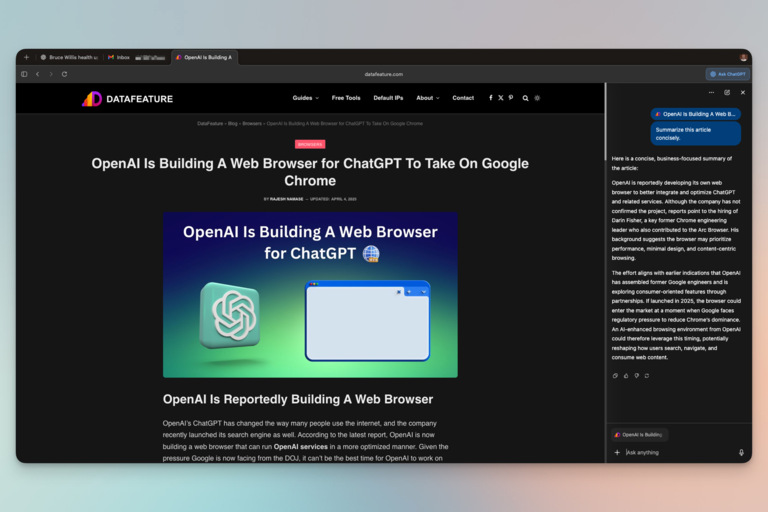
ChatGPT Atlas can make your browsing experience more seamless if you frequently use ChatGPT. For instance, memories from ChatGPT will be used to improve the responses and the assistant’s actions. Its memory and history work together great. For example, you can ask ChatGPT Atlas to open a webpage that you had opened the previous day.
There are, however, a few limitations. Firstly, Atlas is currently available only for Mac OS devices. Another issue is that many features, such as Agent, are Available only with a premium subscription. The browser lacks support for profiles, making it difficult to create separate spaces for different purposes. The tight integration with ChatGPT also means you have less control over the balance between functionality and productivity.
ChatGPT Atlas is free to use; however, the free plan may experience slower response times. If you want the top speed and performance, consider the Plus or Pro plans.
#3 Strawberry Browser
- From: Dendrite Systems
- Availability: macOS
- Pricing: Freemium
Strawberry Browser is an automation-focused AI browser that’s worth checking out. Compared to the other browsers we have covered here, Strawberry Browser is more optimized for specific workflows across various sectors. This AI-powered browser utilizes AI companions to assist with automated actions and workflows. It also presents a unique web browsing experience.

The team behind Strawberry Browser has already created several specialized companions, including Sales Sally, Recruiter Ryan, Competitor Camilla, and Assistant Astrid. While some of these companions are designed for specific tasks, such as recruiting or lead generation, others are intended for general assistance. Users also have the option to create their own companions that can assist them with specific tasks.
While the use cases are endless, there are a few caveats to consider. We noticed that Strawberry Browser is resource-intensive, especially when it browses on your behalf. Response times may also be slower during peak hours. It is also important to note that Strawberry Browser can be pretty expensive once you have exceeded the free limit.
Strawberry Browser is now available through a Waitlist mode for the free version. You can, however, get instant access to the Pro version by paying $20 per month.
#4 Dia Browser
- From: The Browser Company
- Availability: macOS
- Pricing: Freemium
Dia is a brand-new browser from The Browsing Company, the developer of Arc. Even though Arc offers a few AI-powered features for tab management and previews, Dia takes things even further. Dia is a fully-fledged AI browser that has content and agentic capabilities. Consider checking out this AI browser for enhanced control over browser actions.
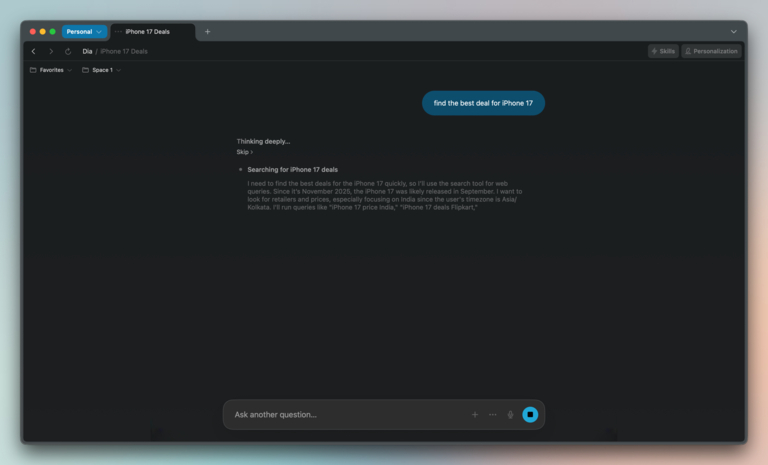
At its core, Dia is context-aware, and you can chat with your tabs and memories without any issues. Its smart address bar takes care of multiple aspects like navigation, web search, and your interactions with the AI model. As a result, you can manage everything from a single spot. The browser continues to learn from your browsing activities, and you can also create AI shortcuts tailored to your workflows.
While it feels nice and familiar to use Dia browser, thanks to its Chrome-like interface and context-aware AI systems, there are some issues. For instance, the Dia browser still contains some bugs that can impact the overall performance and speed of the system. Many features are also limited to the paid plans. This browser is currently only compatible with macOS.
You can download Dia Browser on your Mac and test out the basic features. However, you will have to pay for it down the road.
#5 Fellou
- From: Fellou
- Availability: macOS, Windows
- Pricing: Freemium
Fellou could be one of the best agentic AI browsers you can find today. It packs so many features that help you save minutes, if not hours, every single day. It feels easy to get started with Fellou, but you unlock a great set of tools after the setup. You get to choose between multiple result options before you press the Enter button. For instance, you can set up Fellou to even create a fully-fledged webpage.
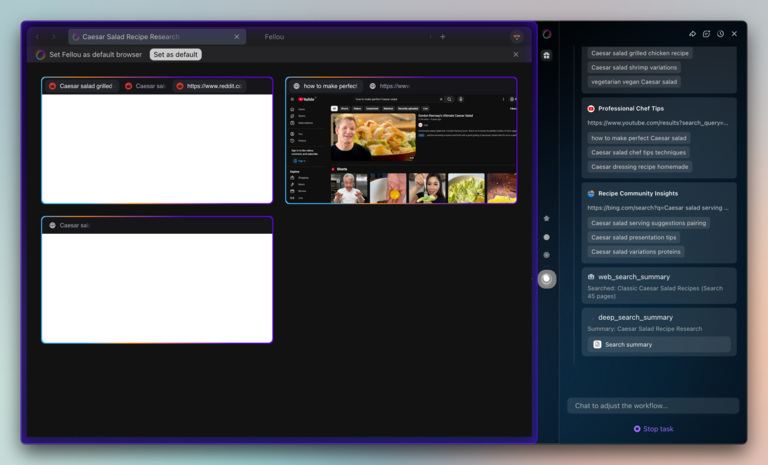
Once Fellou starts working, you get a real-time preview of multiple tabs. Compared to other AI browsers we have come across, Fellou is faster and smarter. Please note that you may occasionally need to assist Fellou with CAPTCHA or login systems. Multi-instance search is also a great feature built into Fellou, and it changes the way you deal with information from the web.
I also liked how Fellou offers impressive control over privacy-related factors. This way, you don’t have to get going with whatever the AI suggests. It is also impressive that Fellou asks for your permission before running a task. As a result, you don’t have to give in to full automation yet. Once you exhaust the included Sparks, it becomes quite expensive to continue using Fellou, though.
You can download and install Fellou on Windows and macOS devices. The free plan provides 1,000 Sparks, along with 2 scheduled tasks.
Wrapping Up
I am confident this guide helped you find some great AI browsers available in the market. I haven’t created a typical list with popular options. Instead, these insights are based on my experience with these browsers. And I have great hopes for options like Fellou and Strawberry Browser, which take agentic browsing to an impressive level.