
Arris routers and modems are popular among users and ISPs alike. Unsurprisingly, they are packaged with a number of internet service plans. While these devices work great out of the box, there are times when you need to reset your Arris router or modem. In this article, I will tell you all about the process and a few things to keep in mind during and after the reset process. We shall start with a basic process.
How To Log in to Arris Router
Depending on your situation, you may want to access the router’s settings page before resetting the router. For instance, you may want to back up the configuration settings. Here is how you can log into an Arris Wi-Fi router or modem-router combo.
- Make sure that your computer is connected to the Arris router’s network via Ethernet or Wi-Fi.
- Open a web browser and enter 192.168.0.1 or 192.168.1.1 in the address bar and wait for it to load
- When the login page appears, enter the credentials to log in. You can find these credentials on either the product packaging or the router.
In a second or so, you can see the Arris router dashboard. You can use this dashboard to modify your Wi-Fi network before proceeding with the Reset process.
What Happens When You Reset The ARRIS Modem?
When you reset the ARRIS modem, all the information on the device will be deleted. The modem will go to a state similar to how it was right after production: factory state. It is thus a great way to ensure that all the user-made changes are removed from the device. Here is a quick list of things that will happen when you reset an Arris modem.
- All user-made settings will be deleted, pushing the router/modem to the factory state.
- The router/modem will restore the default credentials for the Wi-Fi network and login page.
- All devices connected to the previous network(s) will be disconnected from the router.
- It may also remove Internet-related configurations from the router and modem.
If you are looking for these changes, you can proceed with the Reset process. For instance, if you forget the Wi-Fi network or the login password, a factory reset can help you regain access to the router. Similarly, it is a great way to ensure privacy before selling the router/modem.
How to Reset ARRIS Modem/Router
You can choose between two methods to reset your Arris modem/router. I will explain both options so that you can choose one that’s appropriate for your needs.
#1 Using the Reset Button
You can use the dedicated Factory Reset button on the Arris router to reset the device. This method is easier when you don’t remember the Wi-Fi password or cannot access the router login page. The steps are:
- Locate the Reset button on your Arris router/modem. You can find it next to the Ethernet ports or Power ports.
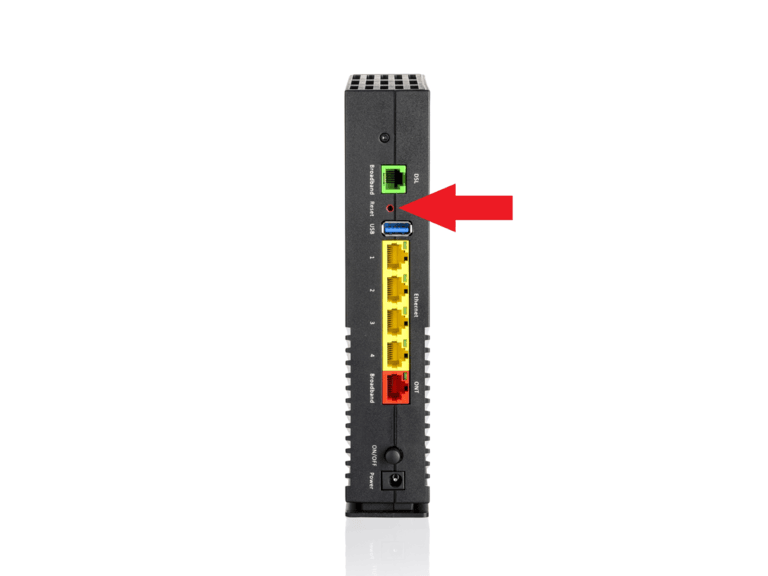
- Press and hold the button for up to 15 seconds or until you see the LED lights flashing.
- On some models, the reset process may take up to 10 minutes. So, patience will help you here.
- Once the Reset process is done, the LED lights will become stable. It means the device is ready for a fresh setup.
This method should work with almost every Arris router out there.
#2 Using Web Interface
You can use the web interface to reset the Arris router. This method is great if you still have access to the router and the network. The steps are as follows:
- Like we did in the first section, log in to your Arris router/modem by entering the login username and password.
- Once you have logged in to the router dashboard, navigate to Settings > Factory Reset.
- Choose Reset or Factory Reset from the available options on the page.
- Confirm the decision when you are asked to.
The router/modem will process the request, and the router lights will start blinking in a few seconds. Keep in mind that the web interface method will also cause all the changes we mentioned first.
Set Up ARRIS Router After Reset
Setting up the Arris router after a reset is pretty straightforward. Keep in mind that the router will now use the default credentials. So, the steps to configure the router are:
- Make sure that the router is powered on and that the LED lights are stable.
- Now, connect your computer/smartphone to the Arris router via Wi-Fi or Ethernet. If you prefer using Wi-Fi, you can find the default SSID and password on the router itself.
- Once you have connected to the router, open a web browser and access the default IP address. It is often located at IP addresses like 192.168.0.1 or 192.168.1.1.
- You can log in to the router by entering the default username and password. It could be something like admin and password or admin and admin.
- After you have logged in, you can proceed with the setup process. Modern routers from ARRIS will show you on-screen instructions on how to complete the connection.
At this point, you can modify the network and create a new Wi-Fi SSID with a unique password.
Wrapping Up
I have covered everything you should know about resetting your Arris modem and router. The steps should work with most models from ARRIS, especially if you use the Reset button method. No matter why you reset the Arris router, use the opportunity to improve your network security by setting up a unique password.
