
AT&T routers are easy to use for most purposes. However, you may have to modify the network settings or run troubleshooting at times. This means logging in to the AT&T router and making changes. If you are using Wi-Fi routers for the first time, it may seem a little challenging. Here is how you can log in to an AT&T router and access the dashboard, as well as tips on how to secure the AT&T router.
What is the AT&T Router Default Login?
Before you attempt to access the AT&T router dashboard, you must know the AT&T router default login. It refers to the username and password you need to log in to the router dashboard. Ideally, you can find these details on the router label or the product packaging.
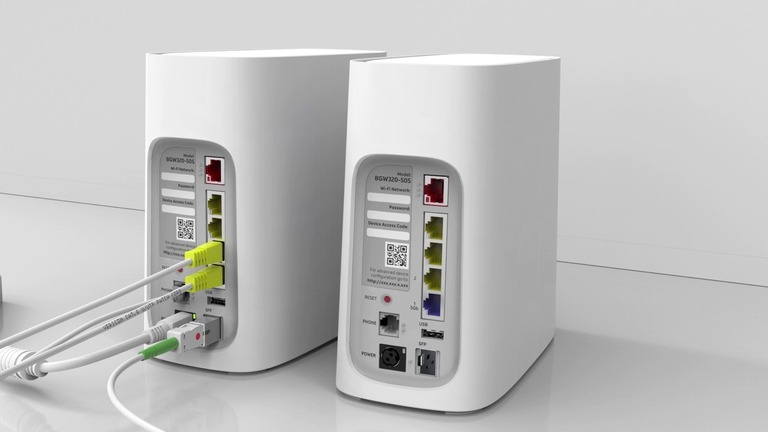
However, don’t worry if you lack access to any of these options. You can try the following combinations of AT&T default login credentials to access the dashboard.
Router Model / Login Page | Default Username | Default Password | Default IP Address |
|---|---|---|---|
Most AT&T Routers | (leave blank) | attadmin | |
Older or Generic Models | admin | admin | |
admin | password | ||
admin | 1234 | 192.168.1.250 | |
admin | (leave blank) | ||
(leave blank) | (leave blank) | ||
BGW320-500/510 Routers | (none) | Printed on router label (access code) | |
AT&T 5G Gateway | admin | admin (or as printed on device) |
As you can see, different AT&T router models have different default usernames and passwords. Yet, it is not a good idea to try random combinations. Instead, you should filter your options based on the model. For some devices, it is necessary to check the router label as they use randomized credentials for login.
The table also mentions the default IP address of some popular AT&T router models. You would need these details to access the dashboard.
How to Access the AT&T Router Dashboard
Now that you know the default IP address of the router and the login credentials, I can tell you how to access the AT&T router dashboard. Here are the steps you need to follow.
Note: I’ve gathered the login credentials and default IP address details for each AT&T router. However, it would be better if you could check the router label for accurate information. Given that modern routers ship with randomized credentials, you must do this at least once.
- Make sure that you have connected your computer to the AT&T router’s network. Though Wi-Fi may work fine, you should choose an Ethernet connection for better reliability.
- Open a web browser like Google Chrome or Microsoft Edge and enter the default IP address of the AT&T router.
- It may take a few seconds, but you will see the login page of the AT&T router dashboard.
- Now, depending on the options visible, enter the username and password to log in to the interface.
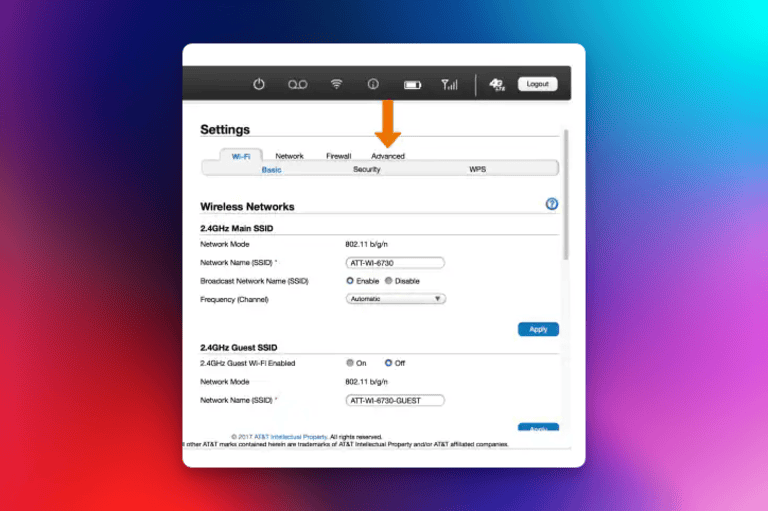
Voila! If you entered everything correctly, you should now be logged in to the AT&T router dashboard. Now, you can navigate the interface and access multiple modules of the AT&T router. For instance, you may want to change the default password of the Wi-Fi network and choose something more secure.
How to Secure an AT&T Router
The following steps will secure your AT&T router from potential security and privacy threats. You can follow these steps on most AT&T router models. That is, unless you are talking about a model-specific feature.
- Change Login Password: I highly recommend changing the login password for your AT&T router as soon as you log in. If you continue using the default password, anyone with access to your Wi-Fi router can modify the network and cause further problems. So, make sure you choose a complex password for the router login.
- Modify Wi-Fi Password: You should change the default password for the Wi-Fi network as well. Once again, a default option may make it easier for threat actors to access your network. You can solve this problem by choosing a more difficult password.
- Set Up Guest Networks: If your router has an option, you should enable a Guest Network. A Guest Network allows you to provide visitors with Internet access without sharing the core network with them. You don’t need to worry about other people leaking your password, either.
- Use Built-in Features: AT&T knows about potential security issues, and it packs many features into a router. So, you should check whether your router has security-focused features. If so, you can turn these features on.
- Use VPN: If possible, router-wide VPNs are a great way to secure your network. Even if you have a potential issue on the way, the additional encryption from the VPN can protect your AT&T router.
With these steps, you can ensure maximum security from your AT&T router.
Wrapping Up
I hope this guide helped you log in to the AT&T router and ensure better security. However, keep in mind that proactive steps are always required for better results. Even so, these steps are better than dealing with the bare minimum.
