
Having any of your devices hacked is a fearsome affair. However, when you have a hacked router, things are worse. A hacker having access to your router can manipulate virtually all devices on the network, including your computer, smartphone, and smart home appliances. Nevertheless, detecting when you have a hacked router and fixing the problem can be confusing.
In this guide, I will explain everything you should know about fixing a hacked router.
How Do Routers Get Hacked?
I will first tell you about a few ways Wi-Fi routers get hacked.
- Weak/Default Credentials: If you still use the admin-password combination for your router, you have no right to act surprised when it gets hacked. Keeping weak/default credentials for the router means anyone with access to the network can hijack the router. These days, hackers can automate attacks.
- Brute Force Attacks: Even when you have a semi-secure password for the Wi-Fi network, attackers can use brute force attacks to guess the passwords. However, it does not happen when you use hard-to-guess passwords.
- Software Issues: Wi-Fi routers are also vulnerable to software bugs, and hackers leverage these bugs to gain unauthorized access to your router. However, major Wi-Fi router manufacturers will release frequent firmware updates fixing such issues.

- Malware: Malware on your computer/smartphone can siphon Wi-Fi router credentials to hackers, who then use those credentials to access the Wi-Fi router. You can see such attacks in the enterprise sector, but they are expanding to residential sectors as well.
- Phishing: Phishing attacks are also used to hack Wi-Fi routers and hijack the network. They work by sending a legit-looking email to gullible customers, who type in the credentials on a fake page. When they enter the details, threat actors use this info to hack the router.
I have seen cases where attackers use a combination of these methods. Sometimes, a hacker might use one software vulnerability to show a particular message that leads to a fake page that collects router login info.
Similarly, when you use a common password for your Wi-Fi network, hackers can connect to this network to manipulate the settings and gain unauthorized access to the router settings.
Consequences of Hacked Routers
Depending on how connected your Wi-Fi router is, a hacked router can lead to many undesired situations. A few of them are:
- Change Wi-Fi Password: Most commonly, the hacker will push you off the network by modifying the router’s Wi-Fi password and network settings.
- DNS Hijacking: Because hackers can change the DNS settings, they can redirect users to legit-looking but malicious websites instead of the actual website.
- Intercept Data: Your router has access to many forms of encrypted data that you enter on your PC or smartphone. A hacker can access all this info, which includes passwords.
- Spread Malware: Some hacked routers can allow hackers to install malware on client devices. This happens when users don’t know that they have been hacked.
- Botnet Attacks: Once hacked, your Wi-Fi router becomes a part of the hackers’ network. They would use your network for fraudulent activities, including DDoS attacks.
- Control Smart Devices: A hacker can access smart home devices connected to the router as well. One could use these devices for crypto mining, spreading malware, etc.
- Data & Financial Theft: Using a variety of these methods, a hacker can use a compromised router to steal data and money from users.
As you can understand, it is not a good idea to ignore a hacked router. Leaving a router in that state would be like letting a serial killer occupy a room in your house.
8 Signs Your Router Has Been Hacked
Probably the biggest issue here is that you often don’t know that your router is hacked. I can’t blame you. A hacker keeps everything sneaky so that they can continue the exploitation for longer. You can watch out for the following 8 signs to check whether your router has been hacked.
Note: The following incidents alone do not mean that you have a hacked router. For instance, you might be facing a slow internet experience because some background apps are draining data. Similarly, you may have changed the router login credentials and forgotten the details. So, use your discretion!
Changed Wi-Fi Password
If you wake up one day and find all your Wi-Fi devices disconnected, it can be due to the changed password. As I said, changing the Wi-Fi network password is the first thing a hacker does after gaining access.
Failed Router Login
If you can no longer log in to the Wi-Fi router, it could mean a hacked router. An attacker may have changed the existing username and password for the router, causing the login to fail multiple times.
Continuous Redirects
Do you observe that your web browser is taking you to strange websites even if you enter the correct URL? It could be a result of DNS hijacking, something that attackers do when hacking your router.
Strange Pop-ups
Because attackers use your router to spread malware into your devices, you would also spot some strange pop-up messages across your devices. These pop-ups are not only annoying but also dangerous as they lead you to malicious sites/apps.
Device/Session Hijacking
Session hijacking refers to a situation in which you don’t have control of your device while browsing. An attacker may use this unauthorized control to access your device and the data you have stored, or ask for a ransom.
Unknown Devices on Network
Do you see unknown devices connected to the Wi-Fi network? It may happen when someone has gained access to the router and Wi-Fi password. Most of the time, these new devices will have strange names too.
Ransomware Threats
Routers can be used to deploy ransomware attacks onto connected devices, especially PCs. Sure, these malware threats may have gotten into your PC through a bad download or something. Even then, you don’t lose anything by checking out the router.
Terribly Slow Internet
Another common symptom of a hacked router is the awfully slow speed you get for downloads and uploads. You should be more careful if this happens all of a sudden. As I said, a bad Internet plan or a nearby outage can also cause these problems.
If you witness more than one issue we have covered, you can safely assume that your Wi-Fi router has been hacked. Even if you are not, following the steps I will cover now will definitely make your network secure, if anything. Shall we move to that part?
How to Fix a Hacked Router in 7 Easy Steps
Here is a step-by-step guide to fix a hacked router. These easy steps will help you regain control of your Wi-Fi router and reduce the chances of a hacker accessing the device or the network. You should follow these steps in the recommended order when you are somewhat sure that someone has hacked your router.
#1 Disconnect Devices
As I said, a hacker can manipulate the network and devices when they control your router. Some common issues include propagating malware and the use of devices for fraudulent activities. So, the first step is to disconnect all your devices from the router’s Wi-Fi network.
You should also remove any Ethernet cables to be on the safe side.
If your router has a dedicated button for Wi-Fi, you can use it to turn off Wi-Fi. It is your only option (assuming that you cannot access the web-based dashboard) to prevent the hacker from accessing all your devices.
#2 Factory Reset the Router
Factory resetting your Wi-Fi router is the best way to regain control. This way, all the changes that have been made to the router by the hacker will be removed, and you will have the router in its factory state.
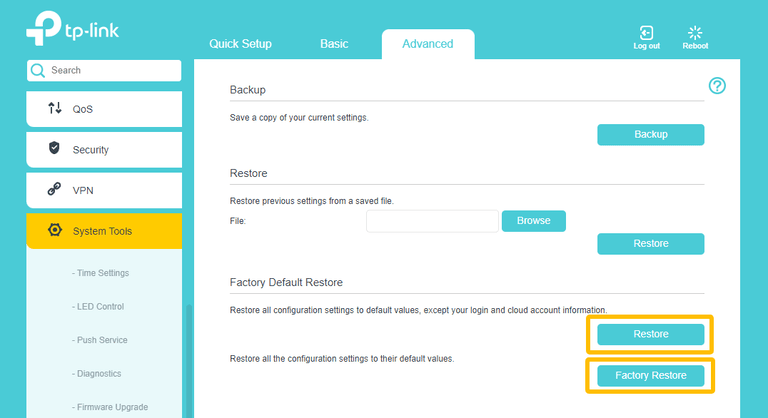
This will also remove all previous network configurations and will incur data loss. However, considering the fact that someone else has control over your network, data loss is not something that you should worry about.

As I said, you probably don’t have access to the web-based login where you can trigger a soft factory reset. It means you have to rely on the physical button for a factory reset. The steps are easy:
- Make sure you disconnect the WAN and LAN cables from the Wi-Fi router.
- Ensure that the router will have uninterrupted power for at least 20 minutes.
- Now, locate the Reset button on the back of the router. It could be a hidden button as well.
- Press and hold the button for at least 15 seconds until you see the LED lights flashing.
- The factory reset process may take up to 10-20 minutes in some cases; patience is key here.
Once the process is complete, you will see solid LED lights on the Wi-Fi router. It means your router has been restored to its factory state. At this point, you have temporarily stopped the hacker from accessing the Wi-Fi router. But, as you can guess, this is not enough.
#3 Setup Wi-Fi Network with New SSID and Password
Given that you want to continue using the router, you need to set up the Wi-Fi network. Using the default Wi-Fi SSID and password is the reason you are in this dip in the first place. So, as soon as you turn on the Wi-Fi router, replace the default network with something unique.
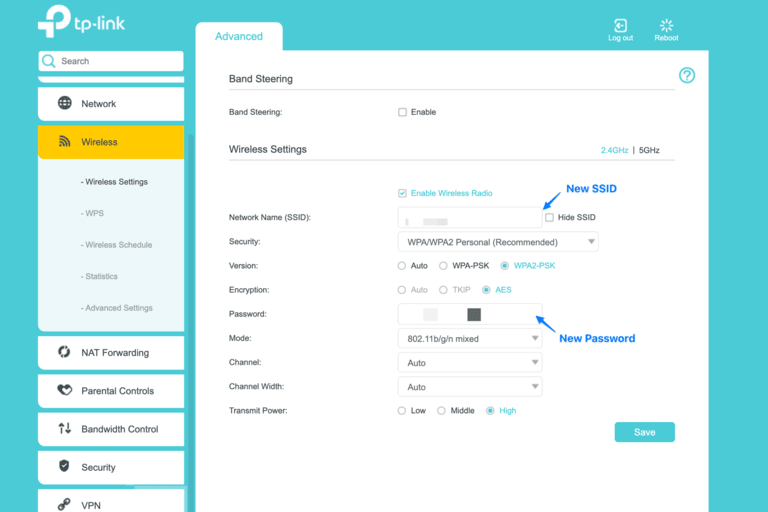
First, ensure that you use a complex password for the Wi-Fi network. The SSID must also be complex. You should also choose the WPA2 or WPA3 security standard for the network. Compared to old standards, these two can provide better protection from brute force attacks.
#4 Change Router Login Credentials
Most people these days are quick to change the credentials for the Wi-Fi network, including the SSID and the password. Most routers will actually prompt you to make these changes when you set up the network for the first time.
But most of us forget to change the router login credentials, which are the username and password that you enter when you visit the web-based dashboard. If you keep using the default password and username, which are mostly admin and password, any connected device can control the web-based user interface.
So, it is equally important, if not more, to change these credentials after the primary setup. You can do this by logging in to the web-based dashboard, navigating to settings, and entering the new password. I suggest changing even the unique password that your router ships with.
#5 Update Firmware
You should also update the router firmware to the latest version. This way, you can stop threat actors from exploiting system-level vulnerabilities. As I said, most Wi-Fi router manufacturers do a great job of tracking and fixing vulnerabilities before they become widespread.
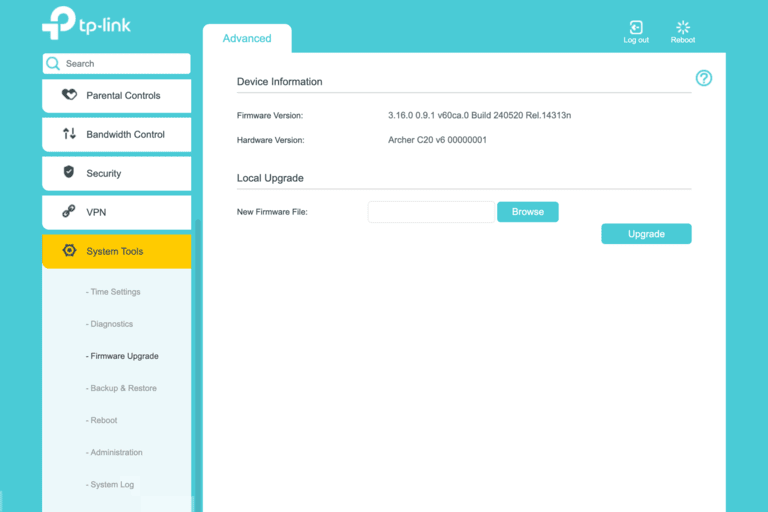
So, updating the firmware once in a while can go a long way.
#6 Turn Off WPS
WPS, which stands for Wi-Fi Protected Setup, is a handy feature for connecting devices. However, it brings a number of security vulnerabilities to the table. So, if I were you, I would trade the slight convenience that WPS offers for the additional security. Most routers have disabled WPS by default, but you can double-check this by navigating to Settings > Wireless > WPS.
#7 Turn Off Remote Management
I recommend turning off remote management features on your router. A hacker may have already used the option, and it is better to keep everything safer until you are more confident. Once again, you can do it by visiting the QoS page of your Wi-Fi router dashboard.
How to Prevent a Router Hack
Now that you have recovered a hacked router, the following tips will prevent future hacking attempts.
- Never use default credentials for the Wi-Fi network or the router login, even if you have to do factory resets.
- Stay careful while using value-added features like remote router access, port forwarding, etc.
- Never rely on outdated technologies like WPS, which may offer slightly better convenience but at the cost of security.
- Check your connected devices for potential malware, as they can steal your router login data.
- Don’t attempt flashing third-party router firmware if you don’t know about the repercussions.
- If possible, have a secondary/guest network for temporarily connected devices.
Wrap Up
I hope this guide helped you understand whether your router is hacked and how to recover it. I understand that you may panic when knowing that you have. Hacked device. But this is something you can easily solve through a factory reset and some security measures.
