Most people don’t think about it, but a lot happens when you open a webpage using a web browser. Given the speeds we enjoy, opening a website is done more quickly than copying a file from a USB drive. We owe it all to the incredible speed of the Internet, in which data travels at (almost) the speed of light. In this guide, I will try to share a few interesting things about the digital superhighway that makes the Internet possible.
What is a Data Packet?
You can think of a data packet as a small part of a file. On the Internet, files aren’t transferred as a whole. On the contrary, they are split into packets that weigh around 1,000 bytes to 1,500 bytes. These packets will then be brought together to form the file at the destination.

Let’s say that you are sending an attachment of 1 MB. This 1MB file will be split into hundreds or thousands of packets before they are sent to the Internet infrastructure. Now, certain protocols exist in order to help the computers reorganize the data packets into properly structured files.
Data packets are also designed to work with various paths on the Internet. If one path is unavailable, a data packet can take another route. In general, data packets will follow a route with the least resistance. It does not matter what type of content is used; everything turns into data packets in the world of the Internet.
How Does Data Travel on the Internet?
Now, we have already seen that data travels in the form of packets on the Internet. However, the Internet is not a direct connection between your device and the web server that hosts the information that you need. Instead, multiple intermediaries exist, and they follow unique protocols and patterns for data transfer. Here is a quick overview of how things happen.
Step #1: Data into Packets
Before the data can travel through the Internet infrastructure, it needs to be broken into data packets. Your devices may use various algorithms and protocols to do this conversion. In particular, it may use protocols like TCP and IP.
Step #2: Device to Router
Now, these data packets will move to the Internet router via wired or wireless methods. For wired options, an Ethernet cable will be used. For wireless connection, Wi-Fi is used. Here, the speed of data transfer would be based on the medium and environment.
Step #3: Router to Modem/ISP
At this point, the data will travel from the router to the Internet Service Provider’s infrastructure. There may be a modem in between to convert the digital data into analog signals. In this step, data travels through fiber-optic cables, coaxial cables, or copper wires.
Step #4: ISP to the Internet
The ISP’s infrastructure will forward the data packets towards the Internet superhighway. This superhighway is a vast network of high-speed fiber-optic cables that connects countries and continents. In this high-priority network, the data transfer speeds can get as high as 100 Tbps.
Step #5: The Internet to ISP to Destination
Now, the ISP of the destination comes into play. The packets are received by the destination ISP and then moved to the destination’s local network. Further, it makes its way to the web server, which processes your request.
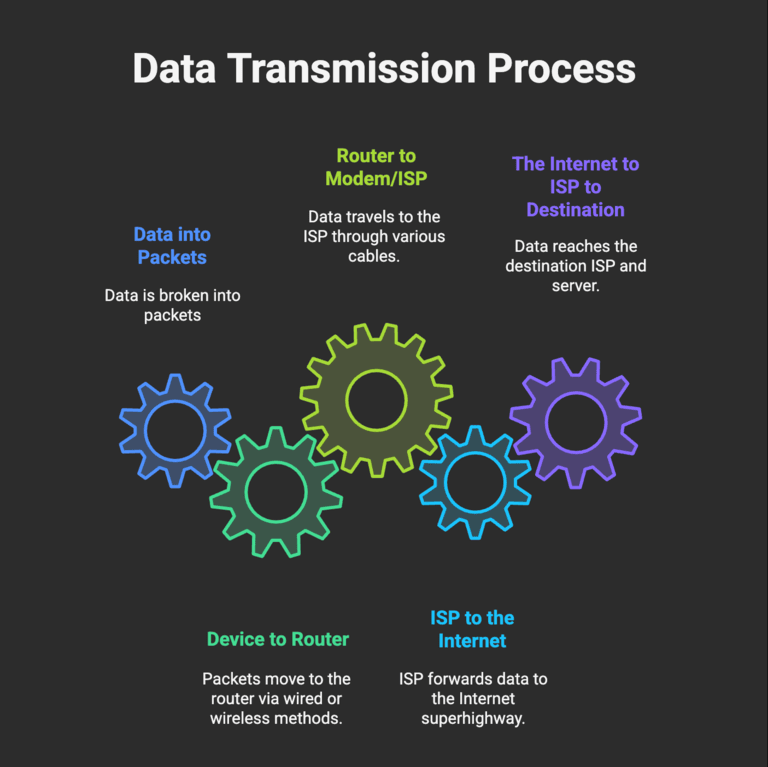
The process will be repeated in reverse order so that your device receives a response from the web server. Keep in mind that many tasks also take place between. For instance, frequent checks ensure the integrity of data packets. Similarly, Content Delivery Networks are used to cut down the distance.
Role of Internet Router
You can think of the Internet router as the intermediary between your local network and the Internet. The primary job of a router is to manage these two networks.
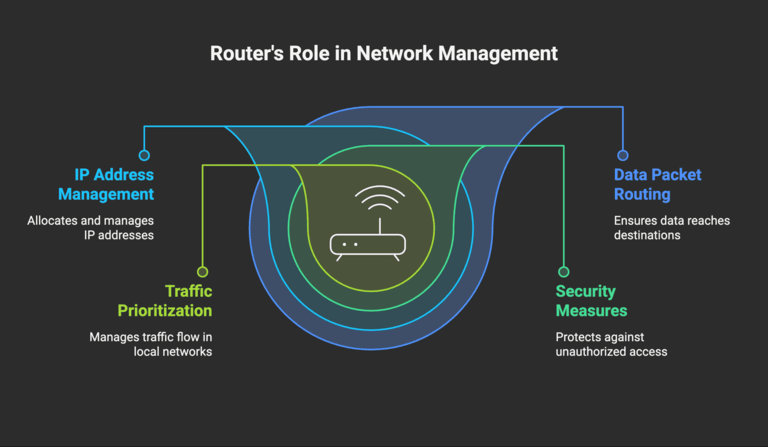
In this role, an Internet router will take care of the following tasks.
- Using routing tables to ensure that data packets reach their intended destinations.
- Take care of IP address allocation and management for connected devices.
- Use a firewall and other security measures to avoid unauthorized entries/attacks.
- In a local network, routers also take care of traffic prioritization and management.
In short, an Internet router is a necessity for connecting your devices, like smartphones and computers, to the Internet. These days, ISPs make use of hybrid devices that combine the modem and router functionalities into one single device.
How Fast Does Data Travel on the Internet?
As you have seen, multiple mediums are used for transferring data on the Internet. Depending on the specific medium, the speed will vary. Let’s take a quick look.
| Connection Segment | Medium/Connection Type | Typical Speed Range |
|---|---|---|
| Device ↔ Router | Ethernet (Twisted Pair) | 10 Mbps – 10 Gbps |
| Wi-Fi (Wireless) | 100 Mbps – 2.4 Gbps | |
| Router ↔ ISP | DSL (phone line) | 5 Mbps – 120 Mbps |
| Coaxial Cable | 25 Mbps – 1 Gbps (up to 10 Gbps) | |
| Fiber Optic | 100 Mbps – 10+ Gbps | |
| 5G Wireless | 100 Mbps – 1 Gbps (up to 10 Gbps) | |
| Satellite | 12 Mbps – 100 Mbps | |
| ISP ↔ Internet Backbone | Fiber Optic | 2.5 Gbps – 100+ Tbps |
As you can see in the table above, data travels the fastest between ISPs and the Internet backbone. Though fiber-optic cables are used here, they are optimized to deliver speeds as high as 100+ Tbps. In case you don’t know, 1 Tbps translates to 1,00,000 Gbps. This number shouldn’t surprise you when you think about the high demand for the Internet across the globe.
You should remember that data travels in the form of light through these fiber-optic cables. Because they’re in a vacuum, the data can reach 67% of the speed of light. The speed measured at this point is 200,000 km per second. That’s damn fast if you ask me.
Wrapping Up
I hope this guide helped you understand and appreciate the digital superhighway that powers your everyday web searches, Netflix streaming, and everything else on the Internet. This technology is growing as we speak, and the 100Tbps speed we now marvel at will be an old tale soon.