JavaScript is one of the crucial programming languages that enables the internet to function as it does. You might not notice its presence at the top, but JavaScript is used quite widely, and most of the websites that you know wouldn’t work without JavaScript. Therefore, it could be a problem if your browser does not have JavaScript enabled. In this guide, I will show you how to enable JavaScript on popular browsers.
Importance of Enabling JavaScript
Here are some reasons to enable JavaScript on your main web browser.
JavaScript is heavily used on websites with interactive elements, such as sliders, tabs, and dropdown menus. Without JavaScript, you would have a fairly unengaging experience with most sites. In many ways, JavaScript is also crucial for user experience.

More and more devices and web applications continue to use JavaScript because the script itself continues to evolve. For instance, popular platforms like Google Docs, Facebook, Twitter, YouTube, and many other websites you can recall use JavaScript to function correctly.
Without JavaScript, you won’t be able to enjoy multimedia playback on most websites, such as YouTube or Netflix. You would also face problems while trying to stream audio content through Spotify or other services. In fact, without JavaScript on your computer and web browser, you’d only see text and images.
Most real-time elements on your web page also use JavaScript. For instance, instant chat options, sports courses, and weather updates rely on JavaScript to retrieve information from a single source and display it directly without delay. In short, all these features will become non-functional when JavaScript is disabled.
Therefore, unless you have specific needs, it is recommended that you keep JavaScript enabled in your web browser.
How to Enable JavaScript
Please note that JavaScript is enabled by default in most web browsers. Unless you have made customized changes, this feature should function properly. For one, you may have installed an ad blocker or a security suite that has disabled JavaScript for additional purposes.
In that case, if you feel like the JavaScript elements on a web page are not functioning as they should, you can try the steps given below to enable JavaScript on popular browsers like Mozilla Firefox, Internet Explorer, Safari, Google Chrome, etc.
On Mozilla Firefox
You can use this method to enable JavaScript on any desktop version of Mozilla Firefox.
- Open Mozilla Firefox on your computer and wait till it loads
- In the URL bar, enter the following address and press Enter.
about:config
- When you see the Proceed with Caution message, click the Accept the Risk and Continue button to proceed.

- Use the search bar to find an entry named JavaScript.enabled. Ensure that the value is “True”. If not, you can use the Toggle button to change it to True.
On Internet Explorer
If you still use Internet Explorer (you shouldn’t), you can follow these steps to enable JavaScript on it.
- Open Internet Explorer on your computer
- On the window, you can find a Gear icon in the top-right portion. Click the button and choose Internet Options from the menu.
- Navigate to the Security tab and choose Internet zone
- Select Custom Level Settings and scroll down until you see a section named Scripting
- You should now see an option labeled ‘Active Scripting’.
- Ensure that the option is enabled.
You can now restart Internet Explorer for the change to take effect. At this point, you can access all websites with JavaScript capabilities.
On Opera
Here are the steps to enable JavaScript on the latest version of the Opera browser.
- Open the Opera browser on your PC or Mac.
- Open the Settings page from the File menu or by clicking the Opera button on the right side.
- Once you open Settings, navigate to Privacy Security > Site Settings.
- Scroll down until you see an option labeled “JavaScript.”
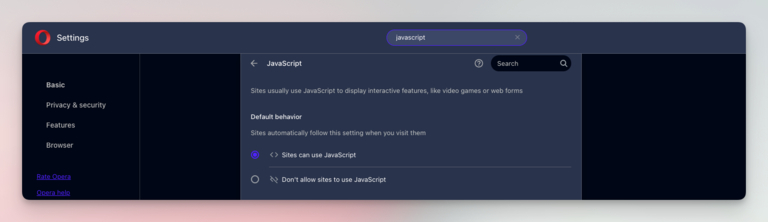
- On the upcoming page, select “Sites can use JavaScript.”
- You can also find an option to customize the behavior for specific websites.
You may have to restart the Opera browser for this change to take effect. After that, all JS-based apps should work fine.
On Safari
Safari, the official browser built into macOS, also lets you enable JavaScript. Here’s how you can go about it.
- Open Safari on your Mac
- Go to Safari > Preferences
- Navigate to the Security tab

- Check the option called “Enable JavaScript.”
- Close the Preferences tab.
- Restart Safari if you want to.
That’s it. Your Safari browser should now be loading JavaScript content without any issues.
On Google Chrome
Google Chrome also makes it easy to turn JavaScript on and off based on your needs. Here are the steps you need to follow.
- Open Google Chrome on your computer
- Use the three-dot menu and choose Settings
- Go to the Privacy and Security tab from the sidebar
- Scroll down and click Site settings, and select JavaScript from the given options

- Check the option labeled “Sites can use JavaScript.”
- Close the tab, and JavaScript should work fine.
That was pretty simple, wasn’t it?
When to Disable JavaScript
Here are a few reasons to disable JavaScript on your web browser, though.
- You can turn off JavaScript on websites that you don’t trust, as JS can be used to exploit vulnerabilities and other issues.
- If you think JavaScript elements are slowing down a website, you can disable JavaScript for a specific website or across the web browser.
- You may want to disable JavaScript in a web browser depending on the development situation. You may need this option during coding.
- You may also want to disable JavaScript to block certain advertisements or paywalls. Some extensions may also use JS-blocking technologies.
However, keep in mind that even Google Search wouldn’t work without JavaScript, illustrating the crucial role this script plays.
Wrapping Up
I hope you have understood how to enable JavaScript on various browsers through this guide. Given that JavaScript is necessary for almost everything on the web these days, there should not be a situation where you have to disable it across the browser. Instead, you can use a tool that would enable the selective blocking of JavaScript.