
Not all homes are made the same. It also means a single Wi-Fi router will not cut it, especially when you have a two-storied home or office. Even if you have a single-floor home or office space, you must consider boosting the Wi-Fi signal.
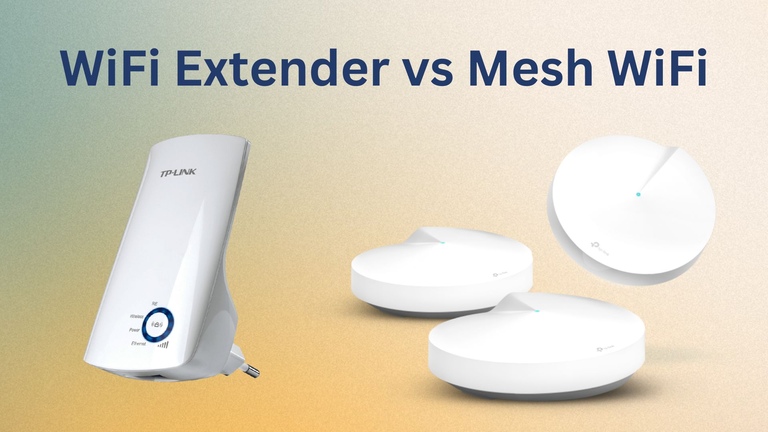
People recommend two options these days: Wi-Fi extender and mesh Wi-Fi.
But which of these options is the best? We will find this out in this Wi-Fi Extender vs. Mesh Wi-Fi comparison.
Wi-Fi Extender vs. Mesh Wi-Fi: Quick Overview
A Wi-Fi extender is better if you want a simple and out-of-the-box solution to extend the Wi-Fi coverage. On the other hand, mesh Wi-Fi is designed to provide convenience and whole-home coverage while costing quite a bit.
What Is A Wi-Fi Range Extender?
A Wi-Fi range extender is a comparatively portable device that can extend the practical range of your wireless network.
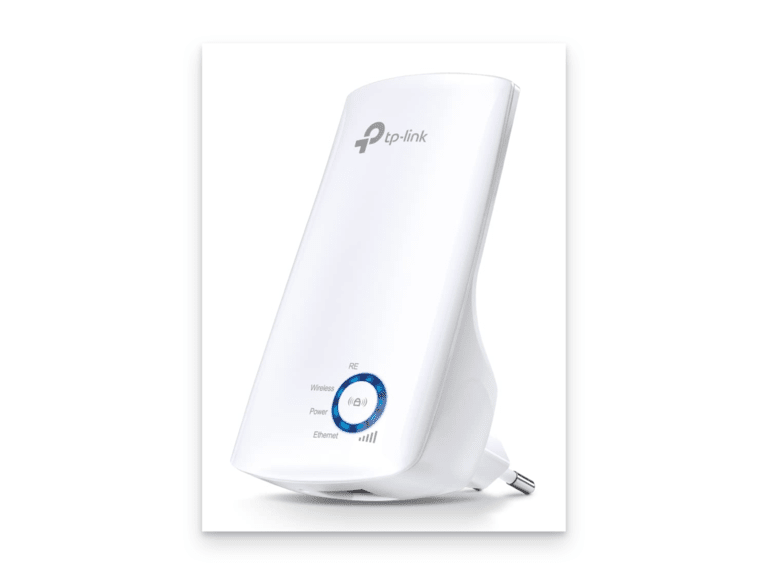
It is also known as Wi-Fi boosters because people expect them to boost the signal. However, a more apt name is Wi-Fi repeater because it merely collects the signal from your existing network and re-propagates it. I will quickly explain how a Wi-Fi range extender works.
How It Works
Let’s imagine a scenario where you have a house with three bedrooms. You may have placed the router in the living room, and people in the first and second bedrooms can easily access the internet. The third room also has a signal, but the speed is terrible.
In this situation, you can place a Wi-Fi range extender between the third bedroom and the living room, and you have to choose an optimal position where the Wi-Fi extender can get a proper signal from the router. The Wi-Fi range extender creates another network in this setup, which the third bedroom can access.
The Wi-Fi range extender is not anything magical. It is as restricted as your Wi-Fi router when providing Wi-Fi coverage. But the good thing is you can get dual-band Wi-Fi range extenders extending 5GHz bands.
If you want to enjoy the best speed of the 5GHz network from a device in the third bedroom, a Wi-Fi extender can help you.
Costs
Like Wi-Fi routers, Wi-Fi range extenders are also available in different capacities. For instance, if you want a low-end Wi-Fi extender with 300 Mbps speed, you can get that for less than $15. However, you should invest more if you want something that can effectively extend 2.4GHz and 5 GHz networks.
As I said, Wi-Fi extenders are popular for their easy setup, portability and no-brainer functionality. But there are some caveats.
A Wi-Fi extender creates another network within your space. So, you will have two unique networks for each band. This can be a little inconvenient for people.
More importantly, you might need many Wi-Fi extenders if you have multiple Wi-Fi dead spots in your space. So, the more extender units you use, the higher the number of networks in your space.
What Is A Mesh Wi-Fi System?
A Mesh Wi-Fi system, also known as Mesh Wi-Fi and Mesh Wi-Fi Router, is a type of Wi-Fi router that uses multiple access points.
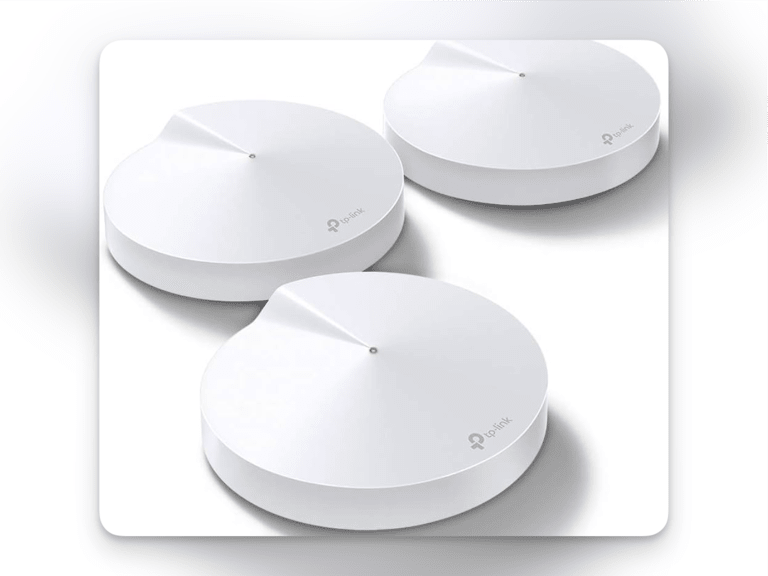
These access points are known as hubs or nodes and are placed in different parts of the home or office space. However, instead of repeating the signal from one node, these nodes will create a single mesh network. I shall tell you how.
How It Works
As I said, you need multiple nodes to set up a mesh Wi-Fi network. While all of these nodes have almost the same hardware, you have to connect at least one of these nodes to the internet using Ethernet. You also have the option to connect all the nodes to Ethernet if the mesh Wi-Fi system supports Ethernet backhaul.
Let’s take the same example from the Wi-Fi extender scenario. Instead of placing one extender between the third bedroom and the living room, you can put three or four mesh nodes in individual rooms. These nodes will connect using Ethernet or Wi-Fi.
Ultimately, you will have a whole home Wi-Fi network that you can access from any room. It means you do not have to shift between multiple wireless networks.
This setup also reduces the Wi-Fi dead zones in your home or office. For instance, you can keep one of the routers in your basement to enhance the coverage of the mesh Wi-Fi network.
Costs
Mesh Wi-Fi routers are more expensive than Wi-Fi extenders and conventional routers. However, you can find affordable options as the Wi-Fi router market grows. You must spend over $100 to get a decent mesh Wi-Fi system. But these prices can become four figures in no time.
Mesh Wi-Fi networks are famous for their convenient setup and whole-home Wi-Fi coverage. But, there are concerns.
For instance, upgrading to a mesh Wi-Fi system requires drastic changes in your network infrastructure. You may also have to change the internet service provider depending on the features you need.
The pricing is also a concern, but I suggest viewing the monetary effort as a value-added investment. But I understand if you have additional concerns.
Pros and Cons of Wi-Fi Extenders
Pros of a Wi-Fi Range Extender
- Extends Wi-Fi signal to areas with weak or no coverage.
- It’s cheaper than upgrading to a new router or mesh system.
- Simple plug-and-play setup with basic configuration.
- Enhances internet experience in dead zones.
- Compact and easily movable to different locations.
Cons of a Wi-Fi Range Extender
- Overall network speed may decrease due to signal relaying.
- Performance can be affected by walls, furniture, and electronics.
- Often limited to a single band, reducing flexibility.
- Adds complexity with multiple devices and configurations.
- Less effective than mesh networks for large or complex spaces.
- Potential for Connection Drops: Intermittent connection drops if not correctly configured.
Pros and Cons of Mesh Network
Pros of a Mesh Wi-Fi System
- Consistent Wi-Fi throughout your space.
- Maintains higher speeds than extenders.
- Easily expandable with additional nodes.
- One SSID for the entire network.
- Includes parental controls, device prioritization, and enhanced security.
- Nodes optimize connections automatically.
Cons of a Mesh Wi-Fi System
- More expensive than routers and extenders.
- The initial setup can be more complicated.
- Strategic placement is required for optimal performance.
- Each node needs a power source.
- This may be excessive for small homes or apartments.
Now that you know the pros and cons, we will compare how Wi-Fi extenders and Mesh Wi-Fi routers fare in different aspects.
Extender vs. Mesh Wi-Fi: Setup
Let’s see how easy these devices are to set up.
Aspect | Wi-Fi Extender | Mesh Wi-Fi Router |
|---|---|---|
Setup Complexity | Simple plug-and-play | It can be more complex, multi-step setup |
Configuration | Basic via web or app | Comprehensive via a dedicated app |
Time Required | Few minutes | Longer due to multiple nodes |
Placement | Strategic for extending coverage | Strategic for optimal performance |
User Interface | Basic and straightforward | User-friendly with guided setup |
Mobility | Easy to move and reconfigure | Nodes movable; require re-optimization |
Firmware Updates | Less frequent updates | Regular security and performance updates |
Wi-Fi Extender
Setting up a Wi-Fi extender is as easy as a piece of cake. Once you unbox the device, you can plug it into one socket nearby. Then, you can use the web interface or dedicated app to configure the extended networks. You get some flexibility in naming and protecting these networks.
In short, the setup process does not take more than a few minutes. Thanks to the dedicated applications, you can do everything from a simple user interface. And you do not have to worry about moving or rearranging your setup. You can simply reconnect the extender to another socket, which will work fine.
Mesh Wi-Fi System
The setup process for a mesh Wi-Fi system can be complex, depending on the device. In any case, you must connect the multiple nodes to multiple sockets across your space. These nodes may also require an ethernet connection if you are looking for backhaul options.
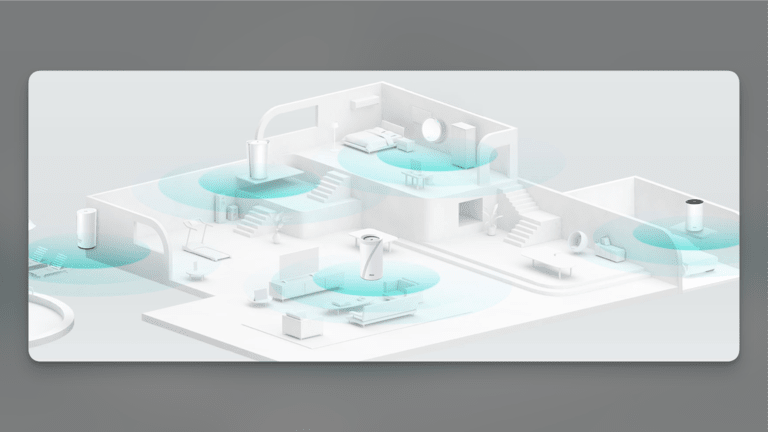
Once you have strategically placed the nodes, you must follow the in-app instructions to proceed with the setup process. You may have to redo all these when moving or rearranging the network setup.
Extender vs. Mesh Wi-Fi: Performance
How do these network devices impact performance?
Aspect | Wi-Fi Extender | Mesh Wi-Fi Router |
|---|---|---|
Coverage | Extends range to specific areas | Seamless, consistent coverage throughout |
Speed | Reduced speed due to signal relay | Maintains high speeds across nodes |
Signal Strength | May have weaker signal in extended areas | Robust and consistent signal in all areas |
Interference | Susceptible to interference from walls and other devices | Less affected by interference, self-optimizes |
Latency | Higher latency due to repeated signal transmission | Lower latency due to direct node-to-node communication |
Bandwidth Management | Limited capabilities | Advanced bandwidth management and device prioritization |
Network Stability | Can experience drops and inconsistent performance | More stable and reliable connection |
Number of Devices | Limited support for multiple devices | Better support for numerous connected devices |
Scalability | Limited to a few extenders | Easily scalable by adding more nodes |
Wi-Fi Extender
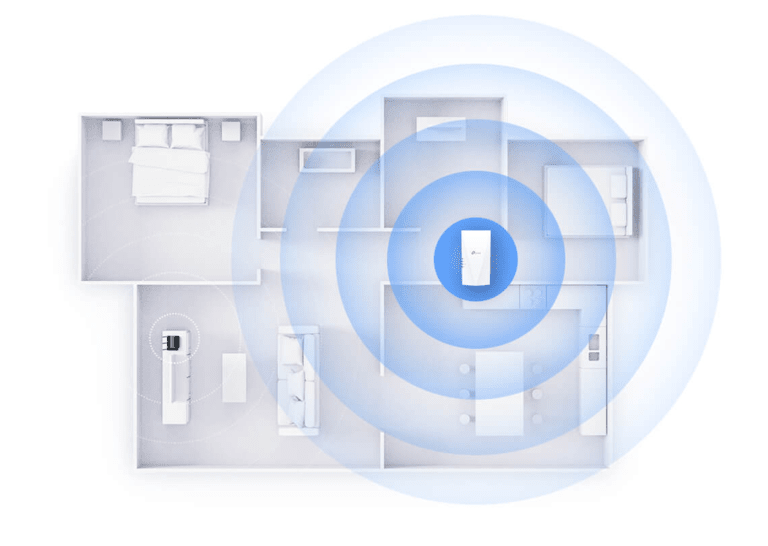
You can expect a decent network performance with a Wi-Fi extender.
For instance, if you get a dual-band Wi-Fi extender, you can use the extender network to leverage the 2.4GHz and 5GHz networks.
Source: TP-Link
However, these networks will likely face interference from other devices. There will also be some impact on latency and stability because the signal has to travel around multiple devices.
Like your router, there is a maximum limit of connected devices. You cannot add more than a couple of extenders, either.
Mesh Wi-Fi System
Unbeatable performance is one of the many reasons people shift to mesh Wi-Fi systems.
Compared to traditional Wi-Fi routers and Wi-Fi extenders, a mesh Wi-Fi network can handle massive bandwidth across multiple nodes.
But, more importantly, you will have the convenience of a single network across the space.
The network connections are more stable and less vulnerable to device interference. Finally, you can’t forget the scalability aspect, which means you can add or remove nodes.
Extender vs. Mesh Wi-Fi: Convenience
Convenience can and should be a criterion when choosing between two products.
Aspect | Wi-Fi Extender | Mesh Wi-Fi Router |
|---|---|---|
Setup | Easy plug-and-play | Slightly more complex but user-friendly |
Maintenance | Low maintenance, occasional repositioning | Low maintenance, automatic optimization |
Configuration | Basic | Advanced |
Network Management | Limited | Advanced |
Integration | A separate network; may require switching | Single unified network |
Flexibility | Limited, fixed coverage area | High, easily expandable coverage |
Portability | Limited, specific to the coverage area | Portable nodes, flexible placement |
Wi-Fi Extender
A Wi-Fi extender does not offer anything exceptional in terms of convenience.
While the setup is plug-and-play, that is where the luxury ends because once you have set up, you will have to deal with multiple networks and manually optimizing your devices to use one of these networks.
It can be a nightmare if you have already set up many devices on a single network. There are also concerns regarding the flexibility of the coverage area.
Mesh Wi-Fi System
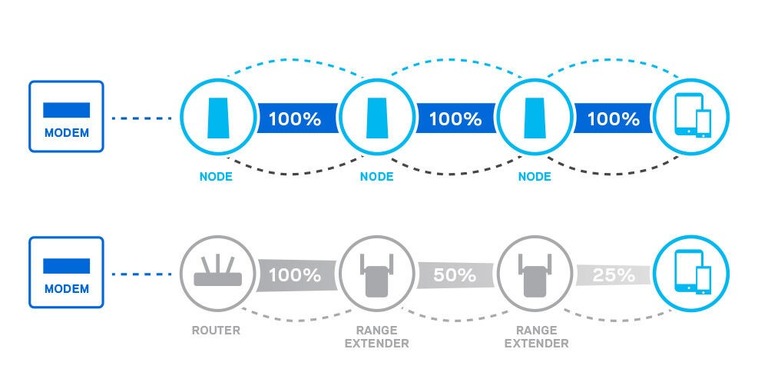
On the other hand, a mesh Wi-Fi system offers the best level of convenience you can expect.
While the setup could take some time, you do not have to worry about maintenance or optimization. The nodes will communicate and create a single unified network you can access from any part of the space.
Source: Linksys
There are additional configuration options, and you can be flexible regarding the coverage area and placement of the nodes.
Extender vs. Mesh Wi-Fi: Budget
We will quickly see how much you have to spend.
Wi-Fi Extender
As I said, adding a Wi-Fi extender does not cost a lot. You can get a good option under $100 even when choosing an advanced dual-band Wi-Fi extender.
Some of these fancy Wi-Fi extenders will also offer options for Ethernet backhaul.
Mesh Wi-Fi System
You may need between $500 and $1000 to set up a proper mesh Wi-Fi system in a large home. This is because you need at least three nodes to actually benefit from the mesh system.
The actual budget also includes the changes you may make to the existing network setup.
Wi-Fi Extender vs. Mesh Wi-Fi: Summary
I will make some quick recommendations here:
A Wi-Fi extender is better if you want something affordable and easy to set up. It can effectively improve the coverage of your Wi-Fi network, but you have to deal with some compromises. For instance, you cannot expect a whole-house Wi-Fi system, nor would you benefit from Ethernet backhaul or seamless roaming.
A mesh Wi-Fi system is better if you need the best speed and coverage across your home without compromising convenience. Even though you have to spend quite a bit, a mesh Wi-Fi system will ensure you can roam between the rooms or living area without connection drops. You can also benefit from features like Ethernet backhaul.
Top 3 Wi-Fi Mesh Network Systems
Here’s a quick look at the top three Wi-Fi mesh network systems.
#1 ASUS ZenWiFi AX XT8
You can get the ASUS ZenWiFi AX XT8 for $300 and enjoy a tri-band mesh Wi-Fi 6 system for your home. The total coverage of the system is close to 5500 square feet. The base pack comes with two nodes. Thanks to the ASUS app, you also benefit from internet security and built-in parental control.
#2 TP-Link Tri-Band Wi-Fi 7 BE22000
I recommend the TP-Link Tri-Band Wi-Fi 7 BE22000 to those who want to future-proof their Wi-Fi system for home or office. This three-pack mesh system can handle up to 22Gbps of data and offers support for VPN and security. Each node is capable of pulling a lot of load.
#3 TP-Link Deco Wi-Fi 6 Mesh
You can get a decent mesh Wi-Fi experience by spending around $150 for the TP-Link Deco Wi-Fi 6 Mesh. The package has three nodes, but you can save money by getting two. But, with the three nodes, you’ll see all the benefits of a mesh Wi-Fi system.
Top 3 Wi-Fi Range Extender
Here are the three top options for a Wi-Fi range extender.
#1 TP-Link RE220 Extender
At less than $20, the TP-Link RE220 Extender is the best affordable deal. You get a dual-band Wi-Fi extender with a maximum speed of 750Mbps and a coverage of up to 1200 sq. ft. It can work with existing Wi-Fi routers as well.
#2 ASUS AX1800 Wi-Fi 6 Extender
If you can boost your budget, consider the ASUS AX1800 Wi-Fi 6 Extender for a more inclusive Wi-Fi experience. This system comes with a maximum coverage of up to 2200 square feet and packs some dedicated features from ASUS.
#3 Linksys RE9000 Wi-Fi Extender
You can get a tri-band Wi-Fi extender with 4 Gigabit Ethernet ports if you can spend close to a couple hundred dollars. It overpowers the routers that you come across. Linksys has optimized the design to offer speeds up to 3Gbps.
Frequently Asked Questions
Does Wi-Fi mesh reduce speed?
Generally, Wi-Fi mesh does not reduce speed. However, because Wi-Fi mesh systems try to balance coverage area and convenient network switching, you may find reduced speed in some areas.
Can I add mesh Wi-Fi to an existing router?
You can add mesh Wi-Fi to an existing router using an Ethernet cable. You will take a LAN connection from the router and connect it to the mesh Wi-Fi system.
What is the best option to extend Wi-Fi range?
You can get a Wi-Fi extender if you are looking for a simple option. But if you want seamless coverage across your home, you should upgrade to a mesh Wi-Fi system.
Conclusion
I hope you narrowed your options between Wi-Fi extender and mesh Wi-Fi from this guide.
If you can afford it, I will always recommend going for a mesh Wi-Fi system, which is convenient and capable. It is also an excellent way to future-proof wireless connectivity in your home.
