
![Is Your Verizon Internet Slow [Potential Causes & Easy Solutions]](https://datafeature.com/wp-content/uploads/2025/05/is-your-verizon-internet-slow-potential-causes-easy-solutions-1.jpg "Is Your Verizon Internet Slow? [Potential Causes & Easy Solutions]")
Consistent, high internet speed is something you expect when getting a Verizon Fios or Home Internet plan, right? While Verizon delivers on most days, there are times when you experience slow Internet with Verizon. You don’t have to worry about this, though. In this guide, I will discuss the potential causes for the sluggish Internet speeds from Verizon, including throttling, and ways to resolve the issue.
Potential Reasons For Verizon Internet Slow Speeds
Let’s first look at the potential causes for getting slow Internet speeds from the Verizon plan. Depending on where you live and the time, more than one reason could apply to your situation.
- Network Outage: An ongoing network outage is the most common reason for slow internet speed from Verizon. The interesting point is that an outage in another area can also cause slow speeds. So, before you do anything, you should check if any outage is going on.
- Network Congestion: If there are too many users under a node, network congestion may also be the reason behind the slow speeds you get from Verizon. During congestion, Verizon may decide to limit the maximum speed for others to avoid overloading.

- Network Throttling: Verizon has also been reported to enable network throttling, which is a conscious process of limiting Internet speed, especially for high-demand sites like YouTube and Netflix. It will cause some problems while streaming.
- Bandwidth restrictions: You should also check whether you have exhausted the bandwidth limit on the plan. In that case, Verizon may employ a Fair Usage Policy limit. During these limits, you will not have access to the full speed as per your plan.
- Connected Device Overload: You should also check whether you have connected many devices to the Verizon Wi-Fi router. Even when these devices do not actively use the Internet, a congested Wi-Fi network may not offer the best speeds.
- Background Apps: If you continue facing slow Internet speeds on a specific device, apps running in the background may be causing the issue. You should check whether any device connected to the Verizon network has background apps draining Internet resources.
- VPN: VPNs are a great way to unlock content and enhance privacy, but they can take a toll on the Internet speed. So, if you want to get the maximum speed from the Verizon Internet plan, it must be off VPN.
- Hardware Issues: Though unlikely, hardware issues with your Verizon equipment can also cause a slow Internet experience. Some of these issues are temporary, whereas others may persist.
- Firmware and Software Problems: Your Verizon router also uses proprietary software to run. Any issue with this firmware can cause problems with the network. One after-effect would be sluggish browsing/downloading speeds.
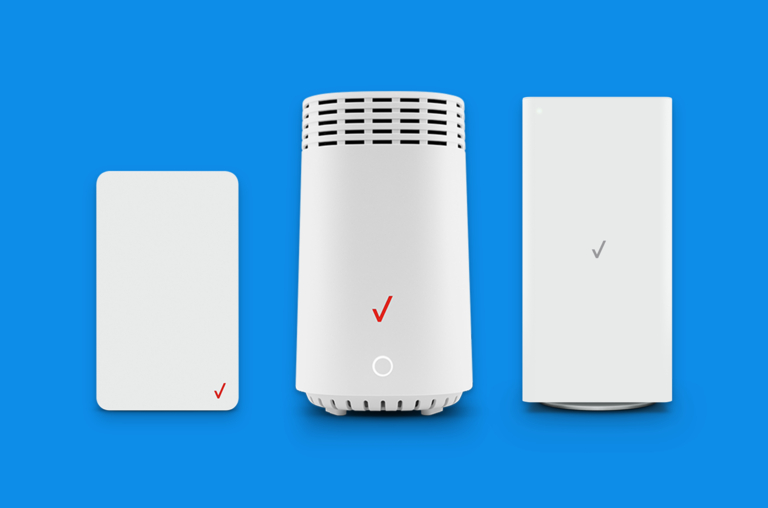
- Wi-Fi Interference: In some cases, interference with Wi-Fi can also cause slow speeds on the Verizon router. This is a common issue if you have kept some equipment, like a microwave, close to the Verizon Wi-Fi router.
As you can see, we have a lot of area to clear. Before I tell you the easy fixes, we need to talk about something called ISP throttling and how to go around it.
What is ISP Throttling?
ISP Throttling is a process by which an Internet Service Provider deliberately limits the Internet speed of users. It could happen across the Internet experience or while browsing a specific website. ISPs may practice throttling in different scenarios, and some of them may be unethical.
For instance, it is common for many ISPs to throttle the speed during network congestion. You may notice a drop in browsing and streaming speed during peak hours. Because more people use the Internet during such times, the ISP may have to limit the speed to prevent bandwidth overload.
Another common instance of ISP throttling is when you have gone past the FUP limits. If your internet plan has a Fair Usage Policy (1TB, for example), you will get throttled speeds (like 8 Mbps or 16 Mbps) after the limit. It is a way for ISPs to keep the costs under the limit.
There are many examples of unethical uses of ISP throttling. For instance, some ISPs throttle speeds while browsing specific websites like Netflix, Hulu, or Amazon Prime. An ISP may have various motivations; in some cases, an ISP may slow down a specific website to promote a competitor.
When Does Verizon Throttle Data?
The official statement from Verizon is that it does not throttle data. However, it does not seem to be true.
I have come across multiple instances when Verizon plans fail to offer the speeds they promised, especially during peak hours. There are also reports of Verizon cutting down the speed while accessing specific video-streaming websites in order to promote Verizon’s own streaming service.
Long story short, it is likely that Verizon will throttle data speeds at times. By the way, you may face throttling during other instances like network congestion, FUP issues, etc.
Verizon Internet Speed Packages
Let’s quickly look at the speeds you can get from Verizon Home Internet and Verizon Fios. You can use these numbers as a reference when checking whether you are getting the promised speeds from the ISP.
Speed Packages for Verizon Fios:
Plan | Monthly Price | Download Speed | Upload Speed |
|---|---|---|---|
Fios 300 Mbps | $49.99 | 300 Mbps | 300 Mbps |
Fios 500 Mbps | $74.99 | 500 Mbps | 500 Mbps |
Fios 1 Gig | $89.99 | Up to 940 Mbps | 880 Mbps |
Fios 2 Gig | $109.99 | Up to 2,300 Mbps | 1,500 Mbps |
Speed Packages for Verizon Wireless Home Internet:
Plan | Monthly Price | Monthly Price with Select 5G Mobile Plans | Download Speed | Connection Type |
|---|---|---|---|---|
5G Home | $50.00 | $35.00 | Up to 300 Mbps | 5G fixed wireless |
5G Home Plus | $70.00 | $45.00 | Up to 1,000 Mbps | 5G fixed wireless |
Keep in mind that the speed and price may vary based on the location. You may find additional discounts if you bundle multiple services from Verizon.
Fix Your Slow Verizon Internet
At this point, we know the potential reasons for your slow Verizon Internet connection, including throttling by Verizon. Here are some reliable steps to solve these problems and enjoy the speeds you pay Verizon for.
#1 Test Your Current Internet Speed
The first step in solving the whole slow Internet speed issue is checking the current speed. These results will help you confirm whether the issue was temporary. I recommend using a website/app like Speedtest.net to get the job done. Make sure that other devices aren’t active during the speed test.
#2 Restart Your Verizon Router
If your speed test results show that the speed is slow, you should first restart your Verizon router. Make sure you unplug the power outlet so that your router is completely disconnected from the Verizon network. When you connect the router back in, the device will attempt a reconnection.
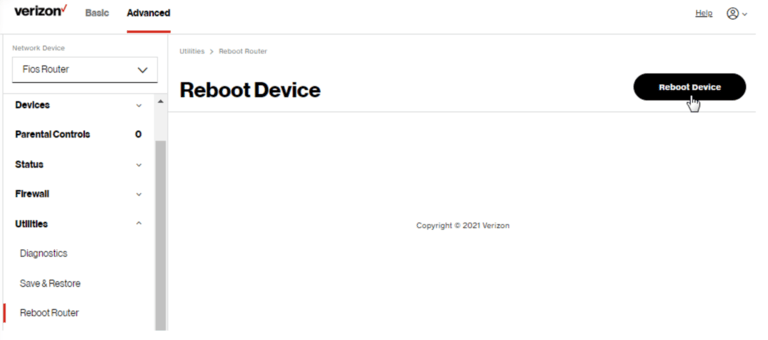
This simple task of disconnecting from the Verizon network and reconnecting can solve temporary problems with your Verizon Internet speed.
#3 Check Connected Devices
We often forget that all devices on the network share the Internet speed of a connection. Even when you do a speed test, you will see the bandwidth available to the device. So, you should check whether there are other active devices on the network.
For reference, check the speed when you have connected only one device.
#4 Check the Wired Connection Speed
It is essential to know that you cannot expect 1 Gbps Wi-Fi speed from a 1 Gbps Verizon Internet plan. On the contrary, the full speed is available only in wired mode. So, it is a good idea to check the speed using a wired connection and see the difference.
A difference of up to 50 Mbps is common even when you keep the device close to the Verizon router.
#5 Optimize the Router Placement
The router placement can also cause slow Wi-Fi speeds with your Verizon router. Therefore, you must try to optimize the location depending on the structure of your house and where your devices are. For instance, if you want balanced speed on most devices, you must choose a central location.
#6 Update Your Router Firmware
To update the firmware of your Verizon router, you first need to log in to the web-based interface. Once you have logged in, you can go to System Settings > Maintenance > and find an option to update the router firmware.
Firmware update may take anywhere between 5 and 10 minutes, and you should be patient. Once the router restarts, you can start using the internet again, and you should have a better speed.
#7 Check for Interference
You should also check whether you have kept the router close to devices that can cause interference. A microwave oven is something that you should keep the router away from. Similarly, make sure that you have kept the Verizon router in a place with proper ventilation and a line of sight view of connected devices if you want the best speeds.
#8 Use the 5GHz or 6GHz Band
The Verizon router mostly ships with a dual-band or triple-band structure, and the base band, which is 2.4 GHz, is designed to offer maximum compatibility and range, not the best speed.
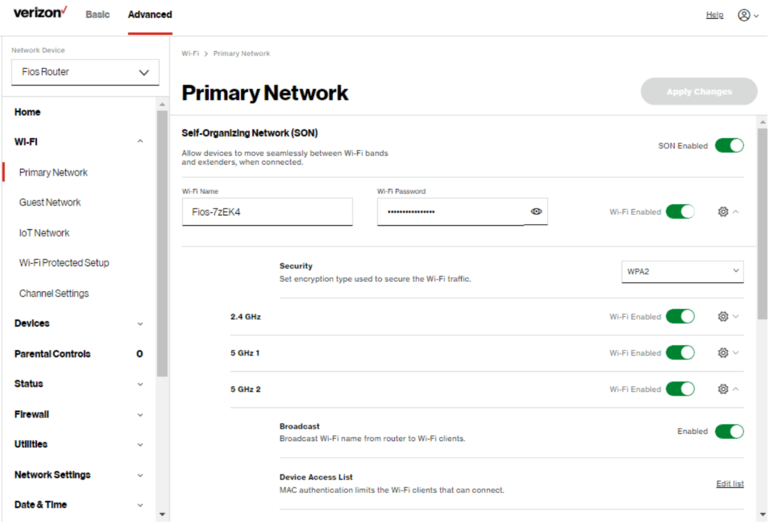
So, if you are looking for the maximum speed from your Verizon connection, you should switch to the 5 GHz or 6 GHz band on the router.
#10 Upgrade Your Verizon Plan
It might be possible that the number of devices at your home or the bandwidth that your members require have changed over time. So, if you were using a 100 Mbps connection from Verizon, it might not do the job right now.
In such circumstances, it is better to upgrade your Verizon plan and get something with a better speed.
#11 Turn Off Your VPN
If you experience a slow internet issue when using a VPN, the VPN itself could be the problem.
Though VPNs provide privacy, the encryption technology can reduce the speed by a noticeable amount, especially if you’re connecting to a faraway server. So, you might want to turn off your VPN when you need the best speed from Verizon.
#12 Check for Outages
If you are facing a slow internet speed issue for the first time, you should also check whether an outage is occurring. The company might be making some adjustments to make up for the lacking infrastructure for the time being. So, if there is indeed an outage, you might consider waiting for a few hours and trying again.
#13 Use a VPN (In Case of Throttling)
If you conclude that Verizon is indeed throttling your internet speed, you might consider using a VPN subscription to circumvent this limitation. A VPN can encrypt your traffic so that Verizon will not be able to understand which websites to block or target. You can reduce the impact of speed loss by choosing a server close to your location as well. These things are easy when you have a paid VPN subscription.
#14 Get a Mesh Wi-Fi Network
If you continue to have terrible internet speed in certain rooms, you might want to consider getting a mesh Wi-Fi network. This system comes with multiple access points that you can place in different rooms to give whole-home connectivity.
#15 Secure Your Wi-Fi Network
It is also likely that an unauthorized device is taking up your resources, so it is a good idea to ensure that your Verizon Wi-Fi network is secured by WPA3 protocol, which uses the best possible encryption.

Wrapping Up
I have offered some inside these projections, including the overall speed of your Verizon internet connection. I understand that the steps might vary depending on the device and plan, but you should not hesitate to contact Verizon if nothing works.
